160
ML-2050A/2051A/2150A
3. Maintenance of the Laser Oscillator Section
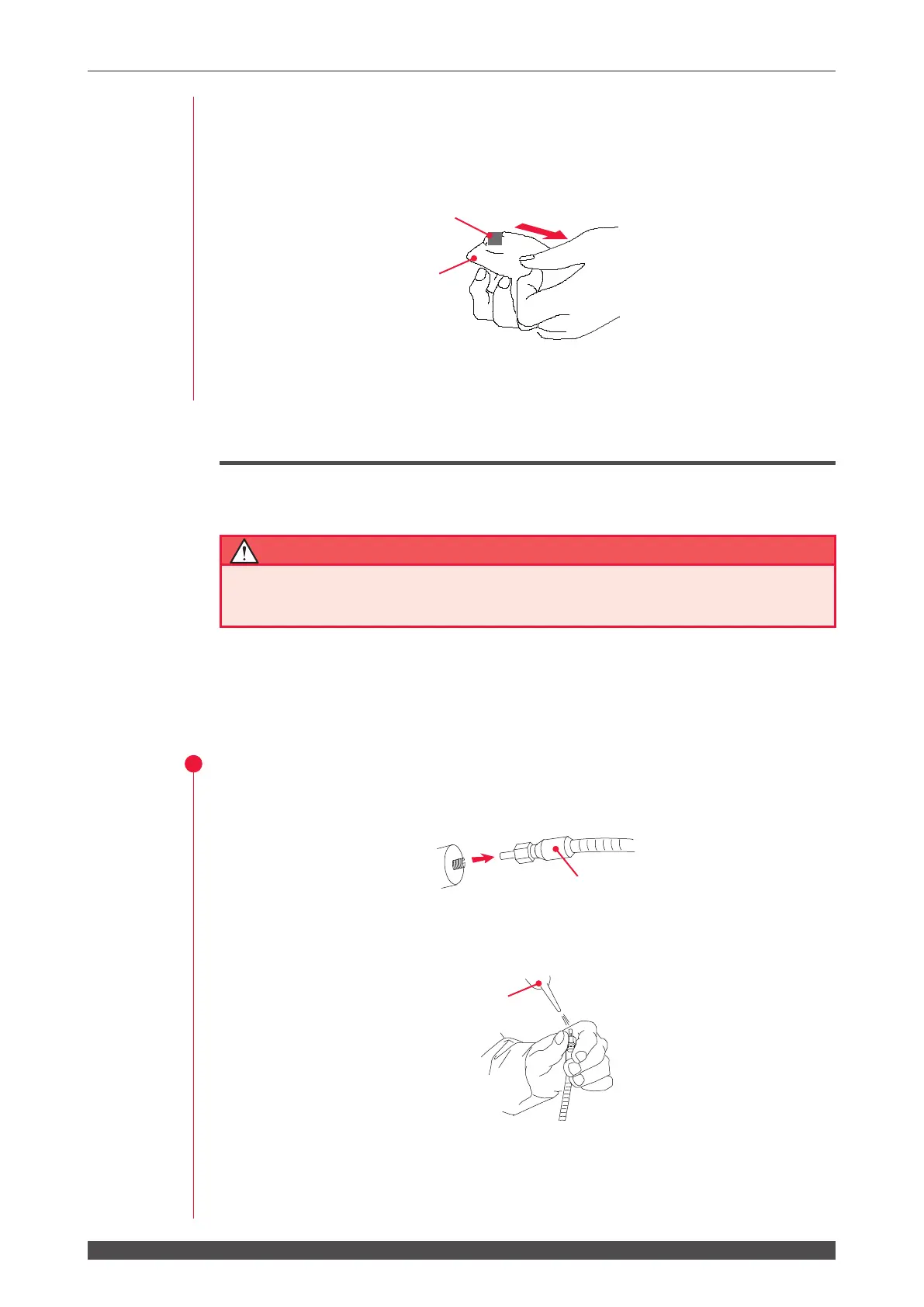
(3) Place the wet part of the cleaning paper onto each optical part.
(4) Holding one end of the cleaning paper, wipe each optical part by pulling the
cleaning paper across it at a constant speed from one side to the other.
⇒
If any clearance is produced between the cleaning paper and the optical part or
ethanol is left during wiping, this will result in unevenness.
Cleaning the Optical Fiber
When the optical ber is dirty, perform cleaning.
■ Be sure to receive education for this work from our engineer.
■ Before starting work, be sure to turn OFF the power supply.
Items required
Air blow, lens cleaning paper, and end face checker
Operating Procedure
(1) Remove the optical ber from the input unit or output unit.
(2) Blow o foreign particles by using the air blow.
If the foreign particles on the end face cannot be eliminated, wipe it lightly with
the cleaning paper.
(3) Make sure with the end face checker that any flaw or foreign particle is not
attached on the end face.
⇒
If the end face of the optical ber is rubbed hard, this will result in a aw.
Be careful about it.
Optical ber
Cleaning paper
Ethanol
Pulling the cleaning paper
across it at a constant speed.
Air blow


 To Next Page