Chapter 4 INTERFACE SETTINGS
201
4.12.5 Embedded audio
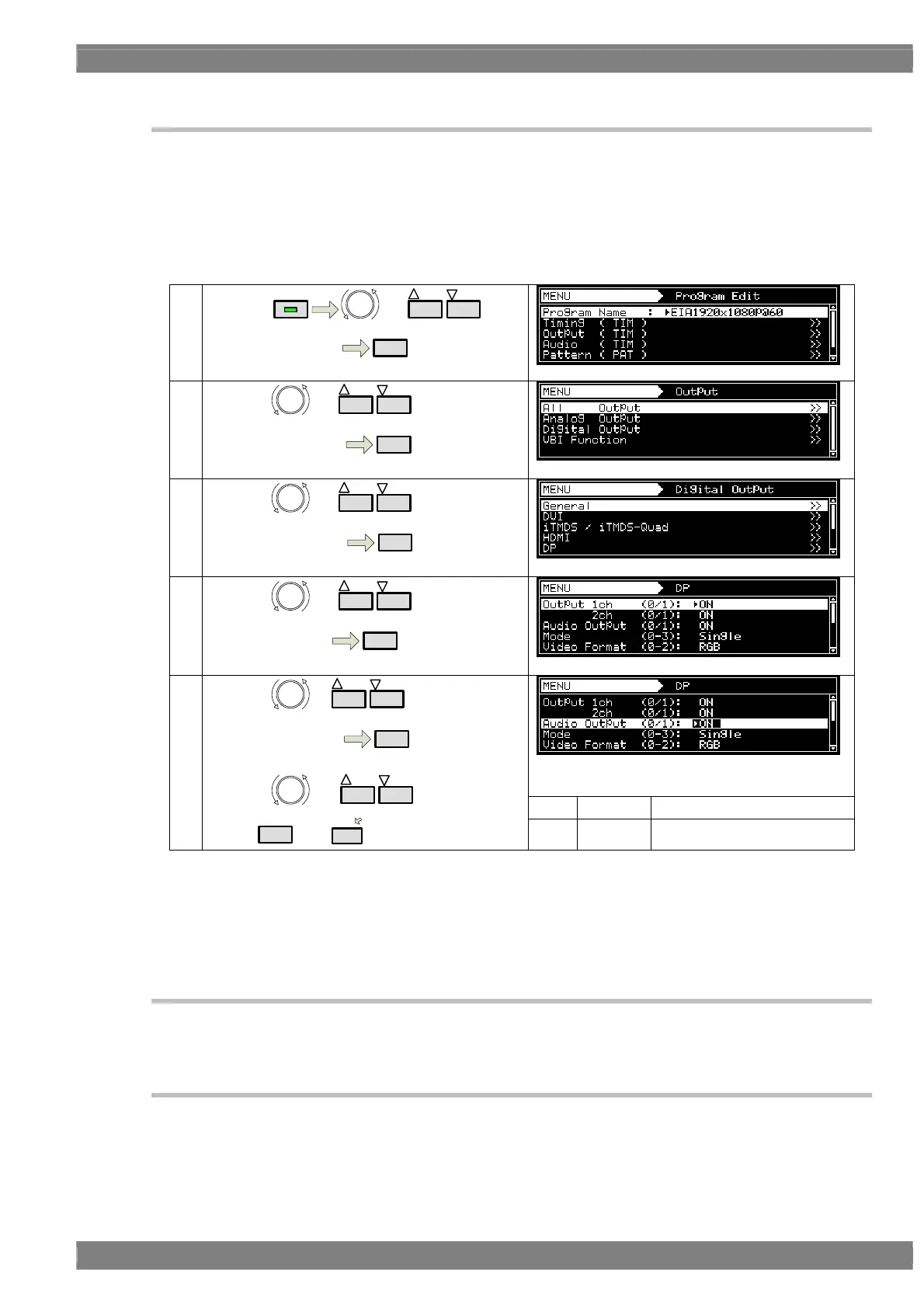
Embedded audio signals can be output from the DisplayPort.
a) Set embedded audio to be imposed on DisplayPort enable.
b)
Set audio source, frequency and level.
a) Set embedded audio to be imposed on DisplayPort enable.
①
By using
MENU
or
INC
DEC
Select Program Edit
SET
②
By using or
INC
DEC
,
Select Output ( TIM )
SET
③
By using or
INC
DEC
,
Select Digital Output
SET
④
By using or
INC
DEC
,
Select DisplayPort
SET
0 OFF Invalid
⑤
By using or
INC
DEC
,
Select Audio Output
SET
By using or
INC
DEC
,
Select
SET
or
1
.
1 ON Valid
b) Set audio source, frequency and level.
Refer to “4.16 Digital Audio”.
4.12.6 EDID
For further details on the setting procedure, refer to “6.13.3 EDID”.
4.12.7 HDCP
For further details on the setting procedure, refer to “8.1 HDCP settings”.



 To Next Page