Chapter 4 INTERFACE SETTINGS
55
4.1.11 Digital level setting of 3D pattern
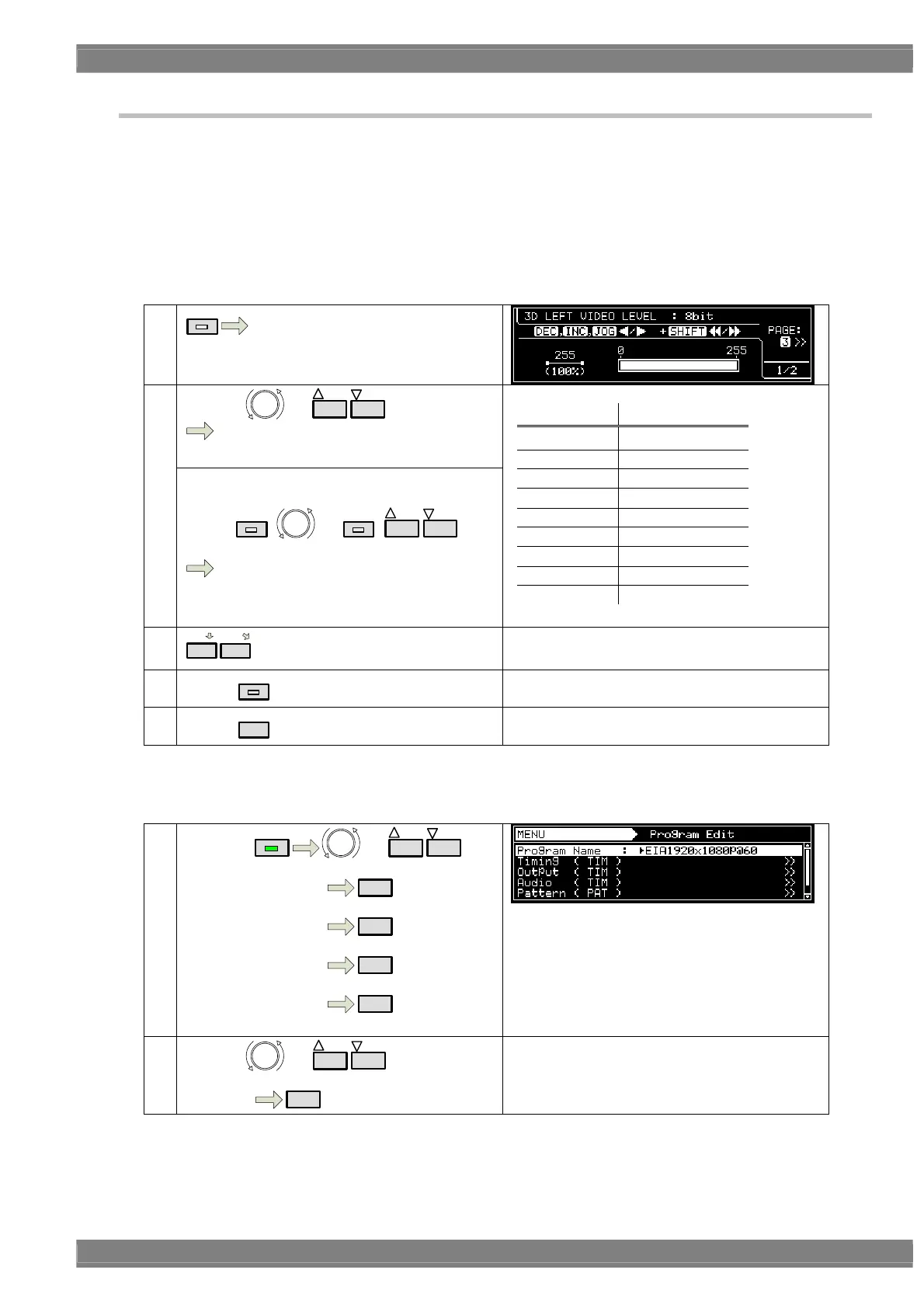
Digital level of 3D pattern is set by each left and right picture.
Refer to “4.1.5 Big length for pattern drawing” about level setting.
There are 2 setting method; LEVEL key screen and Program Edit.
《 LEVEL key screen 》
When you output 3D program, by pressing LEVEL key, it automatically shows “3D LEFT VIDEO LEVEL”
1
LEVEL
“3D LEFT VIDEO LEVEL”
Press “3” to set RIGHT level.
By using or
INC
DEC
,
change video level
2
《For speed up the change》
By using
SHIFT
+ or
SHIFT
+
INC
DEC
step changes (speed up)
* The changing step can be set in “9.1.15
Digital Video Level Step”.
BIT length Setting range
8BIT
0 - 255
9BIT 0 - 511
10BIT 0 - 1023
11BIT 0 - 2047
12BIT 0 - 4095
13BIT 0 - 8191
14BIT 0 - 16383
15BIT 0 - 32767
16BIT 0 - 65535
3
2
3
Switch LEFT / RIGHT.
4
Select
LEVEL
Via DIGITAL LEVEL SETTING screen, it goes
back to initial display.
5
Select
ESC
To initial display
《 Setting by Program Edit 》
①
By using
MENU
or
INC
DEC
Select Program Edit
SET
Select Pattern( PAT )
SET
Select Image / OPT
SET
Select 3D Pattern
SET
②
By using or
INC
DEC
, select it.
Select item
SET



 To Next Page