Chapter 6 PATTERN SETTINGS
375
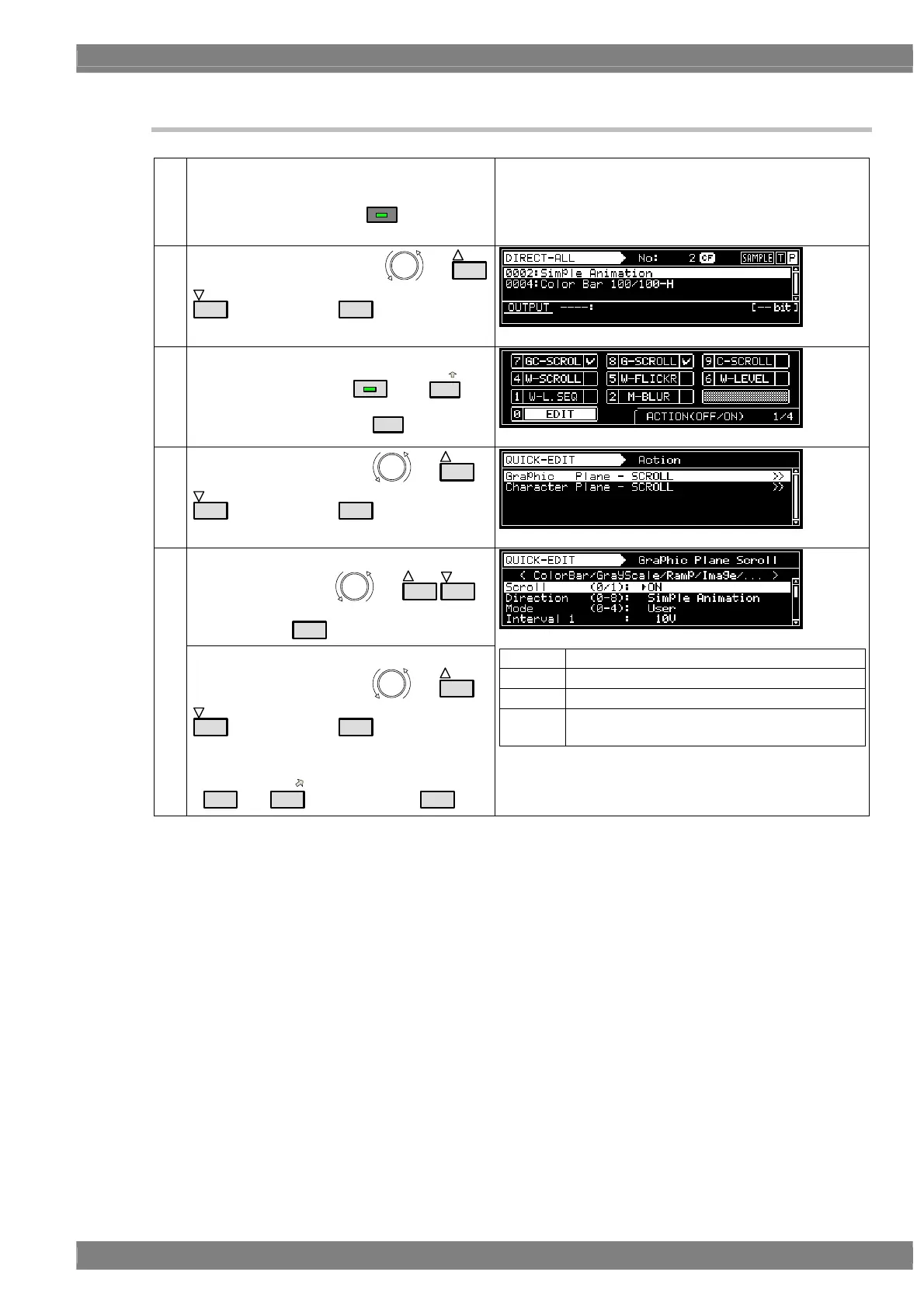
6.15.2 Simple animation settings
(1)
Insert the CF card containing the registered
images.
* At this point, check that
SAMPLE
has not been
pressed.
(2)
Select the program No. using
or
INC
DEC
, and then press
SET
.
(3)
<Setting Action>
Select G-SCROLL using
ACTION
and
8/E
,
and then select EDIT using
0/STATUS
.
(4)
Select Graphic Plane using
or
INC
DEC
, and then press
SET
.
<Selecting the items>
Select the items using
or
INC
DEC
,
and then press
SET
.
(5)
<Setting the parameters>
Select the parameters using
or
INC
DEC
, and then press
SET
.
Alternatively:
Select the parameters using the number keys
(
0/STATUS
to
9/F
), and then press
SET
.
Set only the items below.
Scroll ON (1)
Direction Simple Animation (8)
Interval1 1 V to 255 V
Repeat H = 3, V = 3
* This setting is for a 3 × 3 9-frame animation
* For details of the parameter settings, refer to “7.3
Graphic plane scrolling actions.”
* Do not change any parameters not listed in the above
table from their initial values.



 To Next Page