324
6.9.4 9-marker (OPT No.76) settings
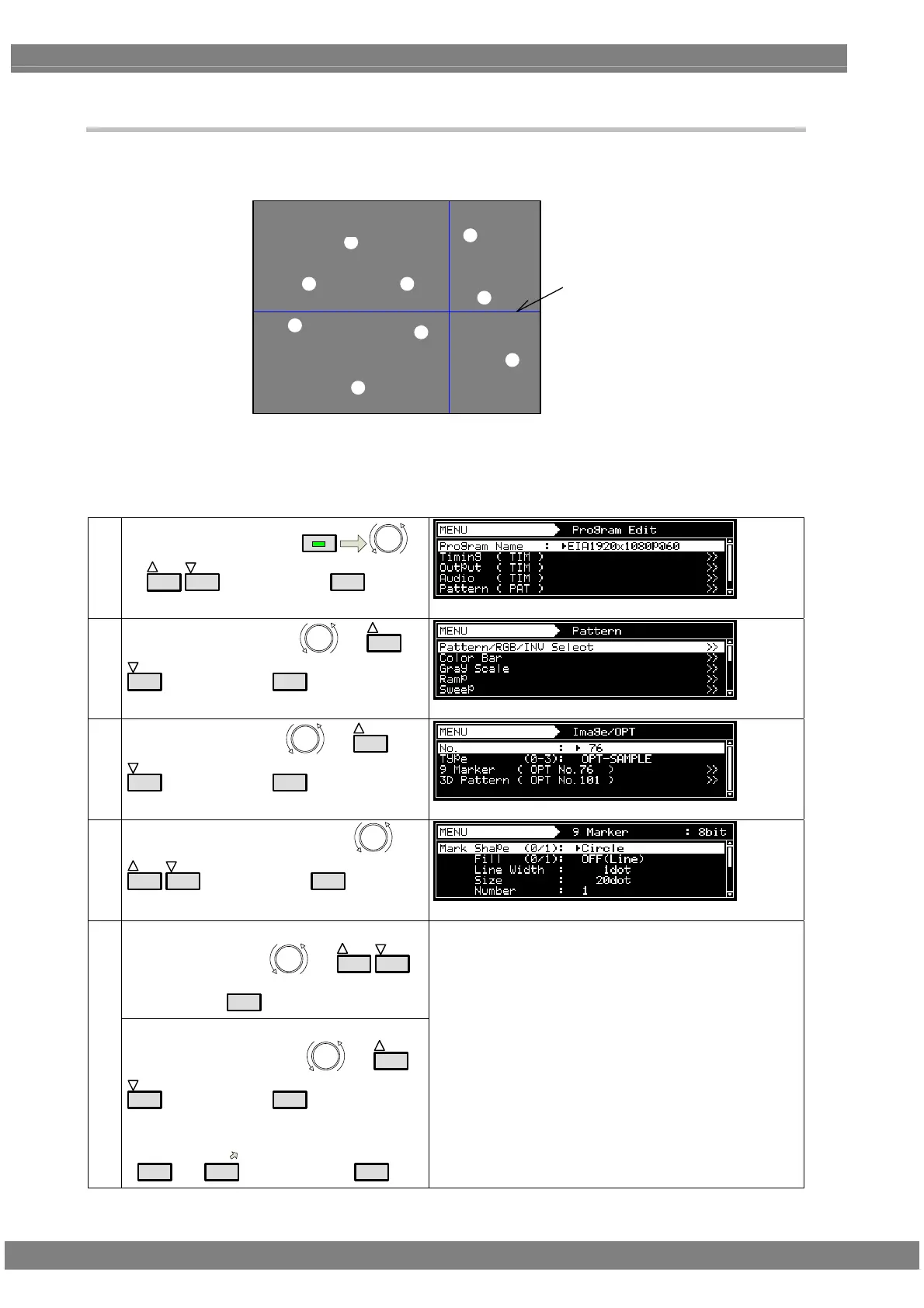
Sample optional pattern No.76 is a pattern which displays up to nine markers and lines at the desired
positions.
マーカー
ライン
The setting procedure is given below.
For details on how to display the patterns, refer to “6.9.2 Option and image patterns setting.” (Type = OPT-SAMPLE,
No.76 specified)
(1)
Select Program Edit using
MENU
or
INC
DEC
, and then press
SET
.
(2)
Select Pattern (PAT) using
or
INC
DEC
, and then press
SET
.
(3)
Select Image/OPT using
or
INC
DEC
, and then press
SET
.
(4)
Select 9 Marker (OPT No.76) using
or
INC
DEC
, and then press
SET
.
<Selecting the items>
Select the items using
or
INC
DEC
,
and then press
SET
.
(5)
<Setting the parameters>
Select the parameters using
or
INC
DEC
, and then press
SET
.
Alternatively:
Select the parameters using the number keys
(
0/STATUS
to
9/F
), and then press
SET
.
For details on the parameters, refer to <Table of 9-marker
setting items>.
Marke
Line



 To Next Page