Chapter 9 VG-870/871 SYSTEM SETTINGS
423
9.1.12 Image Position Setting
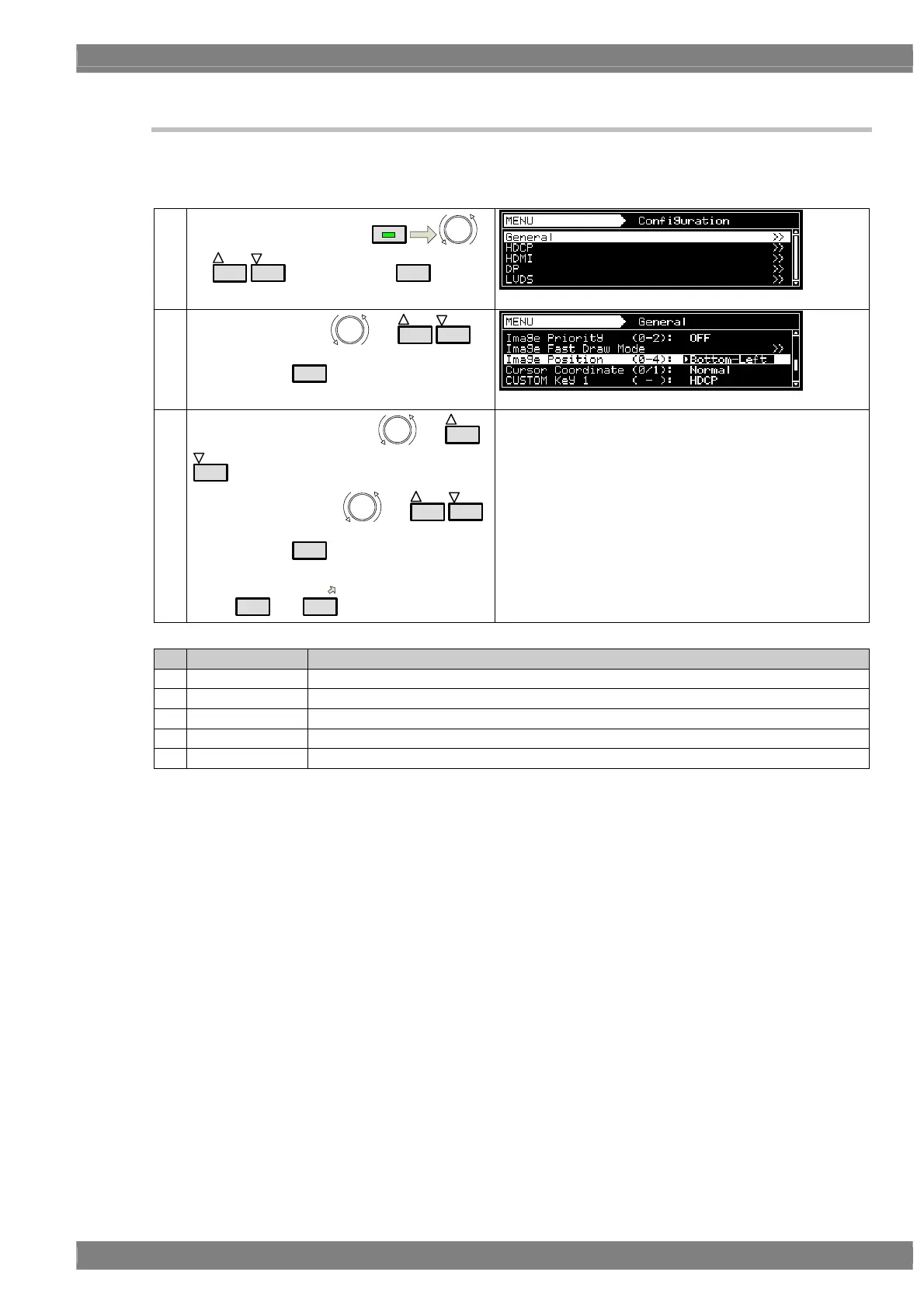
Image Position setting can change Bitmap’s display position.
* Bitmap resolution can be set only when its resolution is lower than display resolution.
(1)
Select Configuration using
MENU
or
INC
DEC
, and then press
SET
.
(2)
Select General using
or
INC
DEC
,
and then press
SET
.
(3)
Select Image Position using
or
INC
DEC
.
Select the setting using or
INC
DEC
,
and then press
SET
.
Alternatively, select the setting using the number
keys (
0/STATUS
to
9/F
).
For further details of the settings, refer to the table below
Key LCD display Description
0 Center The image is displayed at the center of the screen.
1 Top-Left The image is displayed at the top left of the screen
2 Bottom-Left The image is displayed at the bottom left of the screen
3 Top-Right The image is displayed at the top right of the screen
4 Bottom-Right The image is displayed at the bottom right of the screen



 To Next Page