Chapter 6 PATTERN SETTINGS
339
<Table of character setting items>
The format is selected here.
0
Character List
1
All 1-Character
(1)
Format (0-2)
2
Corner&Center
The font size is set here.
0
5 × 7
1
7 × 9
(2)
Font (0-2)
2
16 × 16
(3)
Character Code
The character code is selected here.
Setting range: 20h to FFh
When characters are selected directly, select ABC .
For details on the operation procedure, refer to “2.3 Setting the names.”
The size of each character is set here.
H
Set the size of the character in the horizontal
direction.
(4)
Cell Size [dot]
V
Set the size of the character in the vertical
direction.
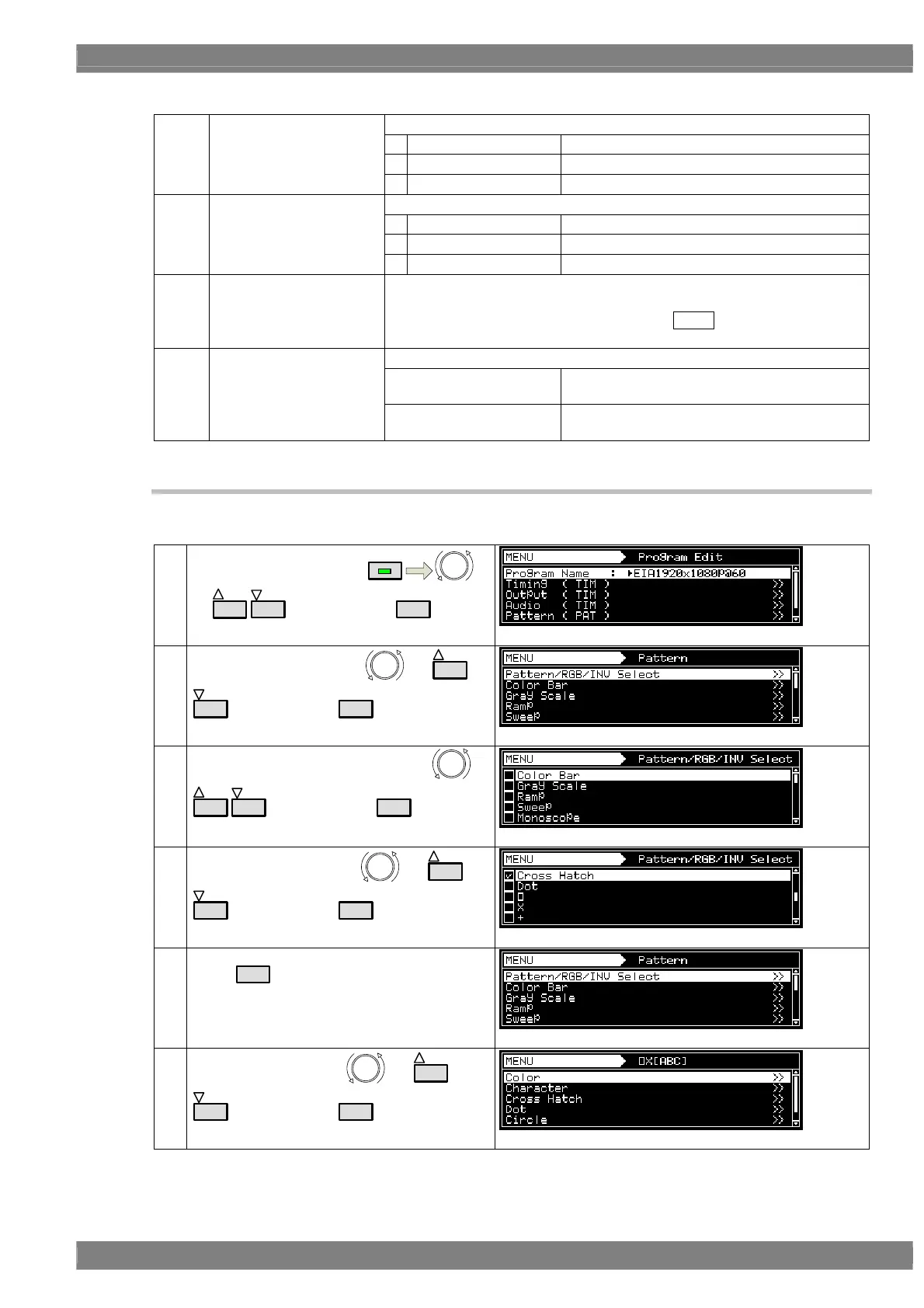
6.10.3 Crosshatch patterns
The crosshatch pattern settings are described below.
(1)
Select Program Edit using
MENU
or
INC
DEC
, and then press
SET
.
(2)
Select Pattern (PAT) using
or
INC
DEC
, and then press
SET
.
(3)
Select Pattern/RGB/INV select using
or
INC
DEC
, and then press
SET
.
(4)
Select Cross Hatch using
or
INC
DEC
, and then press
SET
.
(5)
Press
ESC
.
(6)
Select × [ABC] using
or
INC
DEC
, and then press
SET
.



 To Next Page