380
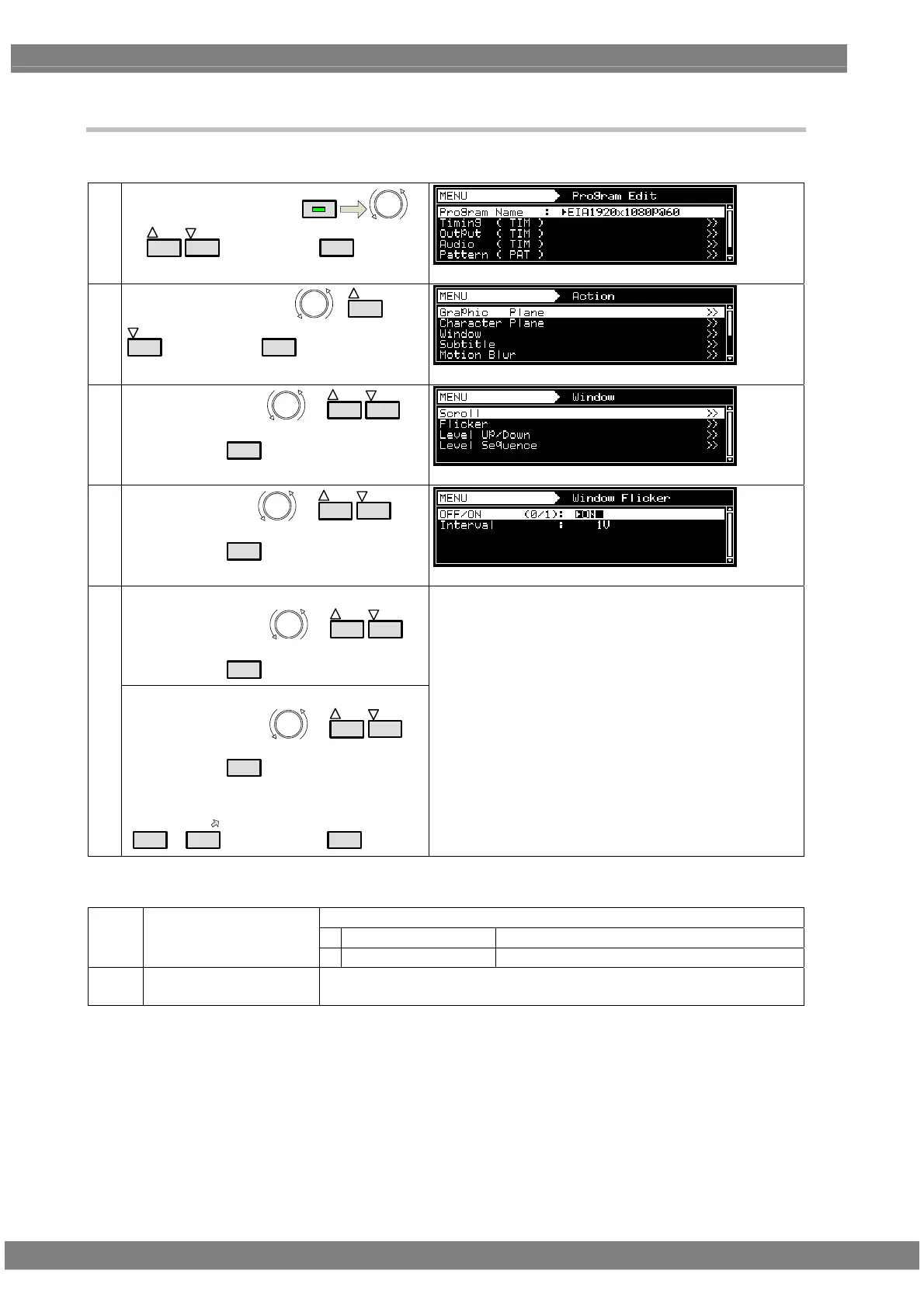
7.2.2 Flickering
For details on the action selection procedure, refer to “2.1.4 Selecting the actions”
(1)
Select Program Edit using
MENU
or
INC
DEC
,and then press
SET
(2)
Select Action (PAT) using
or
INC
DEC
,and then press
SET
(3)
Select Window using
or
INC
DEC
,
and then press
SET
(4)
Select Flicker using
or
INC
DEC
,
and then press
SET
<Selecting the items>
Select the items using or
INC
DEC
,
and then press
SET
(5)
<Setting the parameters>
Select the parameters
or
INC
DEC
and then press
SET
.
Alternatively:
Select the parameters using the number keys
0/STATUS
to
9/F
,and then press
SET
For further details , refer to <Table of Flicker setting
items>.
<Table of Flicker setting items>
On or Off is set for window flicker
0
OFF
Flicker is set to OFF
(1)
OFF/ON (0/1)
1
ON
Flicker is set to ON
(2)
Interval
The interval (execution interval) is set here.
Setting range: 1 V to 255 V



 To Next Page