Chapter 10 OTHER FUNCTIONS
441
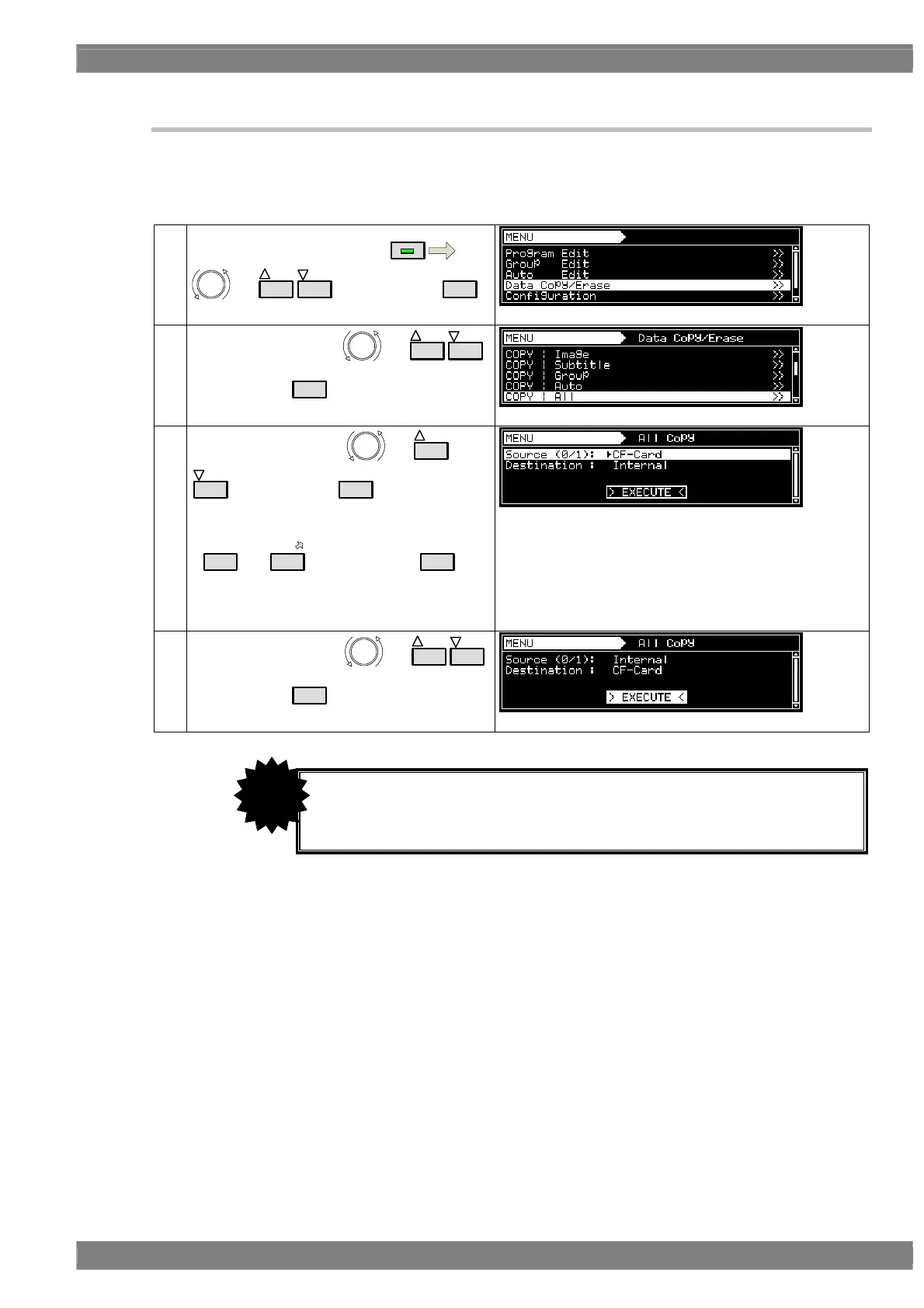
10.1.8 Copying all data
All the data can be copied together.
The time taken to copy the data differs according to how much data is to be copied. It is not possible to cancel
copying once it has been initiated.
(1)
Select Data Copy/Erase using
MENU
or
INC
DEC
, and then press
SET
.
(2)
Select COPY: All using
or
INC
DEC
,
and then press
SET
.
(3)
Select the all data using
or
INC
DEC
, and then press
SET
.
Alternatively:
Select the all data using the number keys
(
0/STATUS
to
9/F
), and then press
SET
.
Source:
Select the copy source media.
Destination:
Display the copy destination media.
(When Source is selected, the media is selected
automatically.)
(4)
Select EXECUTE using
or
INC
DEC
,
and then press
SET
to complete the copying.
Refrain from ejecting the CF card or turning off the power while data is being
copied.
Otherwise the CF card and its data may be damaged.
CAUTION



 To Next Page