312
<Setting the type>
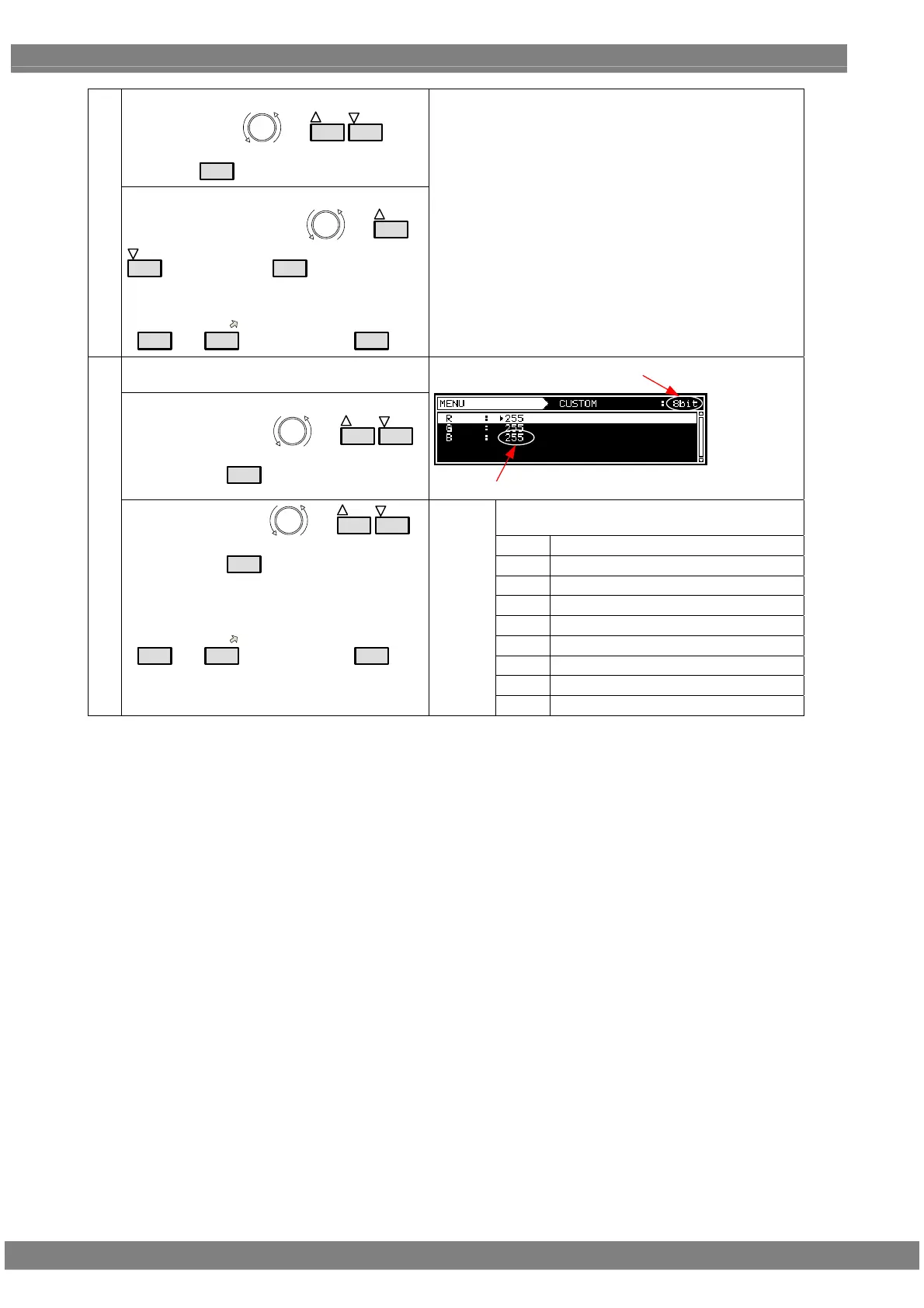
Select Type using
or
INC
DEC
, and
then press
SET
.
(7)
<Setting the parameters>
Select the parameters using
or
INC
DEC
, and then press
SET
.
Alternatively:
Select the parameters using the number keys
(
0/STATUS
to
9/F
), and then press
SET
.
For further details on the types of patterns, refer to “6.6.1
Types of raster patterns.”
When CUSTOM has been selected as the Type
setting
<Detailed settings of customized patterns>
Select CUSTOM using
or
INC
DEC
,
and then press
SET
.
Bit Length
Level
The setting range for the above levels differs
depending on the color depth.
8 BIT
0 to 255
9 BIT
0 to 511
10 BIT
0 to 1023
11 BIT
0 to 2047
12 BIT
0 to 4095
13 BIT
0 to 8191
14 BIT
0 to 16383
15 BIT
0 to 32767
(8)
Select the items using
or
INC
DEC
,
and then press
SET
.
Alternatively
Select the parameters using the number keys
(
0/STATUS
to
9/F
), and then press
SET
.
R,G,B
16 BIT
0 to 65535



 To Next Page