316
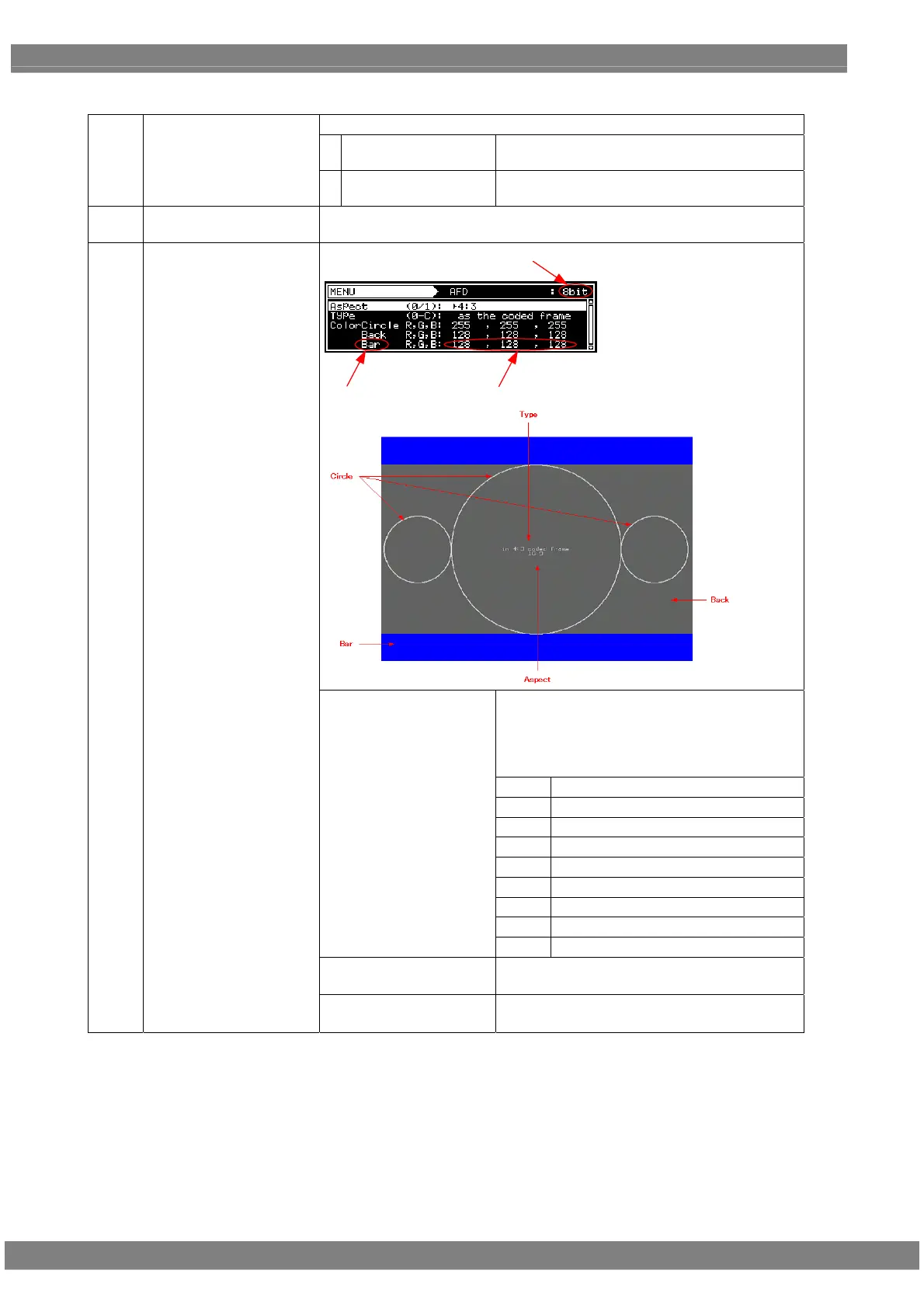
<Table of AFD pattern setting items>
The aspect ratio of the screen is set here.
0
4:3
The images are displayed on the screen with a
4:3 aspect ratio.
(1)
Aspect (0/1)
1
16:9
The images are displayed on the screen with a
16:9 aspect ratio.
(2)
Type
For details on the types of patterns, refer to “6.7.1 Types of aspect ratio
patterns.”
LevelPart
Bit Length
Display the circle level.
The R, G and B levels are displayed in
sequence from the left.
The setting range for the above level differs
depending on the color depth.
8 BIT
0 to 255
9 BIT
0 to 511
10 BIT
0 to 1023
11 BIT
0 to 2047
12 BIT
0 to 4095
13 BIT
0 to 8191
14 BIT
0 to 16383
15 BIT
0 to 32767
Circle
16 BIT
0 to 65535
Back
Set the background level.
(Details are the same as for Color Circle.)
(3)
Color
Bar
Set the bar level.
(Details are the same as for Color Circle.)



 To Next Page