101
MICROWAVEOVEN
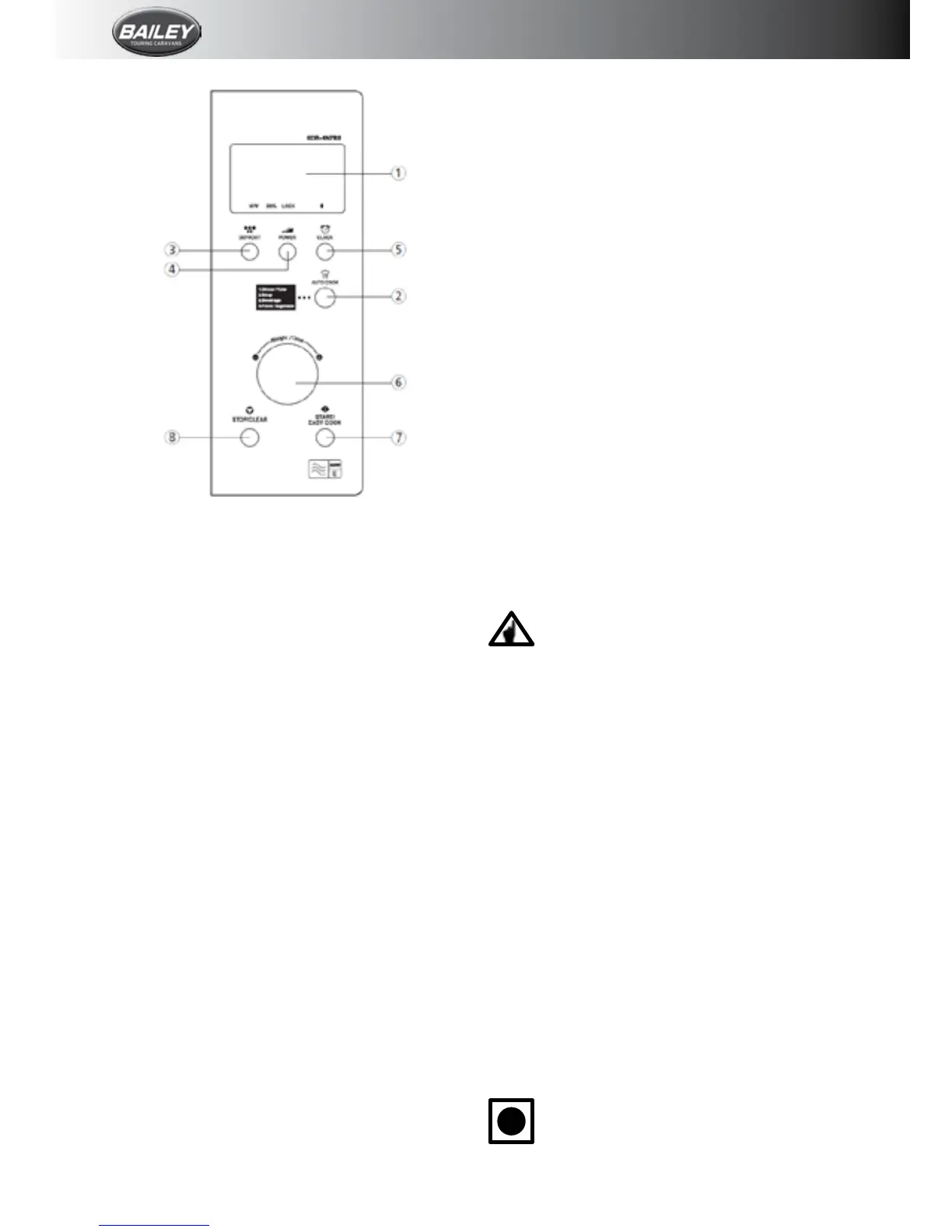
1. InformationScreen
2.Autocook:Usedtocookusingaprogramme
ortoreheat.
3.Defrost:Usedtodefrostfoodsbyweightor
time.
4.Power:Usedtosetpowerlevel.
5.Clock:Usedtosettheclock.
6.Weightandtimedialknob:Usedtosetthe
timeandweight.
7. Start/Easy cook: Used to start the oven
operationandalsoincreasethereheattime
by30-seconds.
8.Stop/Clear:Usedtostoptheovenoperation
ortoeraseallentries.
Operation Procedure
Thissectionincludesusefulinformationabout
ovenoperation.
1. Connect the mains lead to an electrical
outlet.
2.Afterplacingthefoodinasuitablecontainer,
opentheovendoorandputitontheglass
tray. The glass tray and roller guide must
alwaysbeinplaceduringcooking.
3.Shut the door. Make sure that it is rmly
closed.
4.Theovenlightisononlywhenthemicrowave
ovenisoperating.
5.The ovendoor can be opened at any time
duringoperationbypullingthehandle.The
ovenwillautomaticallyshutoff.
6.Eachtimeabuttonistouched,aBEEPwill
soundtoacknowledgethetouch.
7. Theovenautomaticallycooksonfullpower
unlesssettoalowerpowerlevel.
8.Thedisplaywillshow“:0”whentheovenis
pluggedin.
9.Timeclockreturnstothepresenttimewhen
thecookingtimeends.
10. When the Stop/Clear button is touched
during the oven operation, the oven stops
cooking and all information retained. To
erase all information (except the present
time), touch the Stop/Clear button once
more.Iftheovendoorisopenedduringthe
ovenoperation,allinformationisretained.
11.IftheStartbuttonistouchedandtheoven
does not operate, check the area between
thedooranddoorsealforobstructionsand
makesurethedoorisclosedsecurely.The
ovenwillnotstartcookinguntilthedooris
completely closed or the programme has
beenreset.
Make sure the oven is properly installedand
pluggedintotheelectricaloutlet.
Wattage Output
Thepowerlevelissetbypressingthe
powerbutton.
If you touch the power button once, the
power level will be at 100%, if you press it
twicethepowerwillreduceby20%andeach
subsequenttime it is pressed the power will
reduce by 20%. Ifit is pressed6 times the
powerwillgobackuptofullagain.
Controls
Setting the Clock
Whentheovenisrstpluggedin,thedisplay
willash“:0”andatonewillsound.IftheAC
power ever turns off, the display shows “:0”
whenthepowercomesbackon.
1. Press the Clock button. This is a 12-hour
clocksystem.
2.PresstheClockbuttononcemore.Thisisa
24-hourclocksystem.
3.Turnthedialknobtoadjusthour.
4.PresstheClockbutton.
5.Turnthedialknobtoadjustminute.
6.PressClockbutton
i
Thisovenhasmultipleclocksystems.
Ifyouwantthe12-hourclocksystem
omitthisstep.








 To Next Page