71
HEATINGSYSTEMS
1. Boththecontrolpanelandboilerareoff.
2.Tostartthesystem,pressthePowerbutton
on the control panel. The Splash Screen is
displayedandgreenLEDislit.Theboilerwill
nowstart with the previously savedsettings
(factorysettingsbydefault).
Thesystemwillnowbedrawingvariable0.2–
1Aofcurrentfromthe12vsupply.
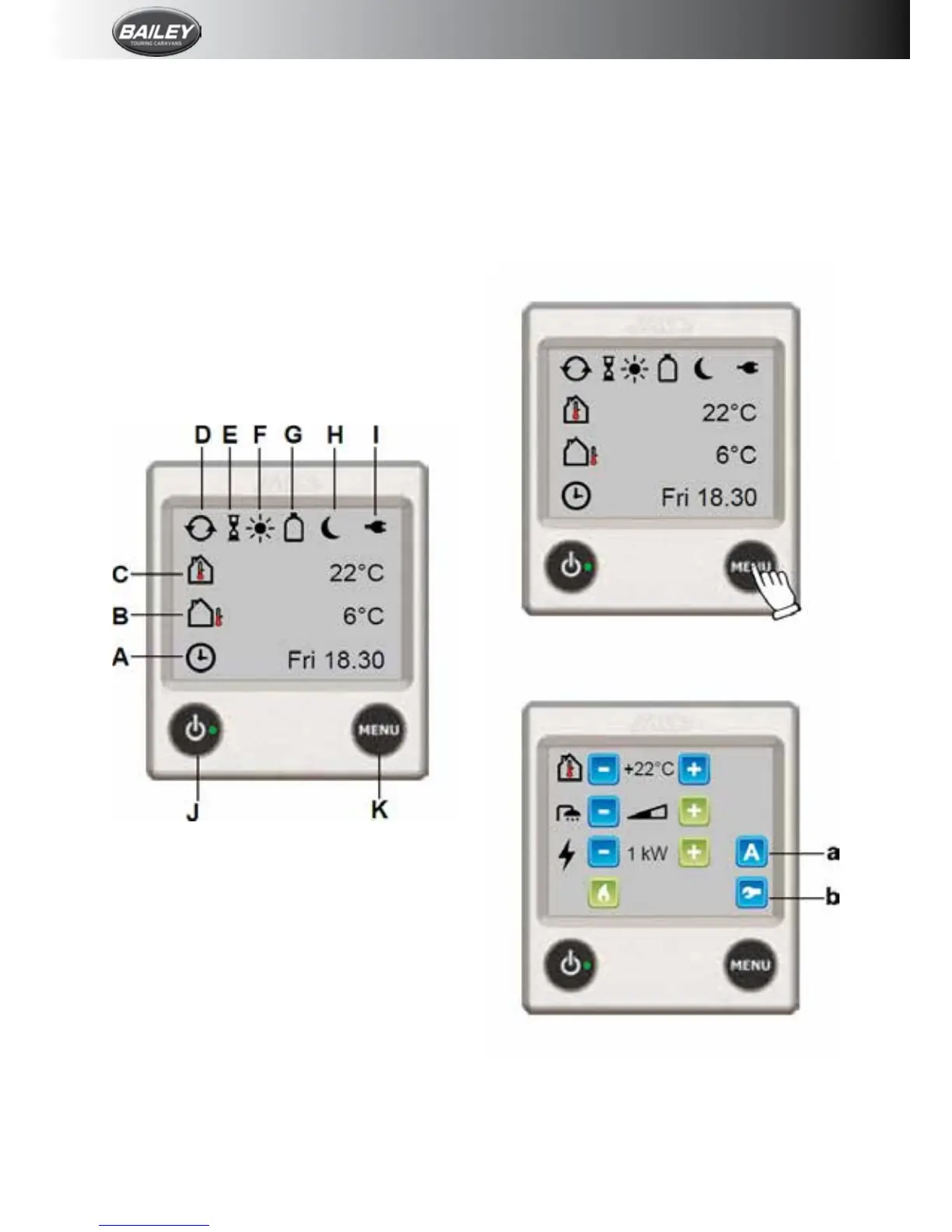
Standby Screen
The Standby Screen is displayed after the
Splash Screen. This screen contains useful
informationaboutthe statusofyourheating
system.
NB: If Standby Screen is set to “Dark” in
Backlightsettings,theStandbyScreenwillnot
be displayed; the screen will be dark unless
touched.
A.Clockisenabled.Dayoftheweekandtime
shown.
B.Outdoor temperature. [Optional outdoor
temperaturesensorrequired.]
C.Roomtemperature.Measuredatthecontrol
panel. [Optional discrete room temperature
sensorsavailable.]
D.Centralheatingcirculationpumpisactive.
E.DelayedStart/Cycleisenabled.
F. DayModeactive.
G.Gas Cylinder Status. Full/empty and
active EisEx shown. [Additional accessories
required.]
H.NightModeactive.
I. 230Vsupply.Ifnotdisplayed,theboileris
notreceiving230Vsupply.
J.Power button. Press to switch system on
andoff.LitgreenLEDindicatessystemison.
K.MENUbutton.
L.Press to access Main Menu from Standby
ScreenorSettingsMenu.
Main Menu
PressMENUbuttontoaccesstheMainMenu
from the Standby Screen or Settings Menu.
ThescreenwillreverttotheStandbyScreen
after30secsifuntouched.
1. StandbyScreen.PressMENUbutton.
2.MainMenu.
a.What’sActivatedMenu.[Notdisplayedifno
activatedfunctionsaredetected.]
b.SettingsMenu.











 To Next Page