83
HEATINGSYSTEMS
Truma CP Plus Digital Control Panel
Operating Instructions
Safety instructions
• Thedevicemayonlybeoperatedifitisin
perfectworkingorder.
• Arrange for malfunctions to be rectied
immediately. Only rectify malfunctions
yourself if the remedy is outlined in the
troubleshooting information in these
OperatingInstructions.Thesecanbefound
onpage86.
• Donotrepairormodifythedevice.
• Only allow the manufacturer or its
customerservicetorepairafaultydevice.
i
Ifthepowersupplytothesystemis
interruptedforlongerthan20
minutes,thetimeanddateneedtobe
enteredagain.
IftheTrumaCombiheaterisconnectedtothe
control panel Truma CPPlus, the heater can
nolongerbeswitchedviaaZUCBtimer.
Intended Use
The control panel Truma CP Plus serves to
control and monitor a Combi heater and/
oraTruma air conditioning unit. Thedevice
is designed for installation in caravans and
motor-caravans.
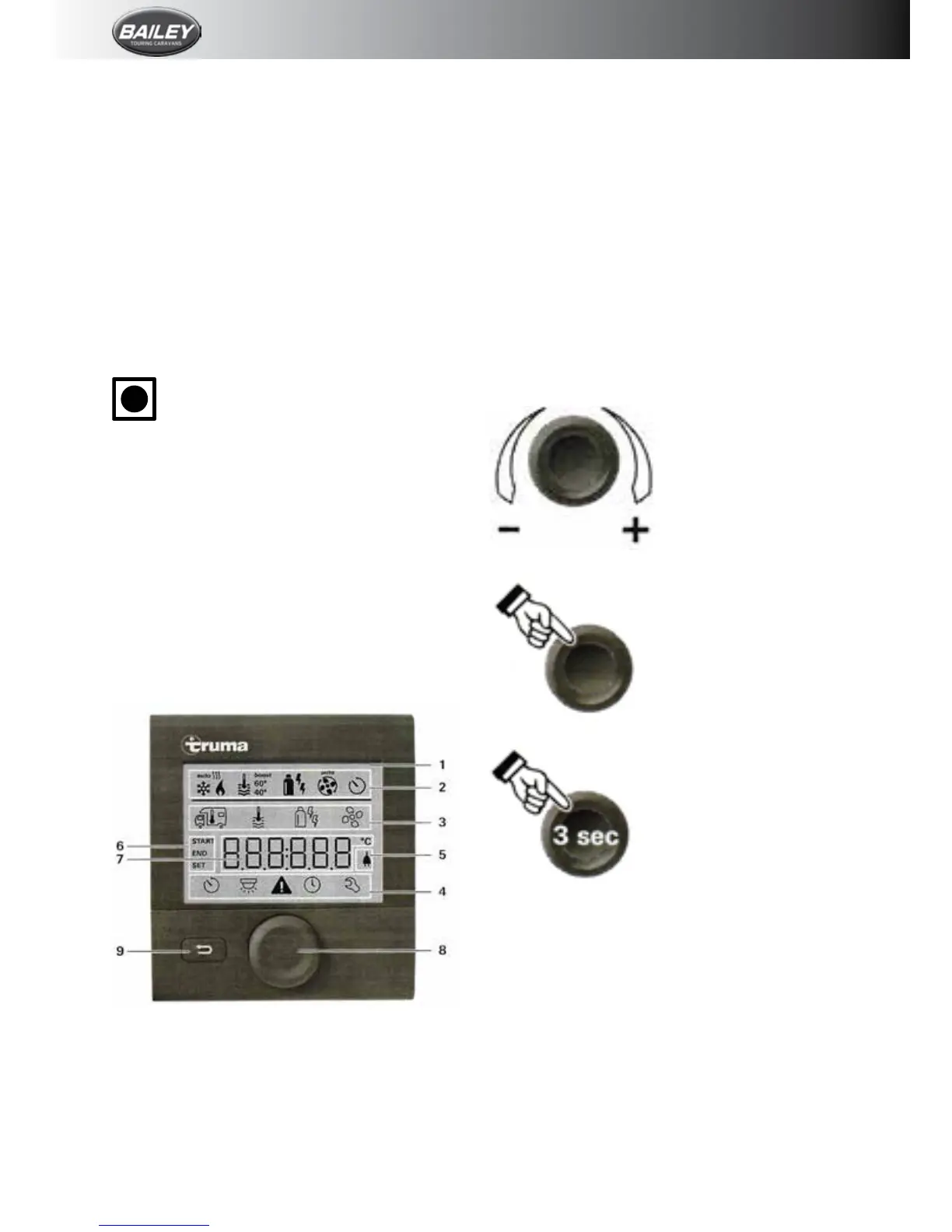
Displayandcontrolelements
1. Display
2.Statusline
3.Menuline(above)
4.Menuline(below)
5.Displayofmainsvoltage230v(shorepower)
6.Displaytimer
7. Settings/values
8.Controlknob/pushbutton
9.Backbutton
The control knob/push button (8) is used to
select menus in lines 3+4 and congure the
settings. These are shown via a display (1)
withalightedbackground.PressingtheBack
button(9)takestheuserbackoutofthemenu
again.
Control knob/push button
The control knob/push button (8) is used to
selectandchangesetvaluesandparameters:
these can be saved by clicking the control
knob/push button. Selected menu items will
ash.
Turn to the right (+)
Menuispagedfromleft
toright.
Increasevalues.
Turn to the left (–)
Menu is paged from
righttoleft.
Reducevalues.
Clicking
Accept(save)aselected
value.
Select a menu item or
a change to the setting
level.
Press(3seconds)
MainswitchfunctionON/
OFF
Back Button
Pressing the Back button (9) takes the user
backoutofthemenuagainanddiscardsthe
settings.Thismeansthatthepreviousvalues
areretained.
Functions
Thefunctionsinthemenulines3&4ofthe
controlpanelcanbeselectedinanysequence.
The operating parameters are shown in the
statusline(2)orthedisplays5and6.








 To Next Page