51
THECONTROLPANELS
OperatingtheWaterHeater
1. Fromthehomescreen,touchthe“tap”icon.
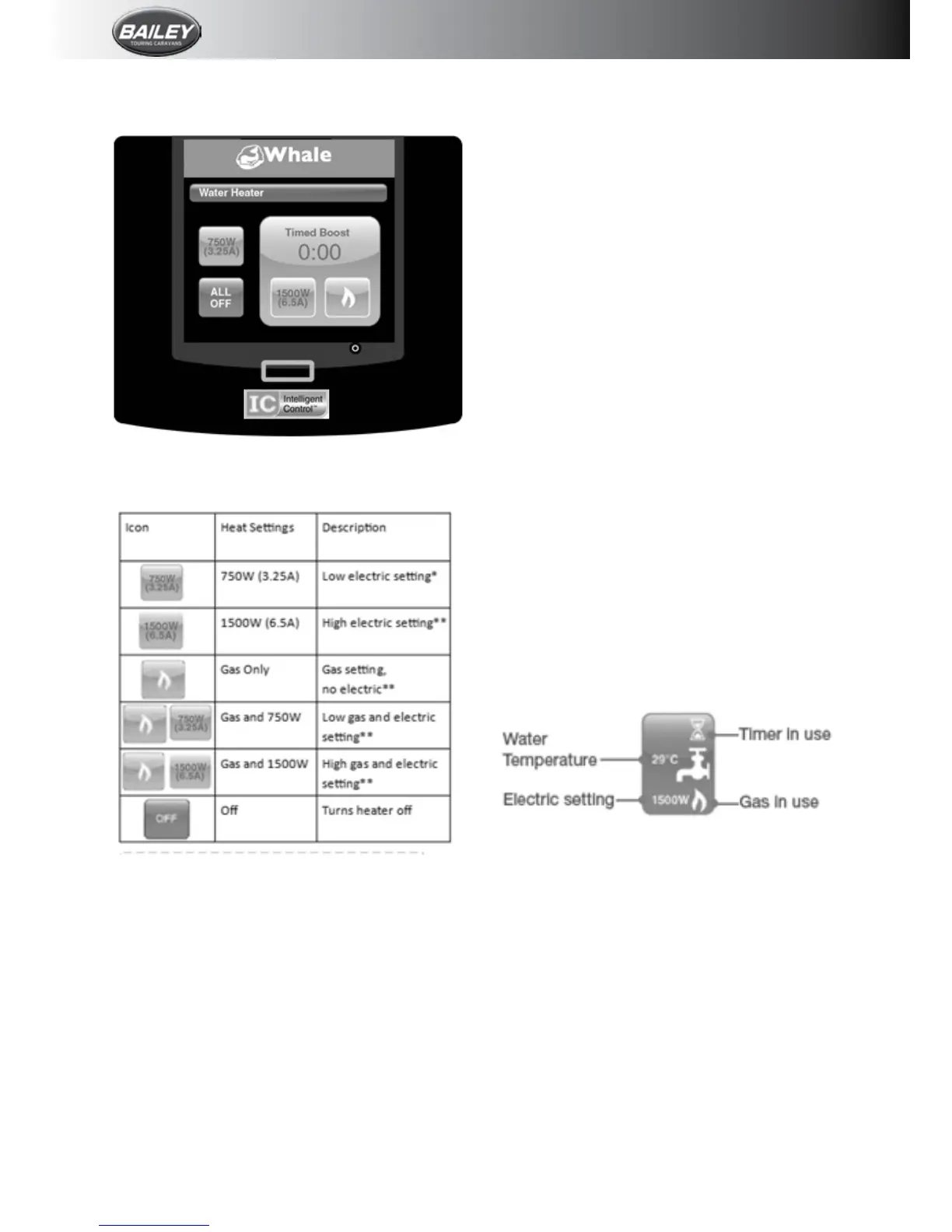
2.Thefollowingscreenwillappear;
3.Selectthedesired settingby touchingone
ofthefollowingicons.Theiconwillturnredto
showithasbeenactivated.
*Low electric setting. This uses 750W
(3.25A). Unlike the heat boost settings**,
the low setting does not operateon a timer,
therefore the timer function will remain at
0. When this setting is enabled the water
heater will remain CONSTANTLY ON until all
waterheatersettingsareturnedoff.Thelow
electricsettingisbestusedwhenthevehicle
is connected to a mains supply with limited
currentcapacity.
NB: Running several appliances at once will
increasethecurrentdrawnbythevan,which
,dependingontheratingofthecircuitbreaker,
couldtripthesupply.Ifseveralappliancesare
running at the same time, the low electric
setting can be used to heat the water but
withareducedcurrentdraw.Pleasenotethe
calculatedampvalueontheiVancontrolpanel
only shows the current drawn by the Whale
heatingsystem,anddoesnotmeasure other
applianceswithinthevan.
** Heat Boost settings:Thereareanumber
of settings which can be used depending on
thedesiredpower/gasusageandtherequired
heat up timer. When using any of these
combinations the timer will count down for
15minutes(default).Ifalargersupplyofhot
waterisrequired,overalongerperiodoftime
e.g.if3ormoreshowersarerequiredinquick
succession,thetimerfunctioncanbechanged
to30mins,45mins,60minsorforever.
NB: After the boost time has reached 0, the
waterheater will automaticallyreturntothe
previoussetting.
To change the default timer function, touch
the spanner icon on the home screen, then
the options icon and use the arrow keys to
scrollthroughto“Water HeaterBoost Time”
Selectthedesiredboosttimerdurationusing
the-and+Note:If“Forever”isselectedthe
water heater will remain CONSTANTLY ON
untilallwaterheatersettingsareturnedoff.
4.Oncethedesiredsettinghasbeenactivated,
pressthehomebuttontoreturntothehome
screen.
Thehomescreenwillnowshowthe“tap”icon
inredwithselectedheatsettingdisplayed.








 To Next Page