Bed Frame Features
Progressa+ Bed Instructions for Use (216321 REV 2) 91
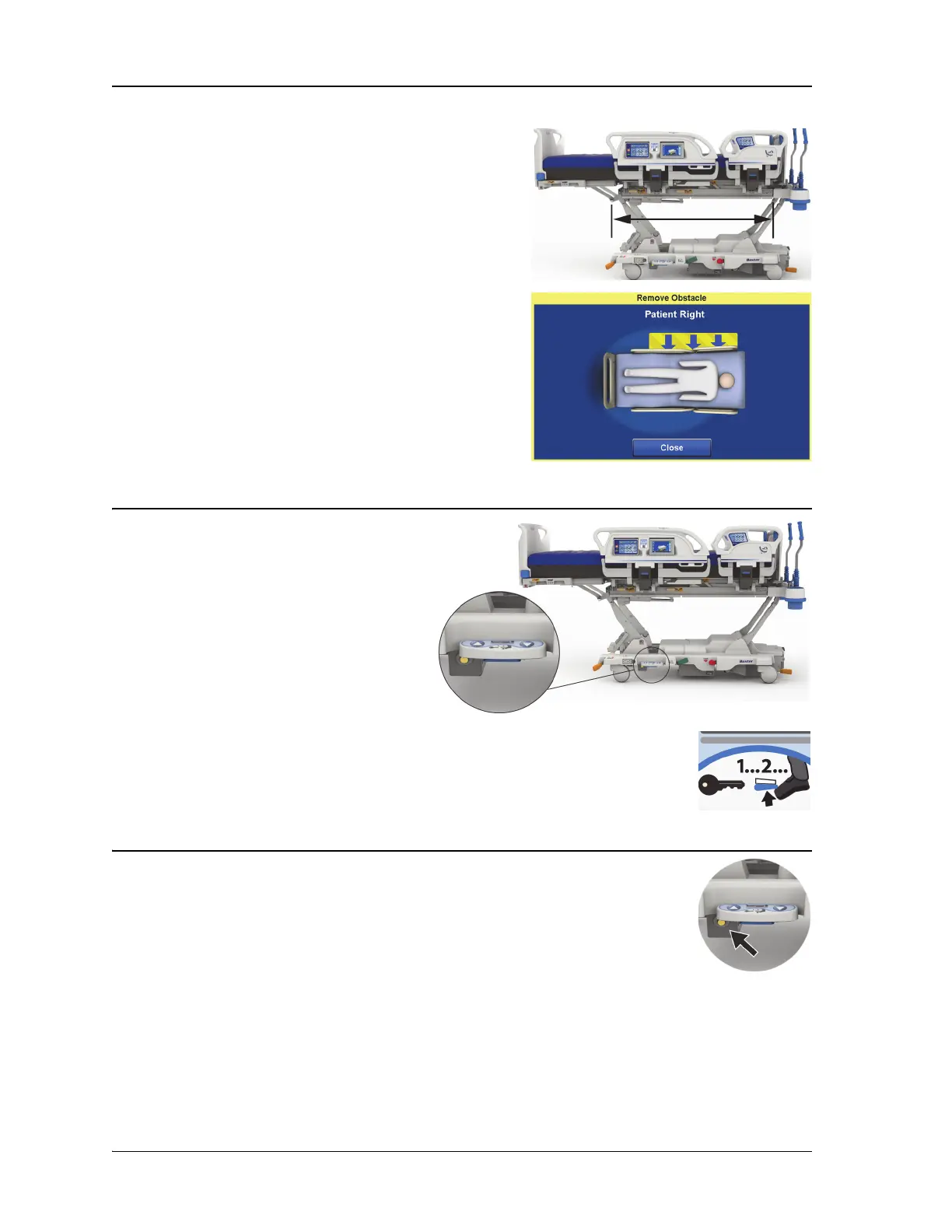
OBSTACLE DETECT SYSTEM
BED UP/DOWN—FOOT CONTROLS
The bed height foot controls are located on
both sides of the base frame, near the foot-
end casters. This feature times out after 15
seconds.
To Activate
1. With your toe, lift up on the blue switch
on the bottom of the foot control until
you hear a beep (approx. 3 seconds).
• If you release the blue switch before
you hear the beep, three beeps will sound and a message will show on the
GCI screen with instructions to enable the foot controls.
2. With your foot, press down on the bed up or bed down control until the bed is at
the desired height.
NIGHT LIGHT
The night light is on each side of the bed, located on the base frame. The light is on
continuously when the bed is plugged into AC power.
The Progressa+ Bed is equipped with the Obstacle Detect
System that runs along the two sides of the base frame. On
the sides, this system senses objects that are between the
upper frame and the base frame.
If the system senses pressure on the sides of the base the
Bed Not Down indicator on the siderails will flash.
If you try to lower the bed:
A message on the GCI screen will show the location of the
obstruction as left or right and you will not be able to lower
the sleep deck.
If the bed is in motion and it encounters an obstacle:
The bed will stop lowering, and then raise automatically for
2 seconds. The GCI screen will show the location of the
obstruction as left or right side of the bed.













 To Next Page