Graphical Caregiver Interface (GCI) Controls
34 Progressa+ Bed Instructions for Use (216321 REV 2)
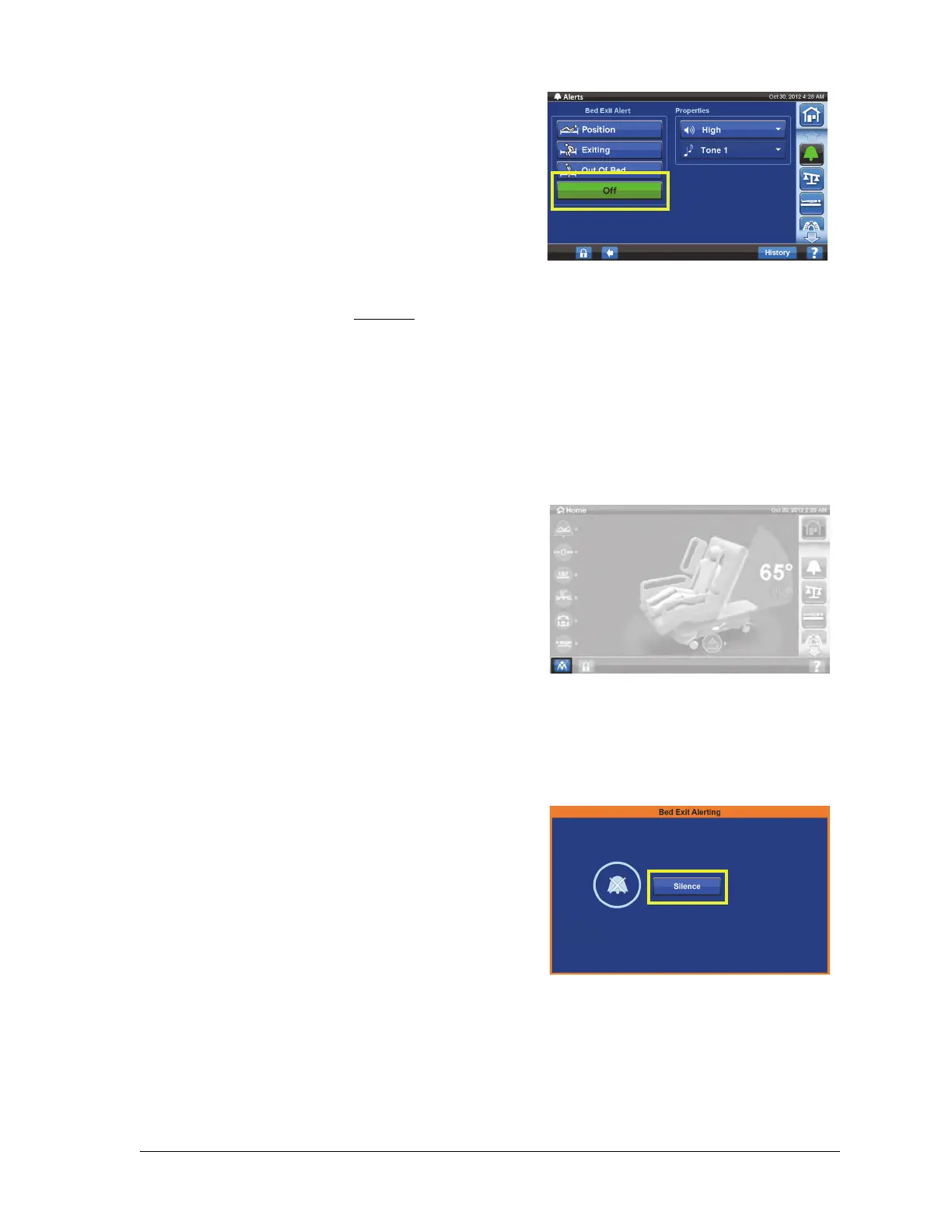
To Silence the Bed Exit Alert without Deactivating
When the Bed Exit System is armed/on, you can silence with the Pre-emptive alert silence control in the
lower left corner of the screen. This will silence the alert for 30 seconds and then suspend the alert for 10
to 30 minutes without turning the system off. While in Silence mode, the system stops monitoring the
patient movements; therefore, the system will not notify the care team or cause an alert. While the
system is in the Silence mode, you can change the position of the patient or assist the patient out of the
bed.
To Activate the Pre-Emptive Alert Silence
To Silence a Bed Exit Alert
When the bed exit system is activated, and it detects an alert condition, an alert will sound and a
message will show on the GCI screen.
3. Press Off. This turns off the Bed Exit Alert.
4. A confirmation screen will show, press Ye s to turn off bed exit.
Press the alert silence control located at the lower left of
the GCI screen. This will allow patient movement or
procedures to be done without the alert sounding.
1. Press Silence.
When the system is in the Alert Silenced mode, the system
stops monitoring the patient’s movement. The system
does not turn on the audible alert or send a nurse call
alert. While the system is in Silence mode, you can change
the position of the patient or assist the patient out of the
bed.













 To Next Page