Graphical Caregiver Interface (GCI) Controls
Progressa+ Bed Instructions for Use (216321 REV 2) 39
Zero/New Patient
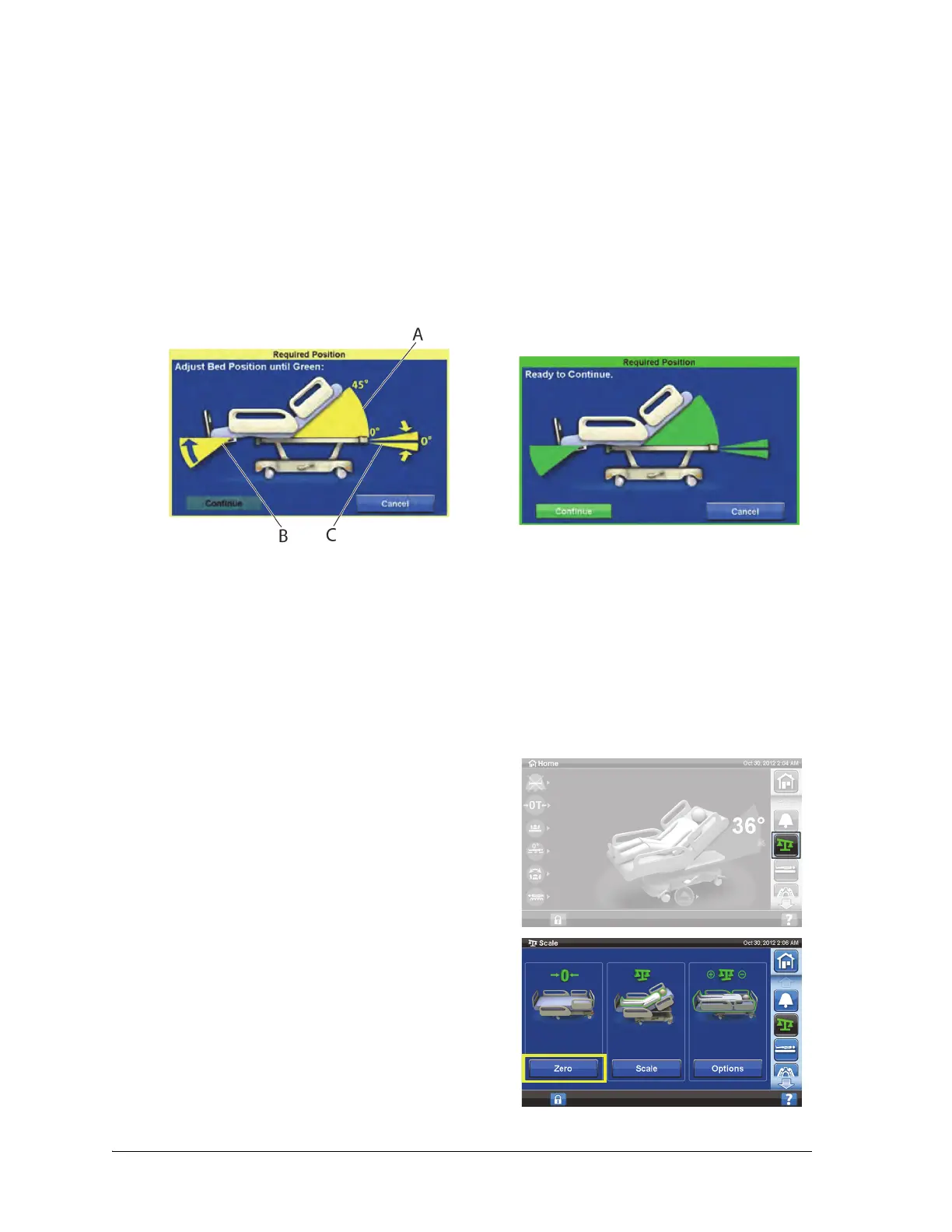
Required Bed Position to Zero the Scale
The required bed position is as follows:
• Head angle (A) < 45°; lower head
• Foot angle (B) < 30° below horizontal; straighten legs section
• Trendelendburg/Reverse Trendelenburg (C) < 2°; level bed
If the bed is not in the required position to zero the bed, a Required Position screen will show on the
GCI screen. Press the Bed Flat control or press knee, foot, and head on the caregiver siderail controls to
adjust the bed to the required position.
1. Make sure the bed is plugged into AC power.
2. Make sure the patient is not on the bed.
3. Put all standard linens, blankets, pillows, and the patient pendant on the bed. A list of these items
posted near the bed may be helpful for future reference.
4. The scale is very sensitive. Make sure the bed is not touching anything that could affect the patient
weight (other beds or carts, headwall, miscellaneous drainage lines, etc.)
5. Put the bed in the required position (refer to “Zero/New Patient” on page 39).
6. Press the Scale menu control.
7. Press Zero.
If the bed detects a weight greater than 26 kg (57.3 lbs)
than the last zero reference point, the scale will not zero.













 To Next Page