Accessories
98 Progressa+ Bed Instructions for Use (216321 REV 2)
To Install
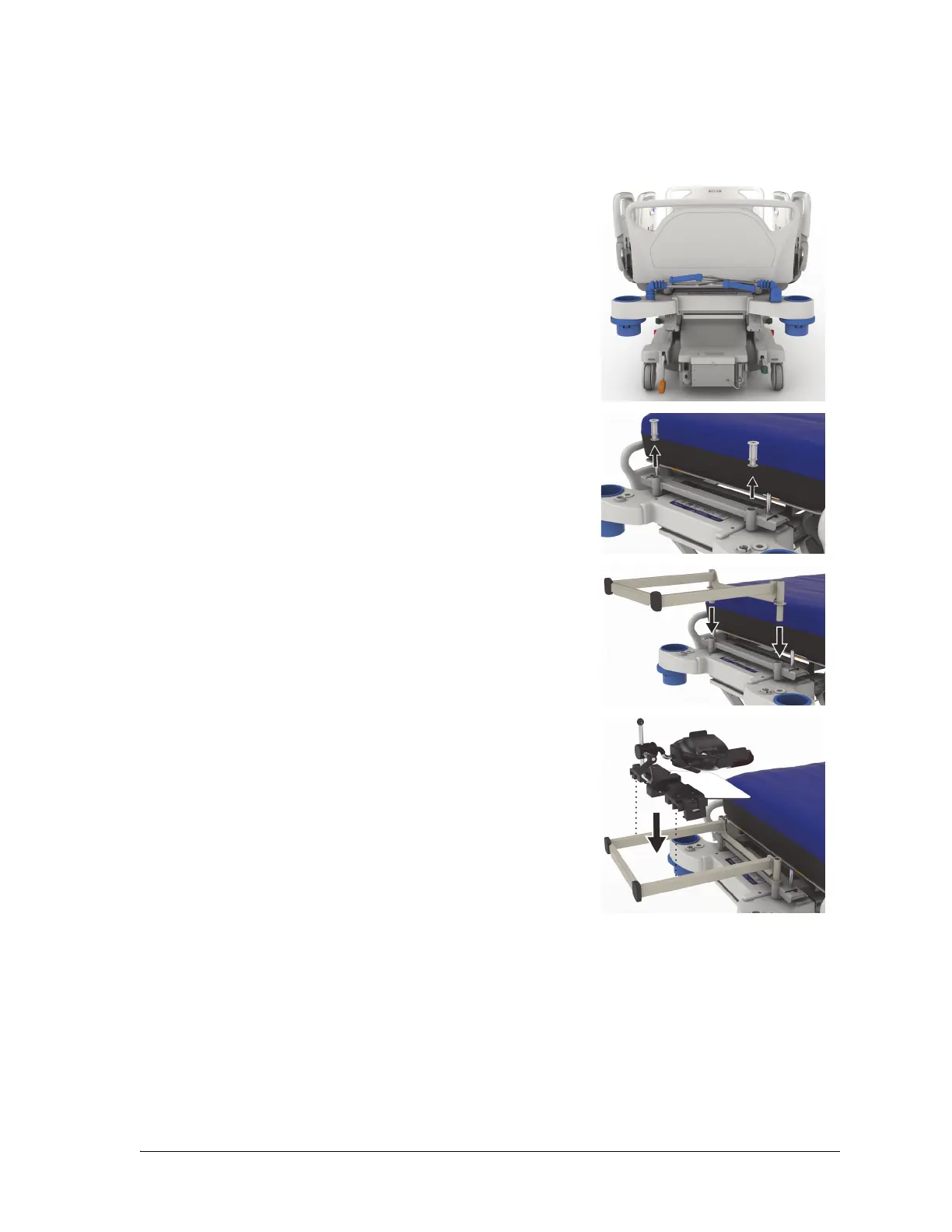
1. Put the bed in the flat position.
2. Remove the headboard.
3. Lower the transport handles and IV pole.
4. If applicable, remove any equipment from the fracture frame
sockets.
5. Lockout the head and knee articulation controls.
6. If applicable, remove the plastic inserts from the traction
equipment sockets on the head-end of the bed.
7. On the left side of the head adapter bracket, push the snap
button to install the head adapter bracket in the traction
equipment sockets. Make sure the bracket is fully inserted
into the socket.
If applicable, the push handles and IV pole will be in the stowed
position and will be under the bracket.
8. Install the Allen ICU prone head positioner. See Allen ICU
Prone Head Positioner Instructions for Use (773439) to install
and to make adjustments to the prone head positioner.
To Use
To use the proning accessory, see Allen ICU Prone Head Positioner Instructions for Use (773439).
To Remove
1. Make sure the patient is not on the proning accessory before you remove it.
2. Remove the prone head positioner (see Allen ICU Prone Head Positioner Instructions for Use
(773439)).
3. Remove the head adapter bracket support from the traction equipment sockets.













 To Next Page