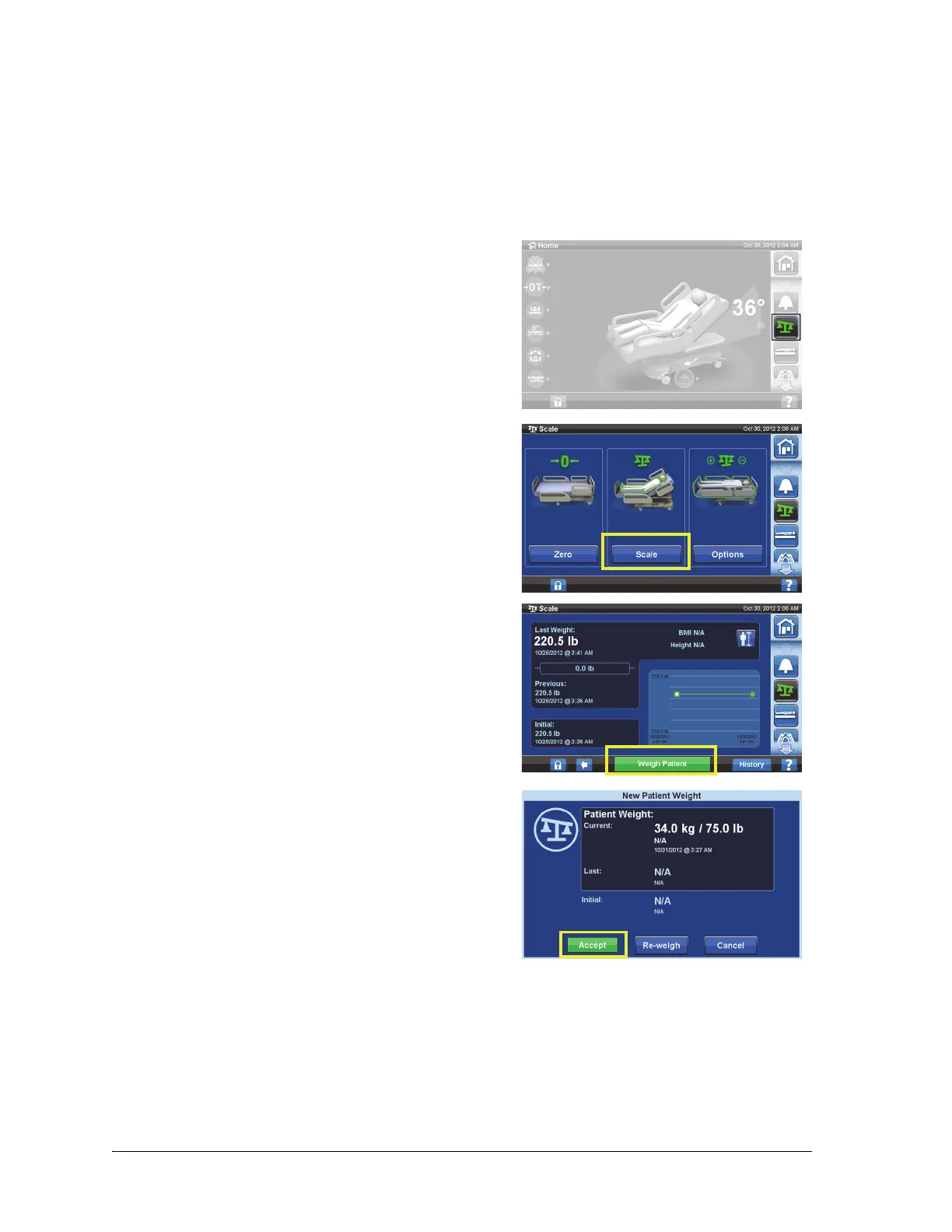
Graphical Caregiver Interface (GCI) Controls
Progressa+ Bed Instructions for Use (216321 REV 2) 41
1. Center the patient on the bed.
2. Move any drainage bags on the bed to the green hooks under the foot end of the sleep deck.
– You can weigh in the non-recommended position; however, non-recommended positions
may reduce accuracy and repeatability.
– Items on the IV poles or in the oxygen tank holders at the head-end of the bed are not
weighed.
7. If applicable, return the drainage bags to the drainage bag holders on the bed.
8. Follow the on-screen instructions.
– If during Zero or New Patient, the “Not Required Position” message shows on the GCI
screen, adjust the bed position as applicable.
9. To protect the privacy of the patient, do not leave the patient weight displayed on the screen.
Return to the Home screen by pressing the Home control on the GCI screen.
3. Press the Scale menu control.
4. Press Scale.
NOTES:
• Remove everything attached to the upper frame,
siderails, and foot end of the bed or the items will
be included in the patient weight.
• The headboard and devices mounted to the head
end of the bed will not be included in the
patient’s weight.
5. Press Weigh Patient. Follow the on-screen
instructions.
6. Press Accept or Re-weigh:
• Re-weigh—bed will repeat the steps to weigh the
patient
• Accept—stores the weight in the history













 To Next Page