2-2
Off: the battery is not installed or the monitor is not connected to the external power supply when being
powered off.
5. External power LED
On: The monitor is connected to the external power supply.
Off: The monitor is not connected to the external power.
2.1.2 Left View
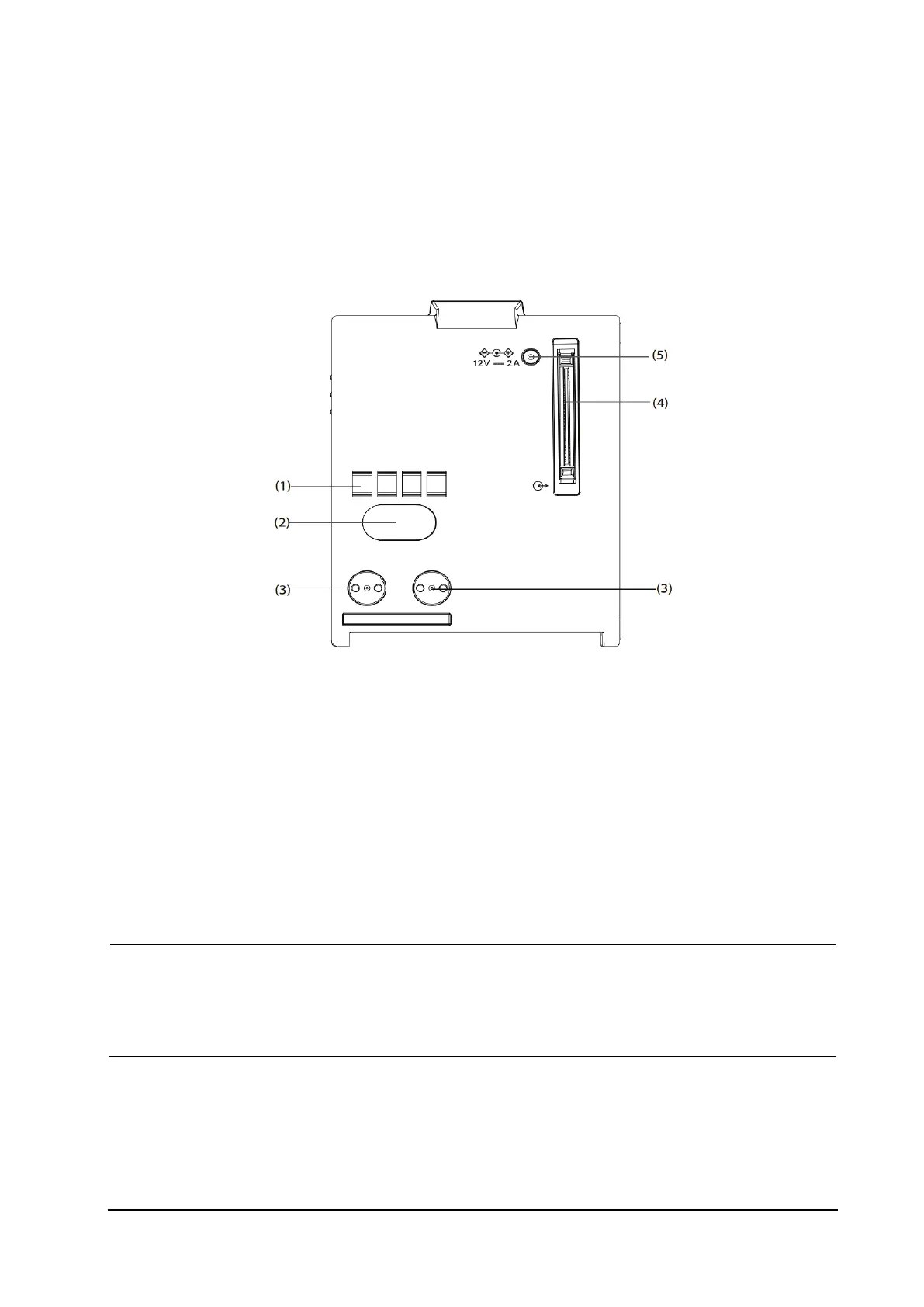
1. Hard connection communication interface: used for communication between N1 and the host monitor.
2. Infrared communication interface: used for communication between N1 and the host monitor. When the host
monitor has a hard connection communication interface and operates normally, the hard connection
communication interface will be first used automatically.
3. Power contact: used for receiving power supply from the host monitor.
4. Multi-pin connector: connects N1 to the Dock or the Modular Rack.
5. External DC power input connector: connects N1 to the external AC adapter.
NOTE
Dry the multi-pin connector of N1 before connecting N1 to the Modular Rack or Dock in case of water
spray.
To ensure a good contact, clean the contacts regularly, as dust and dirt may collect on them. When
cleaning the contacts, wipe them with cotton, dampened with alcohol (using forceps is recommended).



 To Next Page