2-3
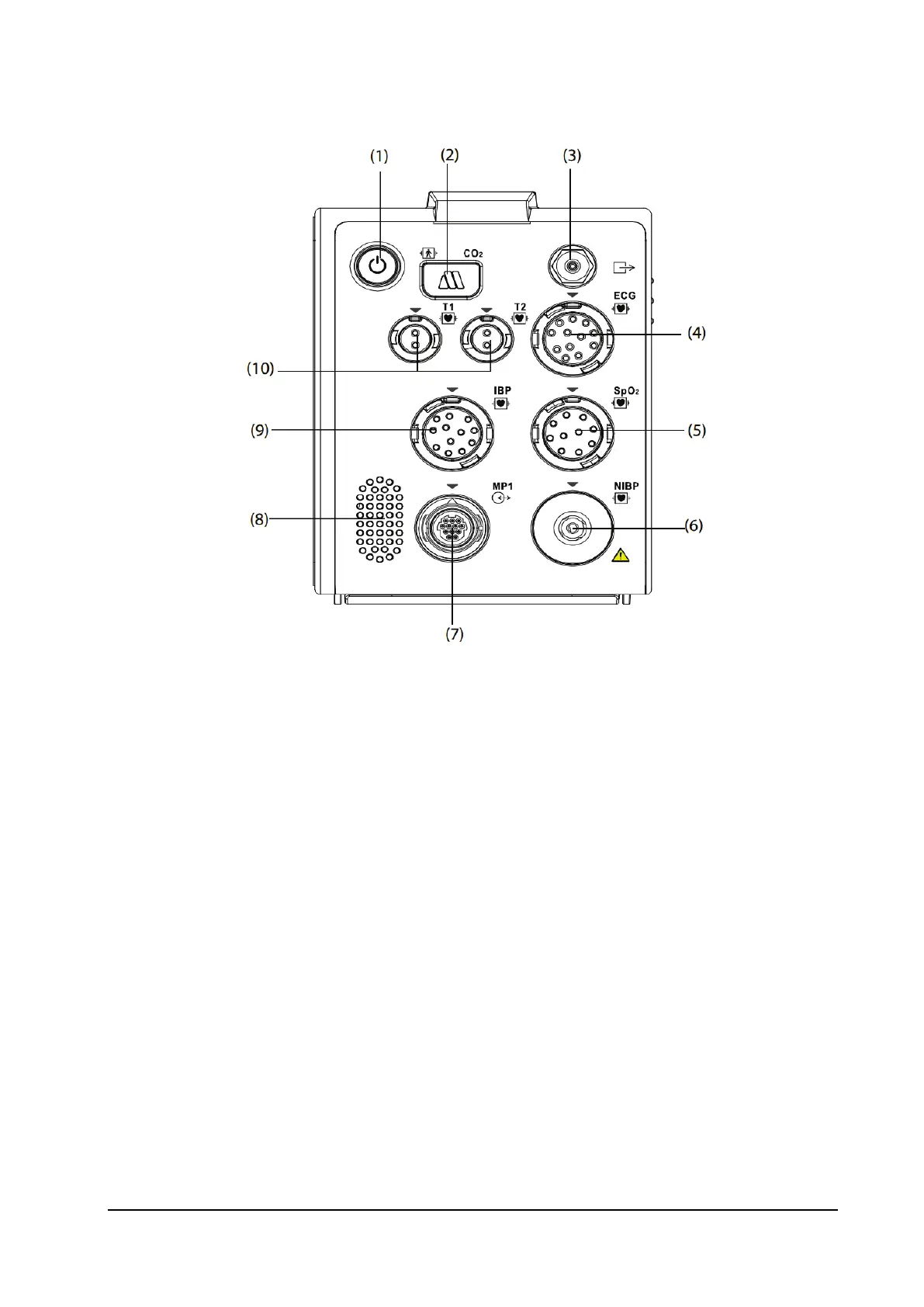
2.1.3 Right View
1. Power switch and LED
On: Press this button to turn on the monitor.
Off: Press and hold this button for 3 seconds to turn off the monitor.
Forcible shutdown: If the monitor cannot be turned off normally, press and hold this button for 10 seconds to
forcibly shut down the monitor. Forcible shutdown may lead to loss of patient data.
Display switching: When the monitor is powered on and the external display is connected separately, press this
button to switch the screen.
Power LED: An LED is built in this switch. It turns on when the monitor is on and turns off when the
monitor is off.
2. CO
2
adapter interface (only for CO
2
configuration)
3. CO
2
gas outlet (only for CO
2
configuration)
4. ECG cable connector
5. SpO
2
sensor connector
6. NIBP cuff connector
7. Multifunctional connector: outputting analog and defib. synchronization signals
8. Speaker
9. IBP sensor connector
10. Temperature probe connector



 To Next Page