6-6
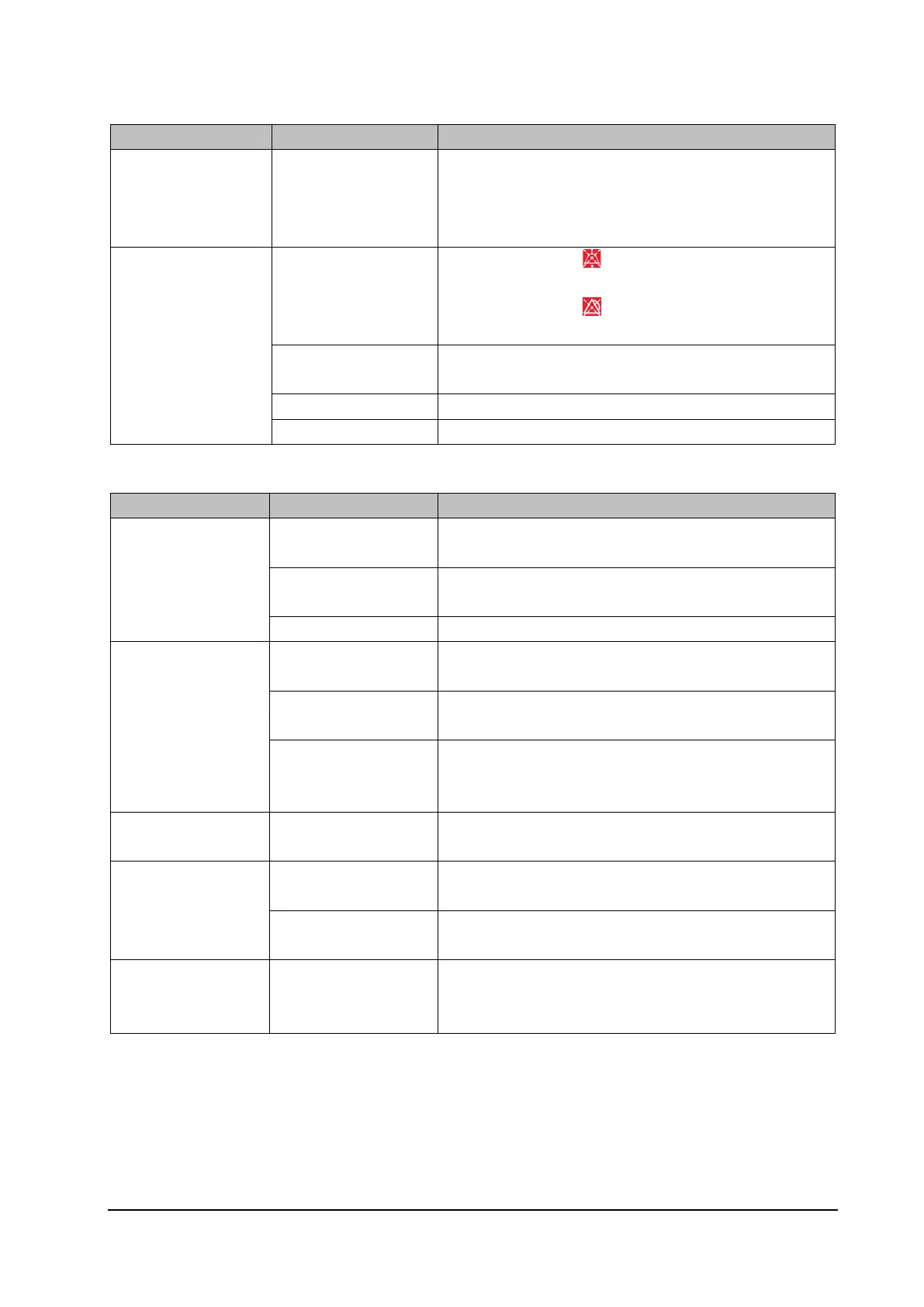
6.5.3 Alarm Failures
Failure Description Possible Cause Troubleshooting
The alarm lamp is off or
cannot be turned off
while the monitor
sounds audible alarms.
The main board is faulty. Replace the main board.
You cannot hear the
alarm.
The alarm is muted.
1. Check whether the icon is displayed in the alarm status
icon area. If yes, the alarm is muted.
2. Check whether the icon is displayed in the alarm status
icon area. If yes, the alarm is paused or disabled.
The speaker connection
cable is faulty.
Verify that the cable connecting the speaker to the main board is
properly connected.
The speaker is faulty. Replace the speaker.
The main board is faulty. Replace the main board.
6.5.4 Dock or Modular Rack Failures
Failure Description Possible Cause Troubleshooting
The parameter module
cannot be identified.
The Rack NIOS board is
faulty.
Replace the NIOS board.
The RACK connector
board is faulty.
Verify that the RACK connector board is securely connected to
the NIOS board, or replace the connector board.
The main board is faulty. Replace the main board.
The monitor provides
no video output, the
USB device or network
cannot be used, or the
monitor cannot be
connected to the main
monitor.
The Dock interface board
is faulty.
Replace the Dock interface board.
The Dock transfer board
is faulty.
Replace the Dock transfer board.
The main board is faulty. Replace the Dock main board.
The Dock provides no
power output.
The Dock power board is
faulty.
Replace the Dock power board.
After the monitor is
installed on the Dock,
the external display is
black.
An abnormality occurs
due to hot plug.
Reinstall N1.
The connection sequence
is incorrect.
Connect the display and the Dock first, and then install or start
N1.
The touchscreen of the
external display cannot
be used.
The USB connection is
abnormal.
Reinstall or restart N1.



 To Next Page