6-5
Message Severity Alarm Clearing Causes and Countermeasures
discharged
patients.
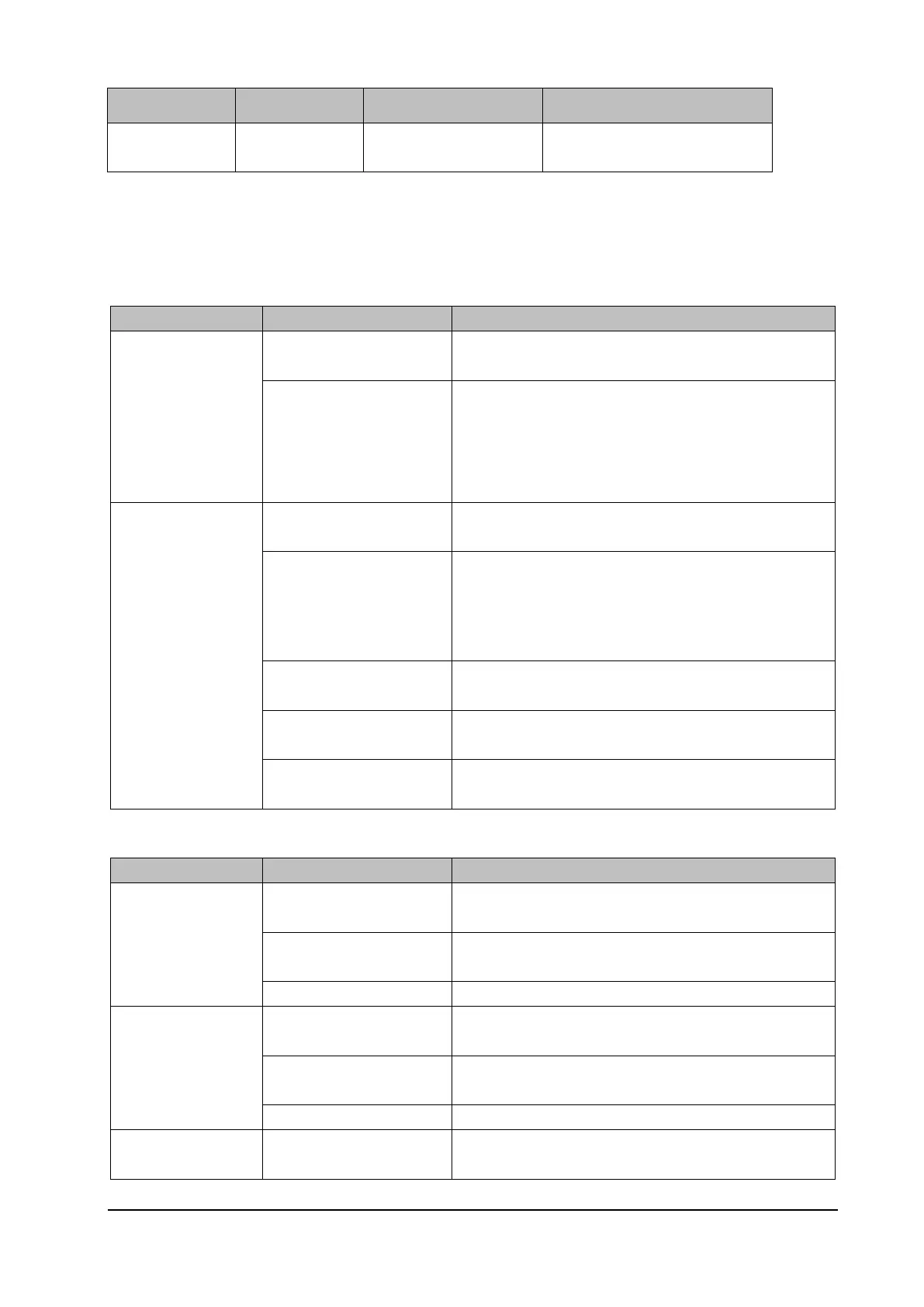
6.5 Troubleshooting Guide
6.5.1 Power-On/Off Failures
Failure Description Possible Cause Troubleshooting
You cannot turn on the
monitor powered only
by the battery.
The battery is not activated. Use the AC adapter or Dock to supply external power to
activate the battery.
The battery is low or the
battery is damaged.
Use the AC adapter or Dock to supply external power to the
monitor. Then turn on the monitor to check the battery level
and battery status. If the battery LED flashes yellow or the
system generates the battery error alarm, the battery is
damaged. In this case, replace the battery.
You cannot turn on the
monitor connected to
the AC adapter (when
the battery is not
available or the battery
is low or faulty).
The AC power supply is not
connected.
Verify that the AC power supply is properly connected.
The AC adapter is faulty. If the monitor can work properly when being connected to the
main monitor or the Dock, replace the AC adapter.
The main board power
supply is faulty.
If the external power LED is off, replace the main board.
The power button PCBA is
faulty.
If you can turn on the monitor after connecting it to the
powered-on main monitor, replace the power button PCBA.
The main board display
circuit is faulty.
If the power LED is on but the display is off, replace the main
board.
6.5.2 Display Failures
Failure Description Possible Cause Troubleshooting
The monitor displays a
black, white, or flower
screen or displays
horizontal or vertical
lines.
The screen cable is loose. Check whether the screen cable is connected properly. If no,
reconnect it.
The display assembly is
faulty.
Replace the display assembly.
The main board is faulty. Replace the main board.
The touchscreen does
not respond.
The screen cable is loose. Check whether the screen cable is connected properly. If no,
reconnect it.
The display assembly is
faulty.
Replace the display assembly.
The main board is faulty. Replace the main board.
The touchscreen fails
to respond accurately.
The touchscreen is faulty. Replace the display assembly.



 To Next Page