5.2 Type plate
Device description
5284 / 08/2023 enBENNING ST 755+ / ST 760+22
Built-in battery
• The device is provided with an integrated battery in order to maintain operation in the event
of a power failure or when changing the test station. Do not switch off the device if you
disconnect the mains supply due to a test station change.
• The correct battery state of charge (SoC) is only displayed after the first full charge to
100%. The SoC remains at 0% until full charging has been completed.
• As soon as the battery has been discharged to 0%, the battery will initially charge slowly
(approx. 30minutes). Then, the actual charging takes place with a higher charging current.
• If the battery is exhausted and the power supply from the mains is missing, the device
switches off automatically. It is recommended to always switch off the device after use via
the ON/OFF.
• The battery will be charged automatically in mains operating mode with the device being
switched on.
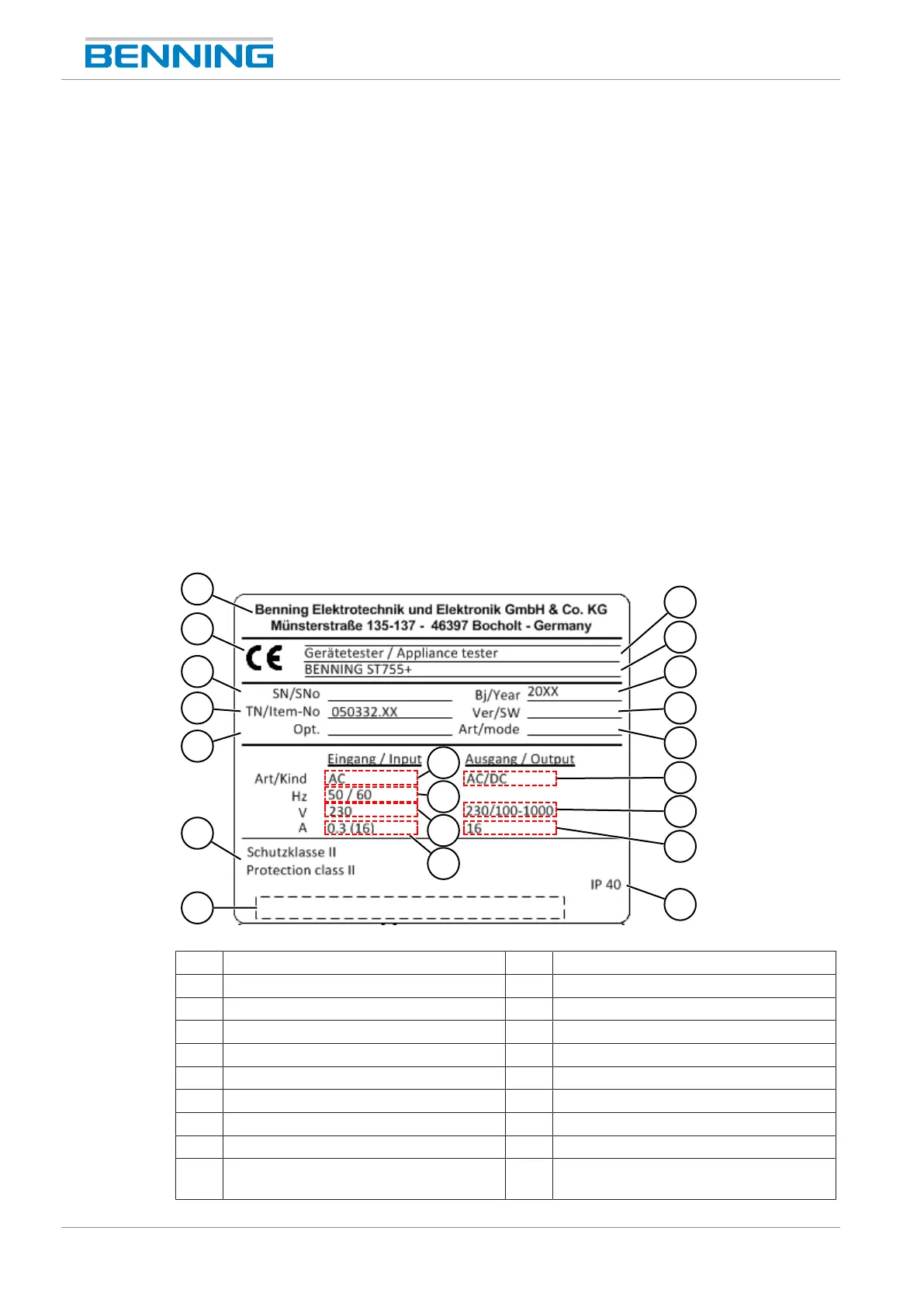
5.2 Type plate
The type plate is located inside the housing case on the left side of the device.
When contacting our Technical support [}page12], have the serial number of the device at
hand. You will find the serial number on the type plate.
The following figure shows an example of the setup of the type plate:
1
2
3
4
6
8
10
12
15
5
7
17
20
11
13
14
16
18
19
9
Figure2: Type plate (exemplary)
1 Manufacturer or sales partner 2 Product type/ product classification
3 CEmarking 4 Series
5 Serial number 6 Year of manufacture
7 Item number 8 Software version
9 Option number 10 Operating mode
11 Type of current at the input 12 Type of current at the output
13 Nominal input frequency [Hz] 14 Nominal input voltage [V]
15 Nominal output voltage [V] 16 Nominal input current [A]
17 Nominal output current [A] 18 Protection class
19 Protection category (with device being
open)
20 Barcode



 To Next Page