Configuration
8.6 Managing a database
5284 / 08/2023 en BENNING ST 755+ / ST 760+ 65
8.6 Managing a database
The "Database" menu is intended to manage the following contents:
• Database names
• Customer data
• Department names
• Test sample data
Menu
“Settings> Database”
Setting options
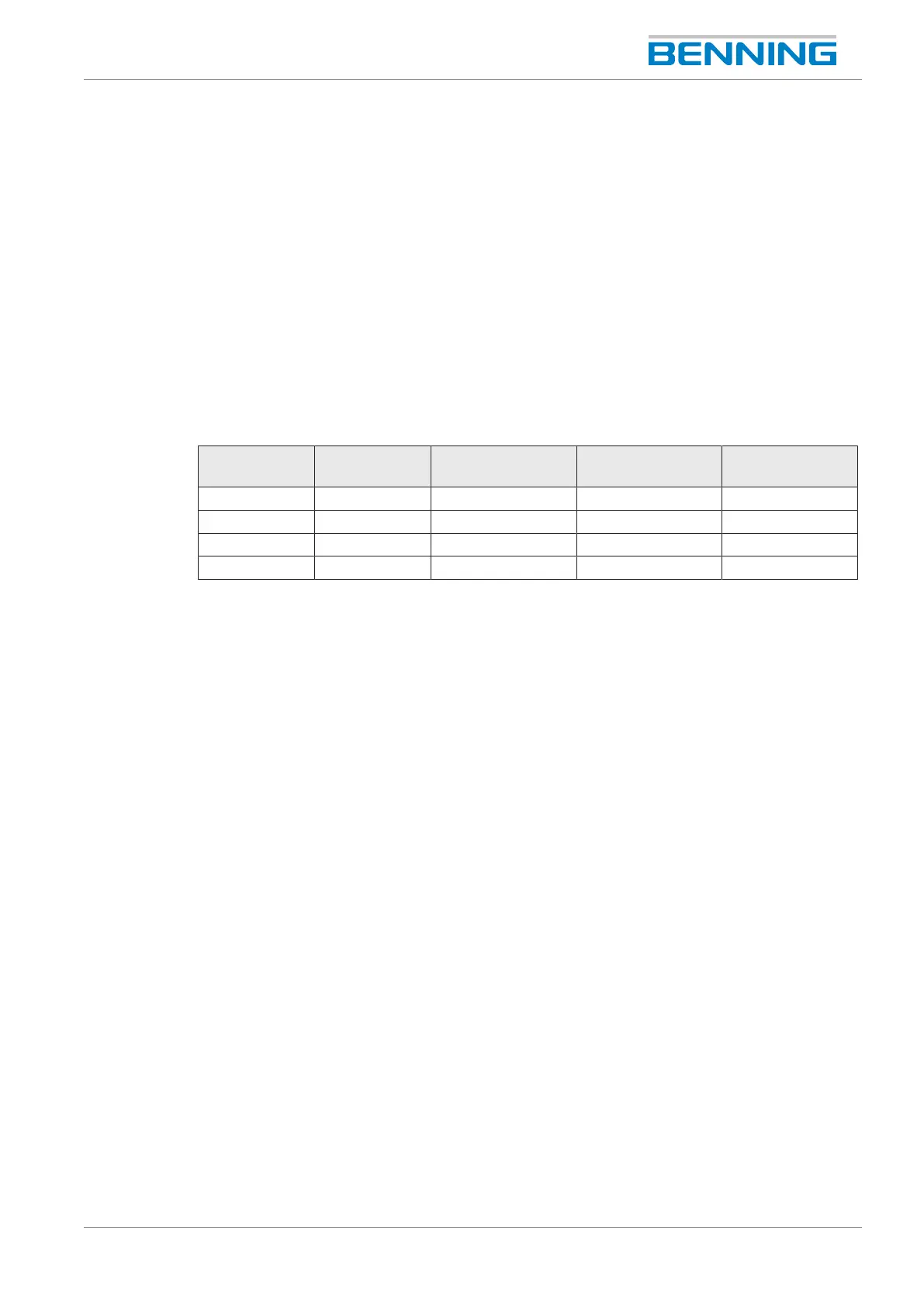
Button Database Customer Department Test sample/
IDno.
New X X X X
Change - X X X
Copy - X - X
Delete - X X X
Table24: Functions of the “Databaseadministration”
8.6.1 Creating (“New”) and selecting e.g. a database
Procedure– Creating a database
1. Select the “Database” parameter. To do this, tap the “Database”line on the left.
2. Create a new database. To do this, tap the “New”button in the footer.
The input window “Database name” opens.
3. Enter the desired database name and confirm it with the “Enter”button.
When the database is created, it will be selected automatically. This is displayed in the
status display of the database.
Procedure– Selecting a database
1. Open the selection window with the databases already created. To do this, tap the line on
the right.
2. Select the desired database. To do this, tap the line and confirm by tapping the “OK” button.
The database now is selected. This is displayed in the status display of the database.



 To Next Page