General operation
6.6 Operating the test view
5284 / 08/2023 en BENNING ST 755+ / ST 760+ 31
6.6 Operating the test view
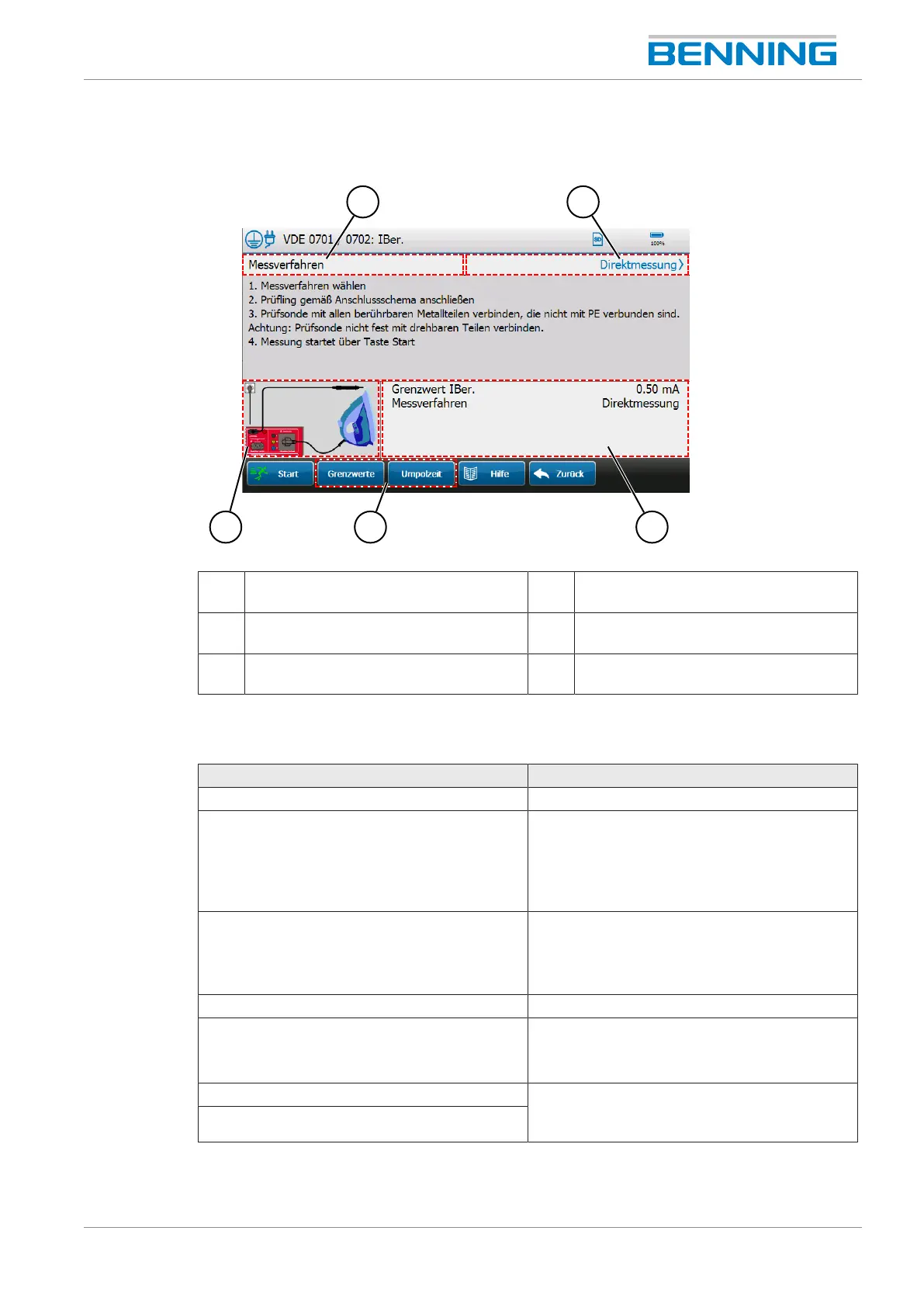
Figure5: Test view
1 Selectable parameter 2 Selected parameter entry
(Tap to open the selection window.)
3 Display area for measurement details 4 Buttons for measurement-specific
settings for the duration of the test.
5 Connection diagram
(Tap to enlarge the screen.)
6 -
Operating the test view
Button Description
Start Starts the test.
Stop Automatic test: The test is stopped. The
“Automatic test” screen opens.
Manual test: The individual test is completed.
The intermediate view of measuring results is
displayed.
Pause The measurement is paused.
Is used when changing the position of
terminals or test probes to avoid incorrect
measurement.
Next Continues the paused measurement.
Reset Deletes incorrect measured values (only works
when the test is running).
The test duration is reset.
Limits
“Limits” [}page60] and “Polarity reversal
time” [}page40] can be changed for the
duration of the test.
Polarity reversal time



 To Next Page