Get Started 2
Get Started
Thefollowingtopicsgiveyoualltheinformationyouneedtosetupyourphoneandwirelessservice
thefirsttime.
Parts and Functions
Thesetopicsillustrateyourphone’sprimarypartsandkeyfunctions.
Phone Layout
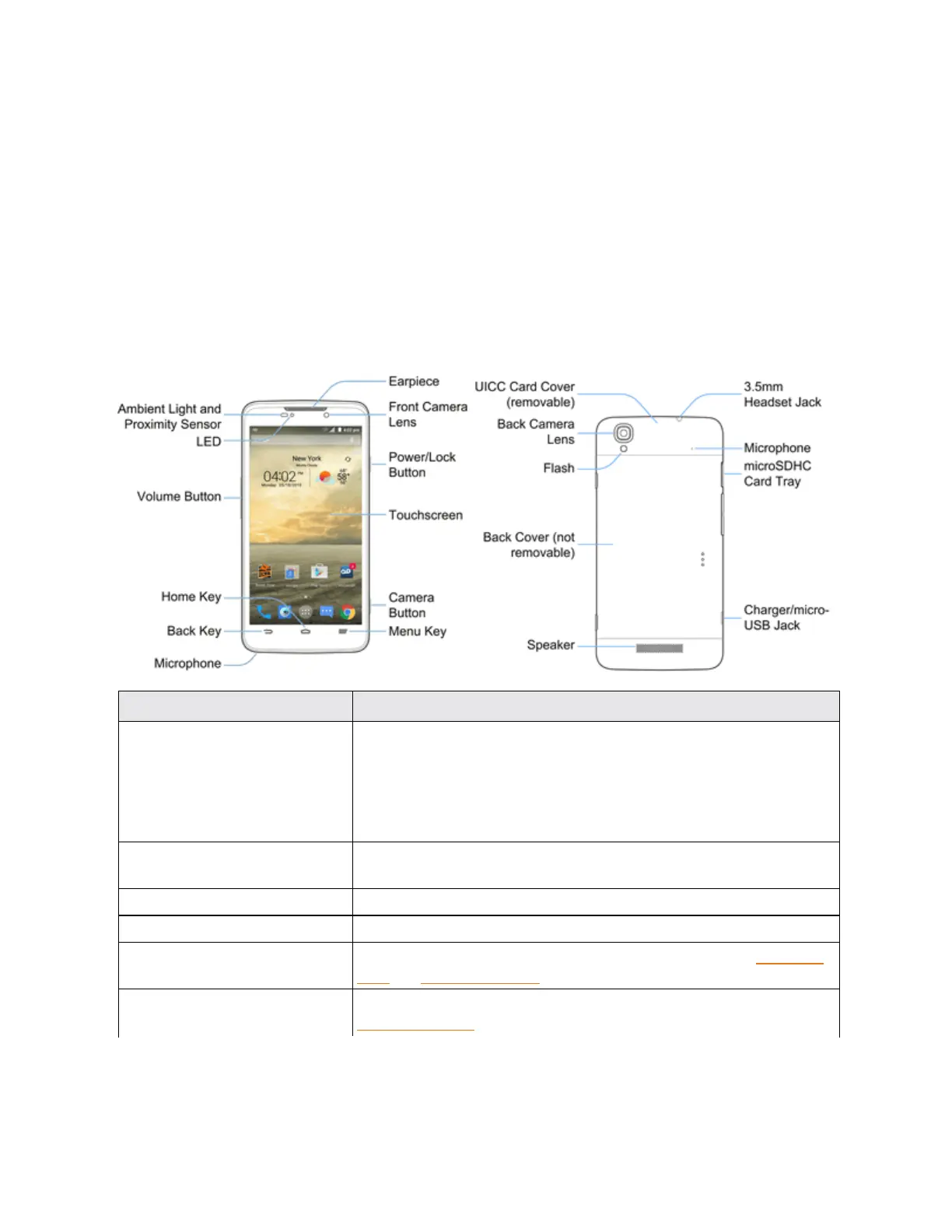
Thefollowingillustrationoutlinesyourphone’sprimaryexternalfeaturesandbuttons.
Part Description
Ambient Light and Proximity
Sensor
Detectshowcloseanobjectistothesurfaceofthescreen.Thisis
typicallyusedtodetectwhenyourfaceispressedupagainstthe
screen,suchasduringaphonecall.
Whiletalkingonthephone,thesensordetectstalkactivityandlocks
thekeypadtopreventaccidentalkeypresses.
Front Camera Lens Takespicturesandrecordsvideoswhilefacingthescreen,andallows
youtovideoconference.
Earpiece Letsyouhearthecallerandautomatedprompts.
LED Displaysaphonenotification,chargingstatus,oralert.
microSDXC Card Tray AllowsyoutoinstallanoptionalSDcardtoyourphone.SeeInsertSD
CardandRemoveSDCard.
UICC Card Cover ProtectsyourUICCcardneededforconnectingtothe4Gnetwork.See
InsertUICCCard.



 To Next Page