Your Phone Interface 62
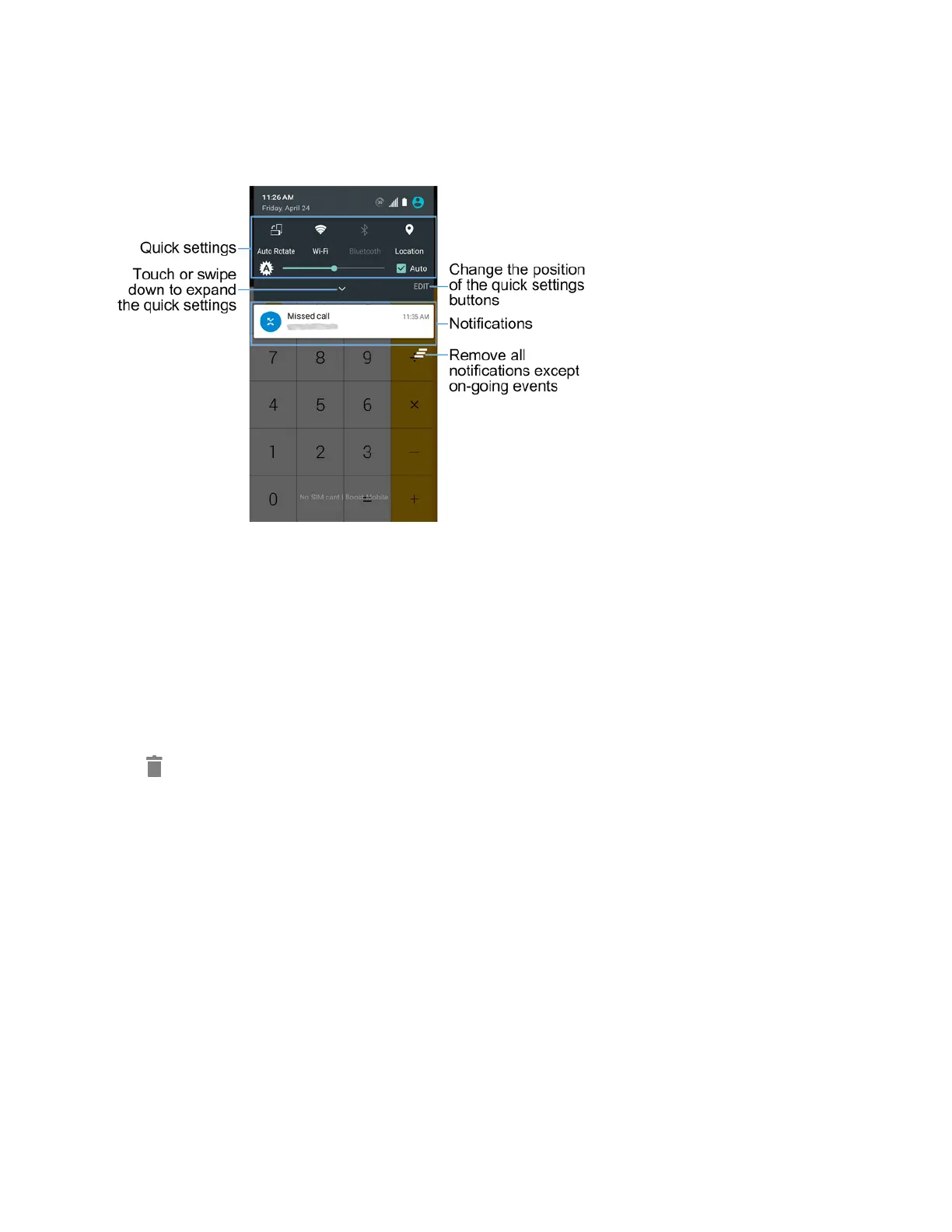
Notifications Panel Layout
Thenotificationspanelgivesyouaccessbothtonotificationsandthequicksettingsmenu.
Customize the Home Screen
Learnhowtosetthewallpaperortheme,andadd,move,orremoveshortcuts,widgets,andfolders
fromthehomescreen.
Operations for Rearranging the Home Screen
n Moving Widgets and Icons:Fromhome,touchandholdanitemandthendragittothe
desiredlocation.
n Deleting Widgets and Icons:Fromhome,touchandholdanitemandthendragittoDelete
.
n Displaying the Home Screen Menu:Fromhome,touchandholdanemptyspacetodisplay
thehomescreenmenu.MenuoptionsincludeWidgets,Wallpapers,Themes,andEffects.
Change the Wallpaper
Selectandassignyourphone’sbackgroundwallpaper.



 To Next Page