Messaging and Internet 150
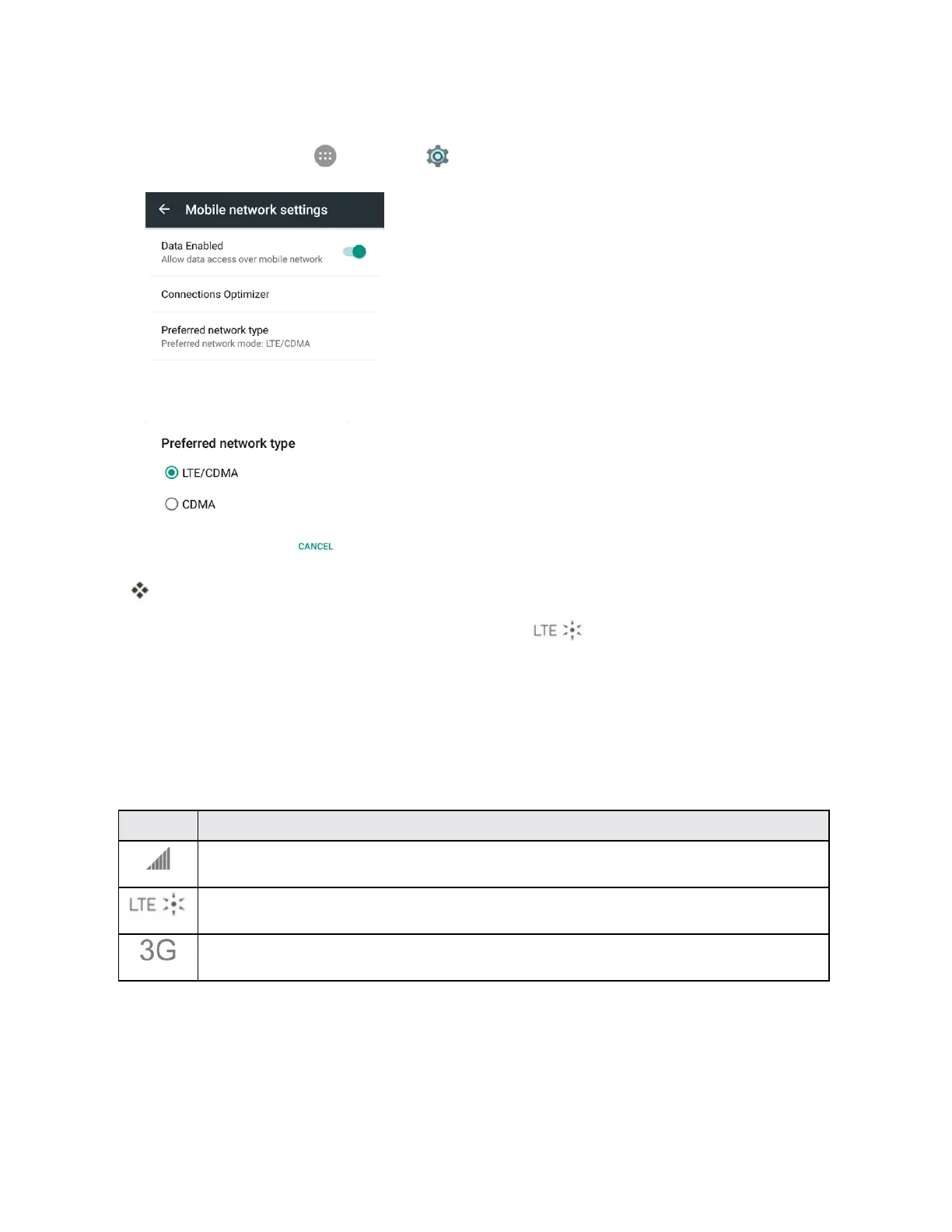
Set Your Network Options
1.
Fromhome,tapApps >Settings >Mobile networks>Preferred network type.
2. SelectLTE/CDMAorCDMA.
Thephonewillscanforthebestavailablenetworkandwillautomaticallyconnecttoit.
Whenyourphoneisconnectedvia4GLTE,theLTEicon appearsinthestatusbar.
Note:Theenhanced4GLTEnetworkisself-discoverable,whichmeansnoadditionalstepsare
requiredforyourphonetoconnecttoit.
Data Connection Status and Indicators
Yourphonedisplaysthecurrentstatusofyourdataconnectionthroughindicatorsatthetopofthe
screen.Thefollowingsymbolsareused:
Icon Status
Network (full signal):Thenumberofbarsindicatesthestrengthofthesignal.Morebars
meanabettersignal.
Enhanced 4G LTE data service:Yourphoneisconnectedtotheenhanced4GLTEnetwork.
Theraysspinwhendataisbeingtransferred.
3G (data service):Yourphoneisconnectedtothe3Gnetwork.Whentheiconisanimated,
yourphoneistransferringorreceivingdata.
Browser
Yourphone’sChromeWebbrowsergivesyoufullaccesstobothmobileandtraditionalwebsiteson
thego,using3G,4G,orWi-Fidataconnections.



 To Next Page