Basic Operations 31
n Tapthealphabetickeystoenterletters.Touchandholdspecifickeystoenterassociated
accentedletters,symbols,ornumbers.Forexample,toenterŢ,touchandhold toopen
availablecharactersandnumbers.SlidetochooseŢandrelease.
n
Tap touseuppercase.Tap twicetolockuppercase.Thiskeyalsoindicatesthecurrent
case: forlowercase, foruppercase,and whenlockedinuppercase.
n
Tap toenteraspace.Touchandholdthiskeytoopenapop-upmenuforlanguage
selection.
n
Tap toselectnumbersandsymbols.Tap tofindmoresymbols.Tap togobackto
enterletters.
n
Touchandhold or andthenslidetochoosedifferentkeyboards.Youcanselect
keyboardslayoutssuitableforlefthand,righthandortwohands,openaphonekeypadtoenter
numbersandcertainsymbols,openapop-upmenutochooseemoticons,oropenatextediting
panelwhereyoucanselect,copy,andpastetext.
n
Tap toenterasmilesymbol.Hold or toopenanemoticonlist.
n
Tap todeleteacharacterbeforethecursor.Touchandhold todeletewordsonebyone
beforethecursor.
n
Tap touseGooglevoicetyping.
n
Touchandhold toopentheSwypesettings.
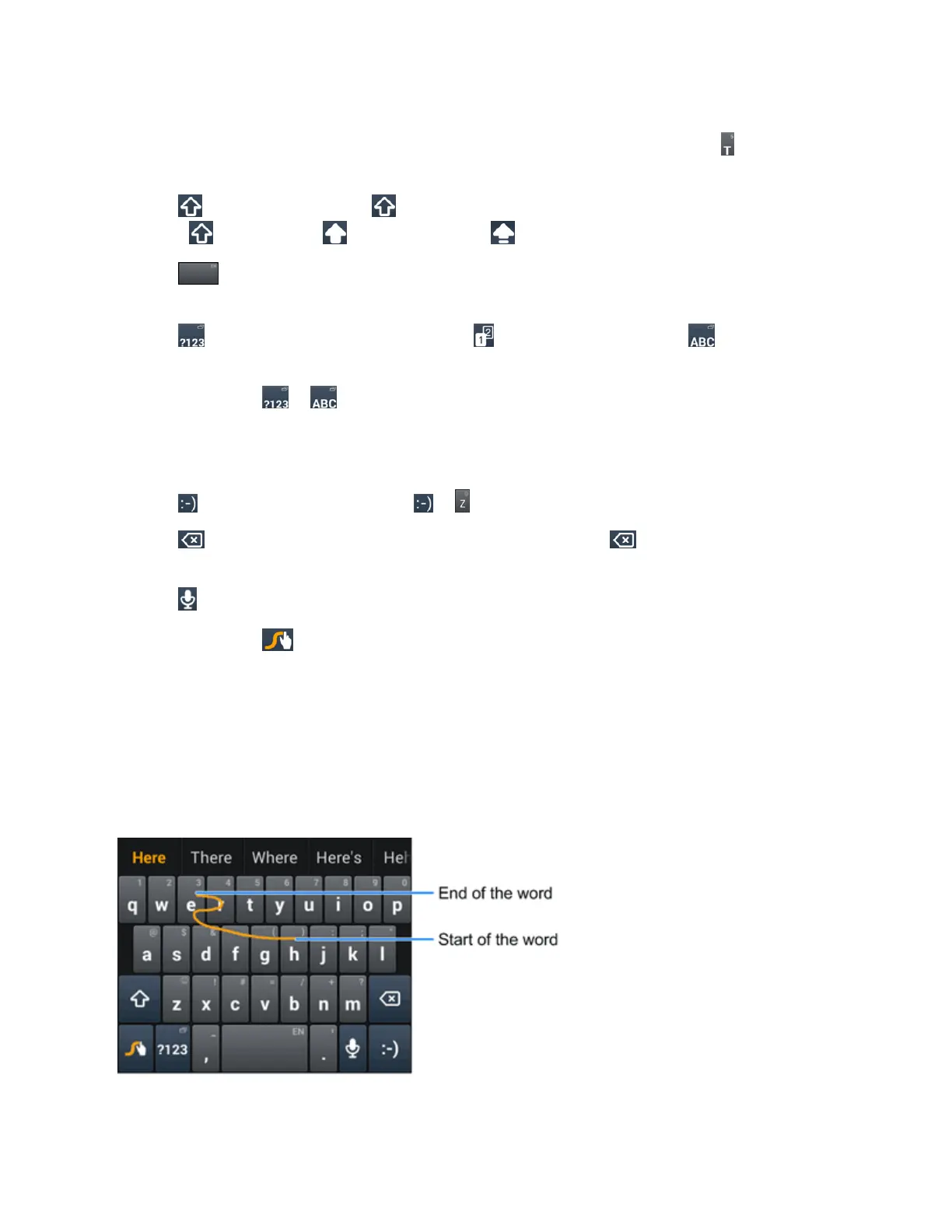
ToentertextviaSwype:
Moveyourfingerfromlettertolettertotraceawordwithoutliftingthefingeruntilyoureachtheend
oftheword.
Thefollowingexampleshowshowtoentertheword"here".Putyourfingeron"h"andslideto"e",
"r",andbackto"e".Whencomplete,liftyourfingeroffthescreenandthematchedwordsare
displayed.
TipsforusingSwypeTextInput:



 To Next Page