- 18 -
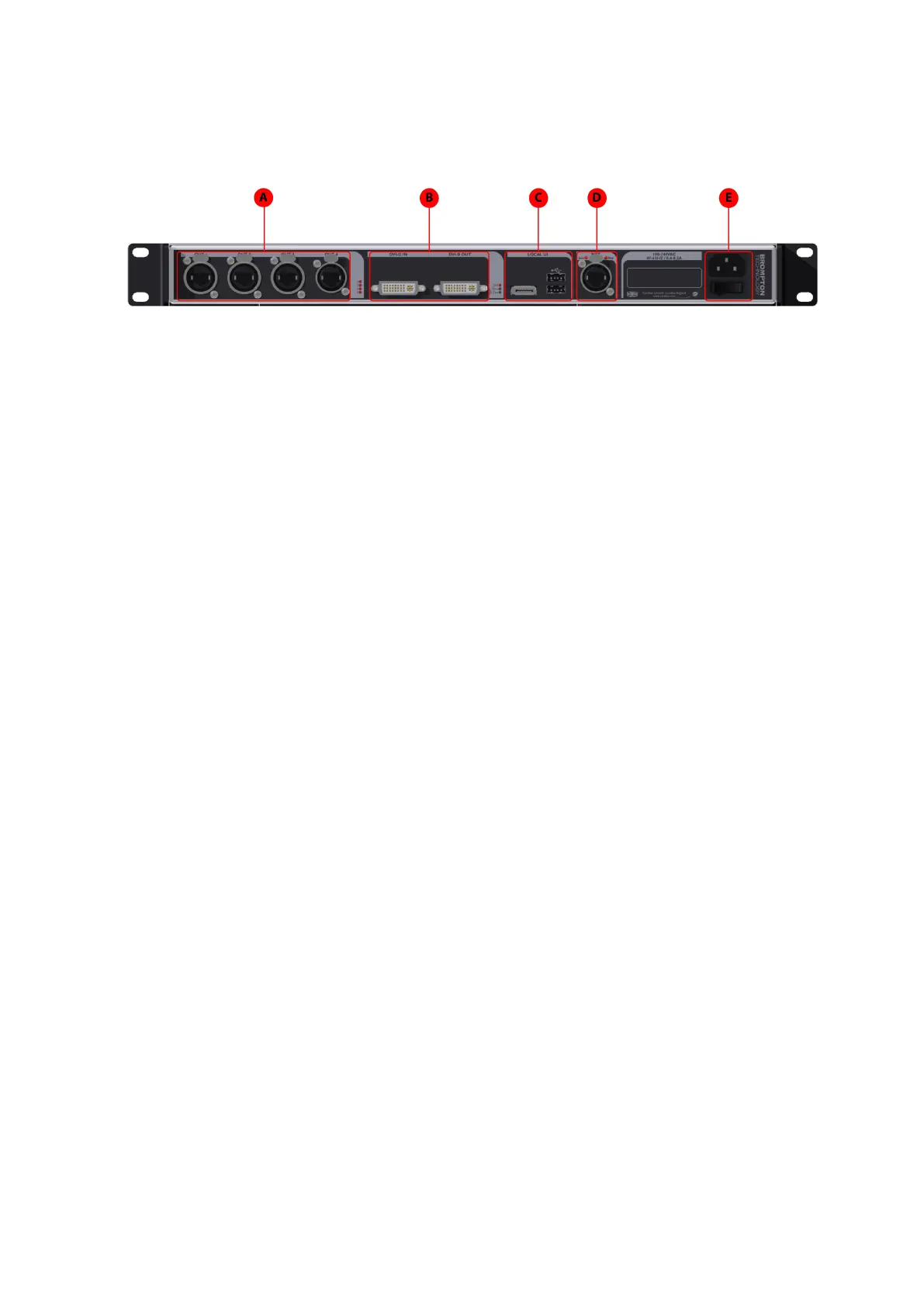
Rear Panel
A
Gigabit Ethernet Outputs
The S4 processor has four Ethernet outputs which are provided on EtherCON
connectors. Fixtures should be connected with gigabit Ethernet cable (Cat-5e or
above). For more information on Ethernet connection see Connecting Fixtures on
page 1.
B
DVI-D Input
A DVI-D input of up to 1920x1080 is available, with a reclocked DVI-D thru
C
Local User Interface
The M2 Processor can be operated locally with a monitor connected via DisplayPort.
Peripherals such as mouse and keyboard can be connected to the USB ports on either
the front or rear panel
D
Remote Control Ports
The S4has a Gigabit Ethernet port for remote control with Tessera Remote software
only.
E
IECMains Input and On/Off Switch
The S4 processor supports a voltage range of 100V-240V, and a mains frequency
range of 50 - 60Hz. The processor can be turned off from the power switch. It can be
shutdown from the local interface or remote computer. No harm will result from
turning the processor off at the switch.



 To Next Page