Managing the System
Exte rnal Device
Cisco Small Business NSS 322, NSS 324, and NSS 326 Smart Storage Administration Guide 166
3
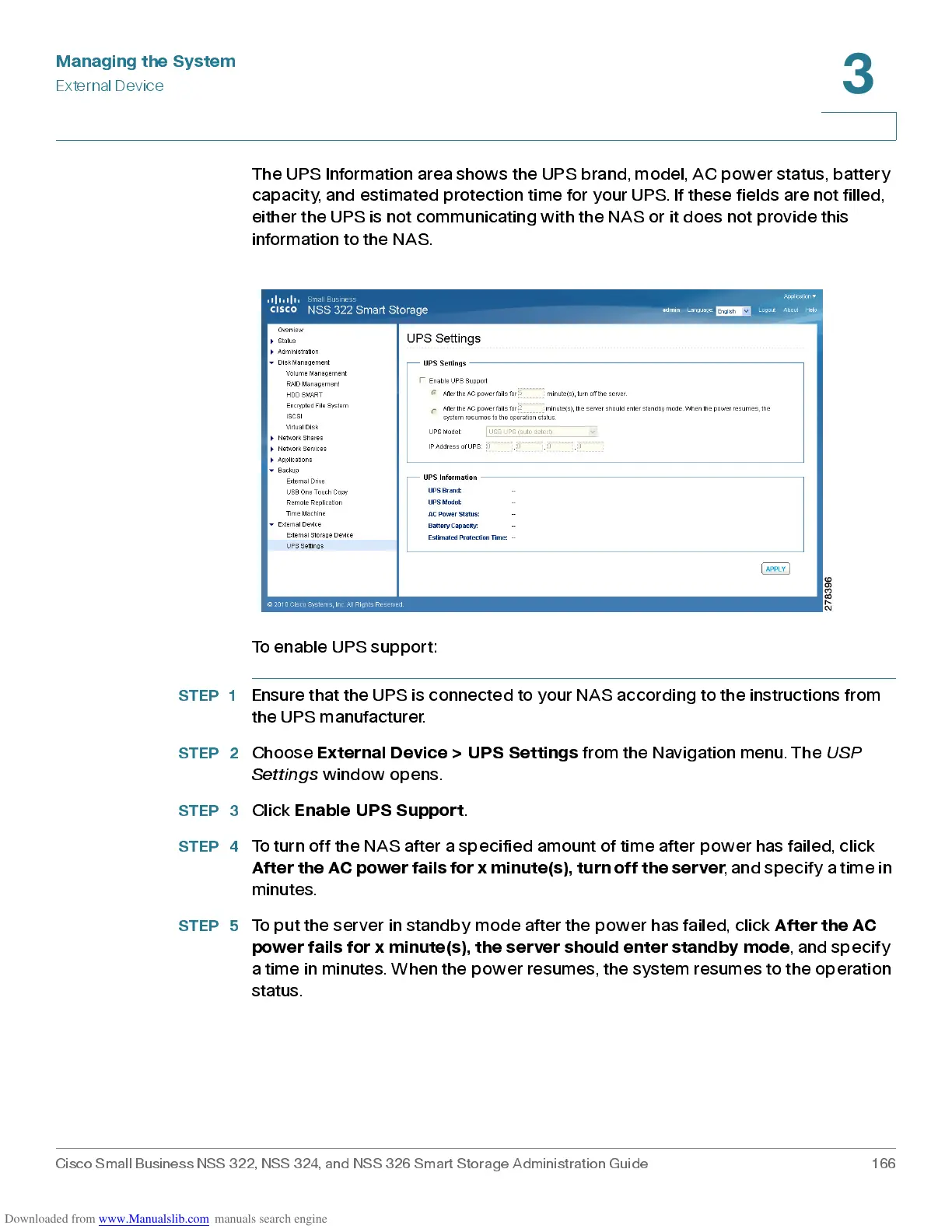
The UPS Information area shows the UPS brand, model, AC power status, battery
capacit y, and estima ted protection time for your UPS . If these fields are not filled ,
either the UPS is not communicating with the NAS or it does not provide this
information to the NAS.
To enable UPS support:
STEP 1
Ensure that the UPS is connected to your NAS according to the instructions from
the UPS manufacturer.
STEP 2
Choose
External Device > UPS Settings
from the Navigation menu. The
USP
Settings
window opens .
STEP 3
Click
Enab le UP S Supp ort
.
STEP 4
To turn off the NAS after a specified amount of time after power ha s failed, click
After the AC power fails for x minute(s), turn off the server
, and specify a time in
minutes.
STEP 5
To put the server in standby mode after the power has failed, click
After the AC
power fails for x minute(s), the server should enter standby mode
, and specify
a time in minutes. When the power resumes, the system resumes to the operation
status.



 To Next Page