5.9.9.2 Conguring ANPR
Background Information
Congure the ANPR alarm rules.
Procedure
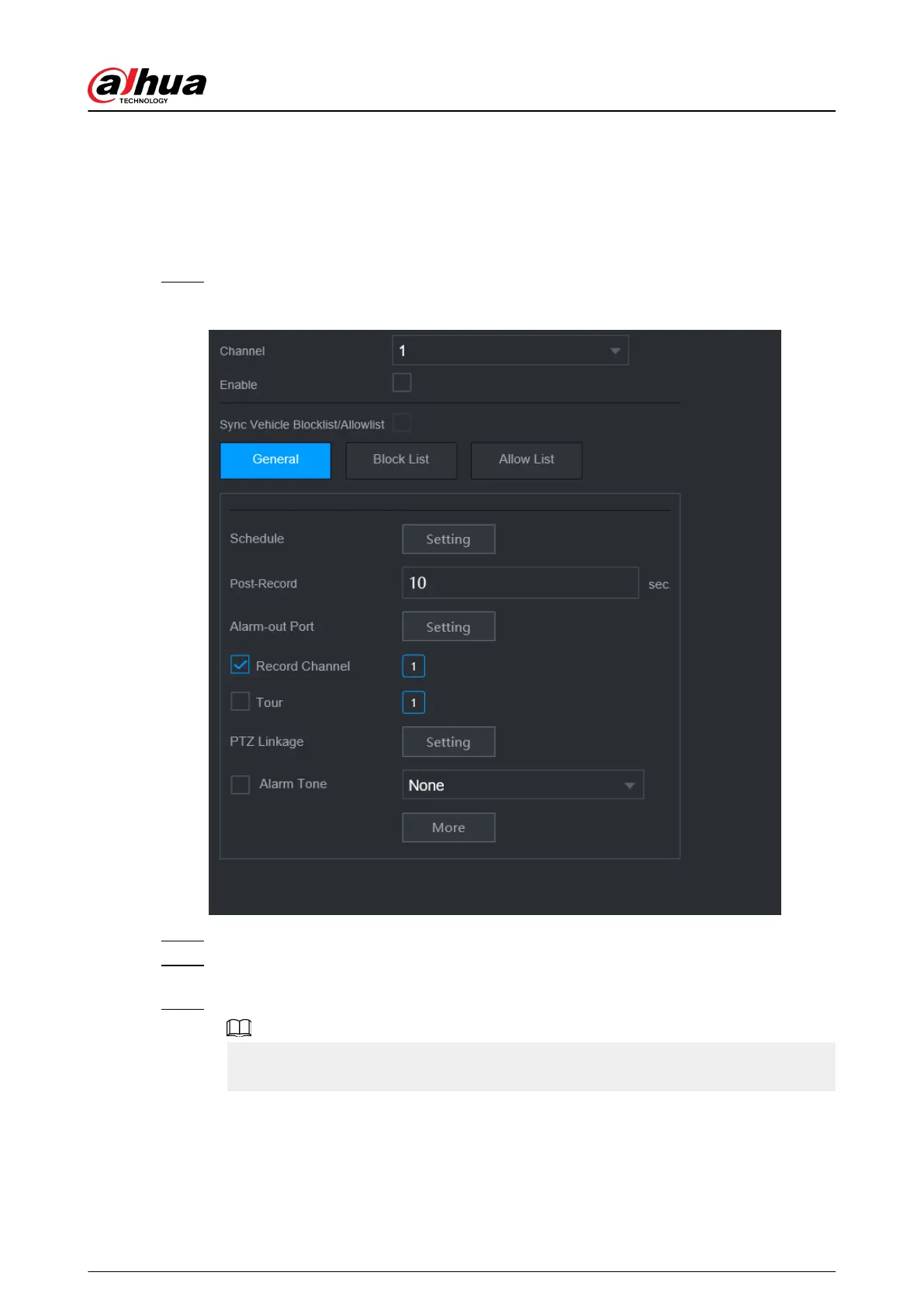
Step 1 Select Main Menu > AI > Parameters > ANPR.
Figure 5-164 ANPR
Step 2 Select a channel and then select the Enable checkbox to enable ANPR.
Step 3 (Optional) Enable Sync Vehicle Blocklist/Allowlist to synchronize the blocklist and
allowlist on the NVR to the connected camera.
Step 4 Click General (default), Blocklist or Allowlist tab.
Before enabling the blocklist alarm or allowlist alarm, you need to add the corresponding
plate information.
●
General : The system triggers an alarm when it detects any plate number.
●
Block List : The system triggers an alarm when it detects plate number on the
blocklist.
●
Allow List : The system triggers an alarm when it detects plate number on the
allowlist.
User's Manual
274


 To Next Page
 Loading...