44 6.4 Setting Group No. for Centralized Control
Fundamental of DIII-NET
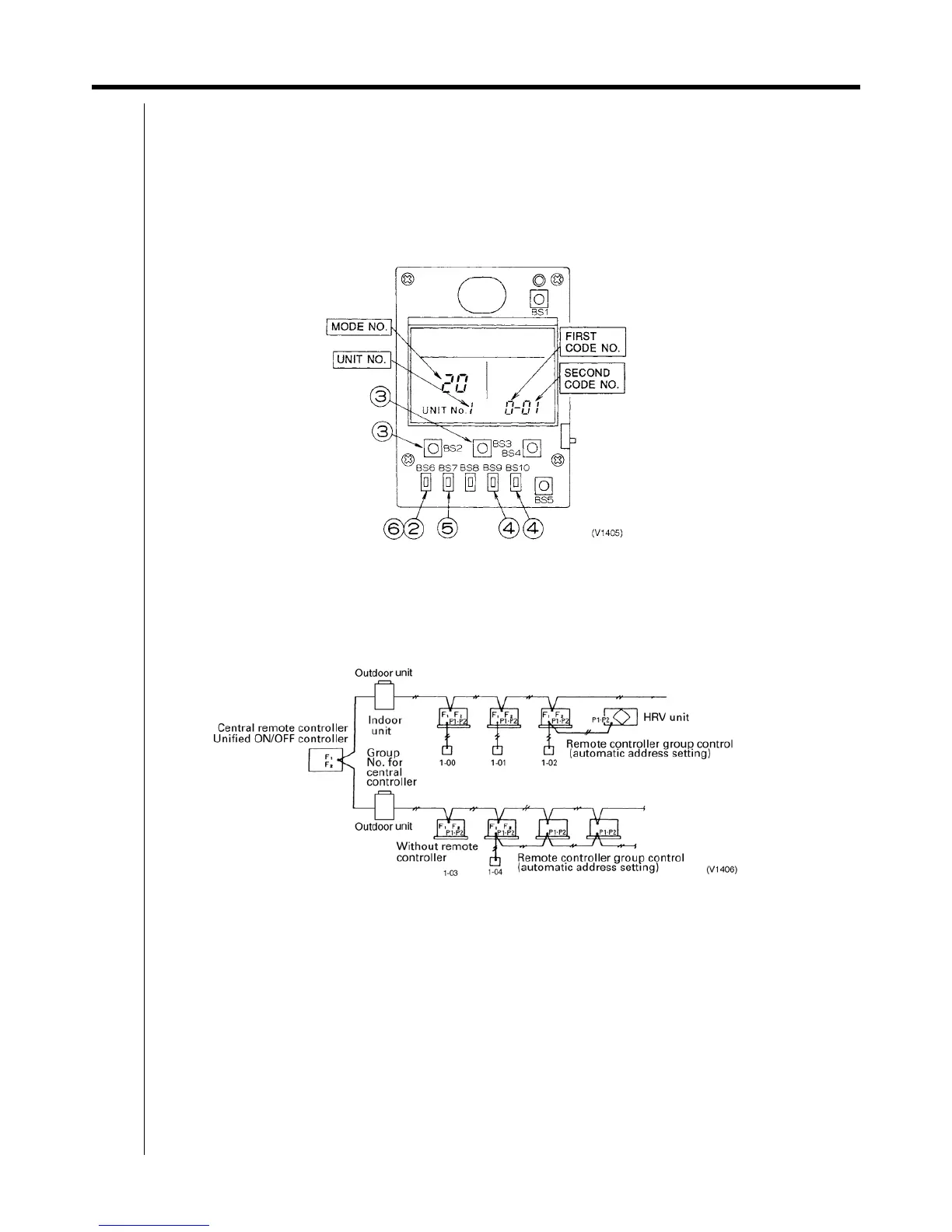
6.4.3 Simplified Remote Controller <BRC2C51>
1. Remove the cover of remote controller.
2. While in normal mode, press the [BS6] BUTTON (field set) to enter the FIELD SET MODE.
3. Select the mode No. [00] with [BS2] BUTTON (temperature setting ▲) and [BS3] BUTTON (temperature setting ▼).
4. Select the group No. with [BS9] BUTTON (set A) and [BS10] BUTTON (set B). (Group Nos. increase in the order of 1-
00, 1-01......1-15, 2-00,.....4-15. However, the unified ON/OFF controller displays only group No. set within the range
of control.)
5. Press [BS7] BUTTON (set/cancel) to set group No.
6. Press [BS6] BUTTON (field set) to return to the NORMAL MODE.
<Cautions>
Even in the system without remote control, connect the remote controller once to set group No. for central control
equipment and remove the remote controller after setting.
When you set the group No., be sure to supply the power to the central remote controller, the unified ON/OFF
controller and the indoor unit.
<Example of group setting>
Cautions
When the power is supplied, all the display appears once on the remote controller and then the display changes to [88] for
about one minute and during that time the remote controller does not function. However, this is not a malfunction of
remote controller.


 To Next Page