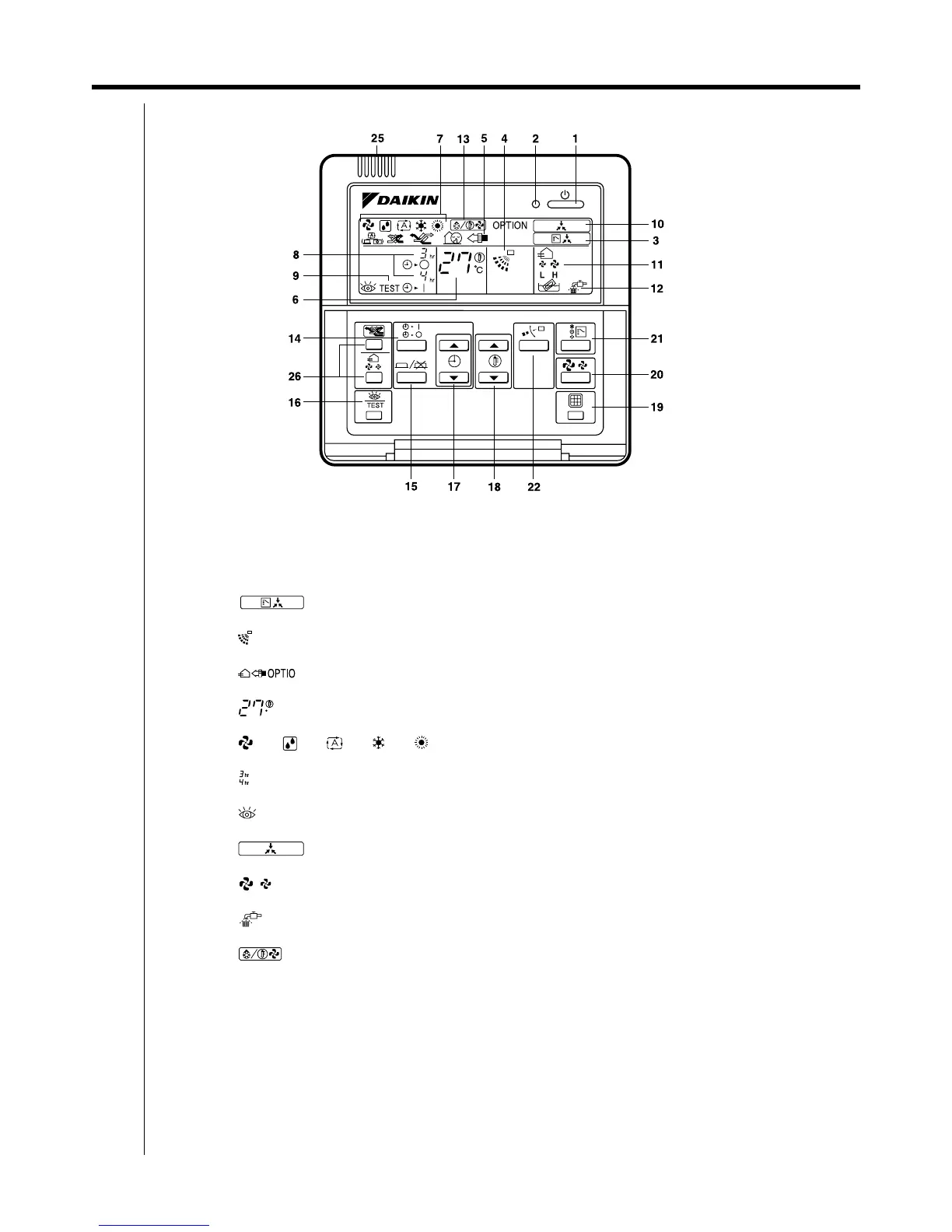
66 3.3 Remote Controller <BRC1C62>
Remote Controllers
3.3.2 Name and Function
1. On/off button
Press the button and the system will start. Press the button again and the system will stop.
2. Operation lamp (red)
The lamp lights up during operation.
3. Display “ ” (changeover under control)
It is impossible to changeover heat/cool with the remote controller which display this icon.
4. Display “ ” (air flow flap)
Refer to the chapter “Operation procedure - Adjusting the air flow direction”.
5. Display “ ” (ventilation/air cleaning)
This display shows that the ventilation unit are in operation. (these are optional accessories)
6. Display “ ” (set temperature)
This display shows the temperature you have set.
7. Display “ ” “ ” “ ” “ ” “ ” (operation mode)
This display shows the current operation mode.
8. Display “ ” (programmed time)
This display shows the programmed time of the system start or stop.
9. Display “ ” (inspection/test operation)
When the inspection/test operation button is pressed, the display shows the mode in which the system actually is.
10.Display “ ” (under centralized control)
When this display shows, the system is under centralized control. (This is not a standard specification.)
11.Display “ ” (fan speed)
This display shows the fan speed you have selected.
12.Display “ ” (time to clean air filter)
Refer to the operation manual of indoor unit.
13.Display “ ” (defrost/hot start)
Refer to the chapter “Operation procedure - Explanation of heating operation.”
14.Timer mode start/stop button
Refer to the chapter “Operation procedure - Programming start and stop of the system with timer.”
15.Timer on/off button
Refer to the chapter “Operation procedure - Programming start and stop of the system with timer.”
16.Inspection/test operation button
This button is only used by qualified service persons for maintenance purposes.
17.Programming time button
Use this button for setting the programming start and/or stop time.
C
TEST



 To Next Page