CAUTION
RISK OF FIRE OR EXPLOSION
l Do not recharge or disassemble the battery, or dispose of it in fire.
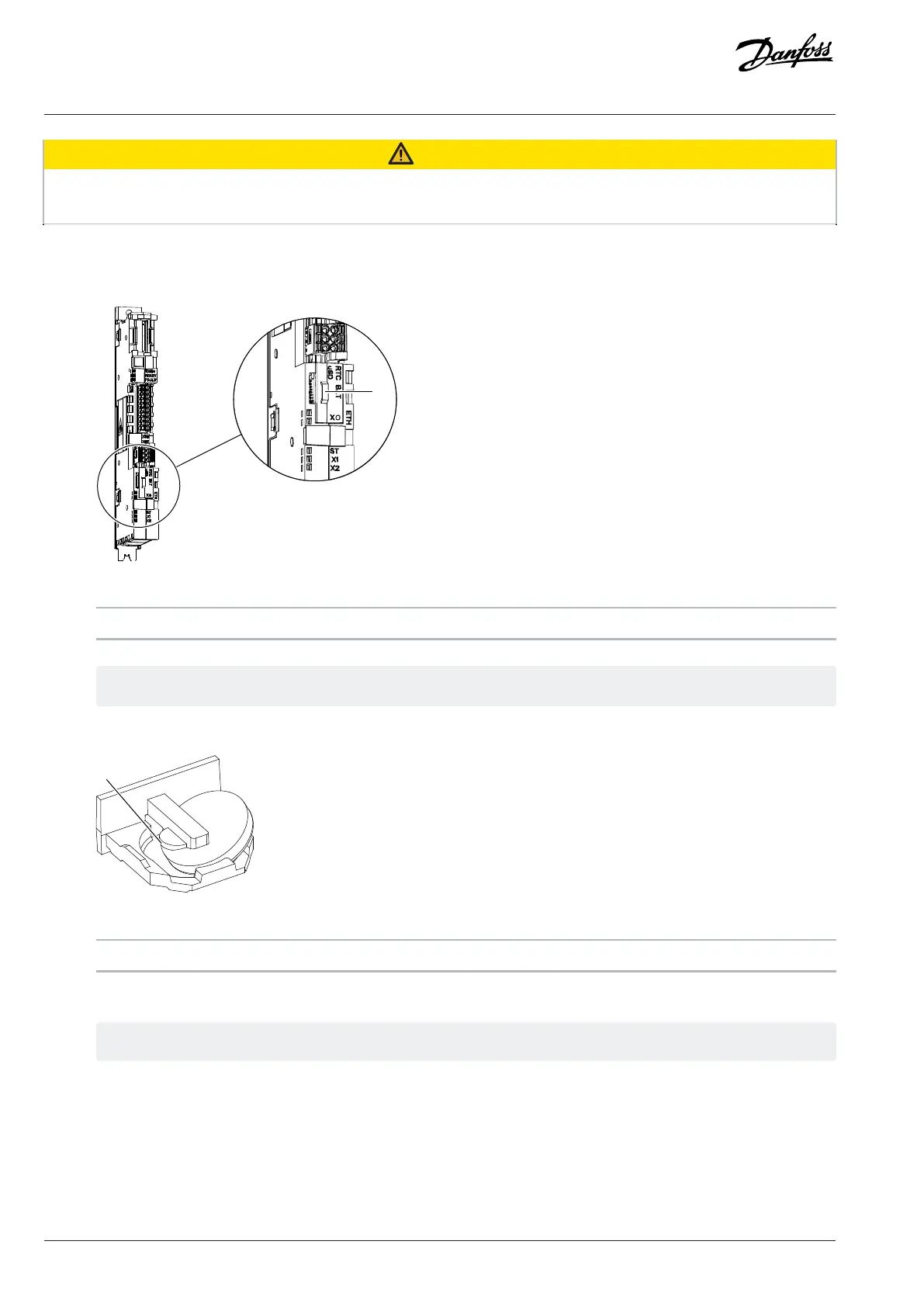
1. Locate the RTC battery holder on the control board of the control unit.
2. Pull from the handle next to the text RTC BAT.
Figure 49: Location of the RTC Battery
1 The handle
Ü
The battery holder slides out.
3. To remove the battery, push it on the tooth side and slide it out of the plastic holder.
Figure 50: Replacing the Battery
1 The tooth
4. To put a new battery in place, start from the opposite side and slide it into the slot in the holder, the plus side towards the tooth.
The correct battery type is a coin type lithium battery BR1632.
5. Push the holder back into the control board.
8.4 Cleaning or Replacing the Door Filters
Clean filters are important to ensure a good air flow into the cabinet. The filters are only included in drives with protection rating IP54.
1. Locate the door filters on the outside of the cabinet door.
2. Pinch together the release tabs on the fan grill and remove the grill from the filter frame.
74 | Danfoss Drives Oy © 2024.09 AJ389643274589en-000101 / 172F6409A
Design Guide | iC7-Automation Air-cooled Enclosed Drives Maintenance



 To Next Page