222 Dell Printer Configuration Web Tool
Print Server Settings
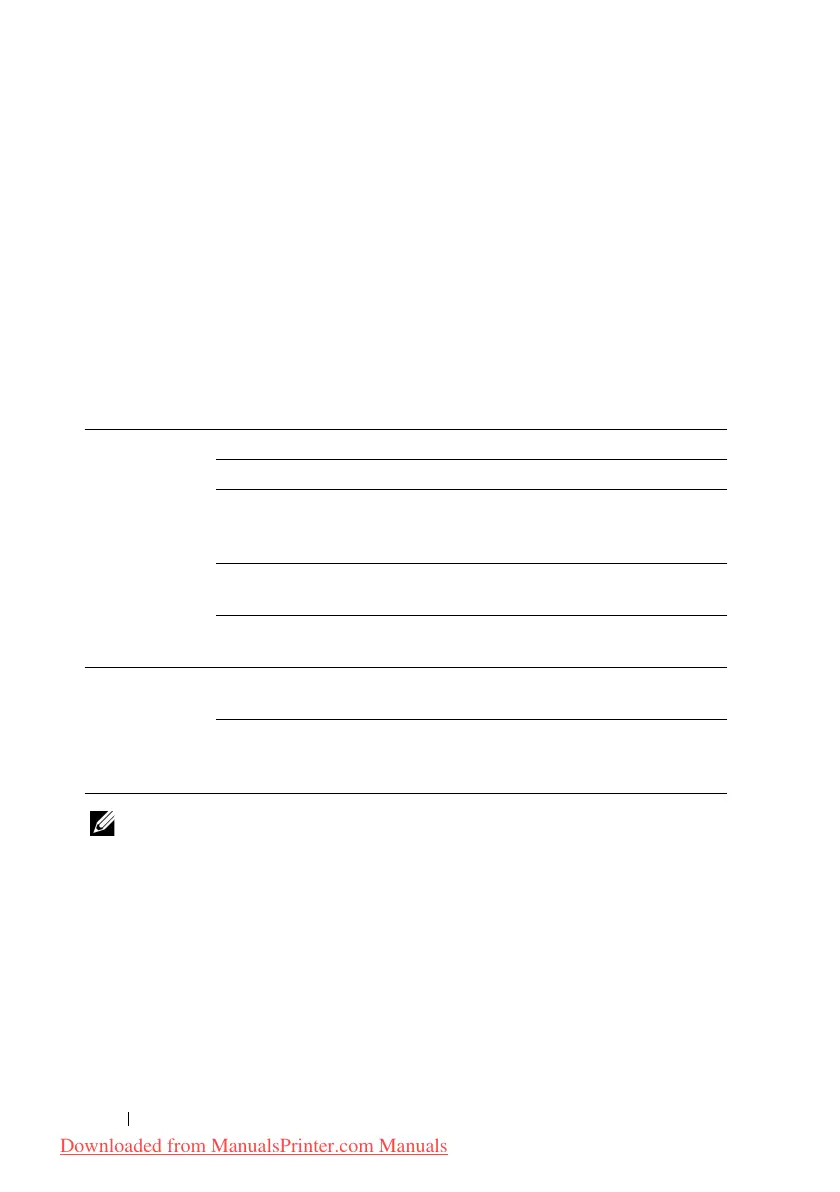
The Print Server Settings tab includes the Basic Information, Port Settings,
TCP/IP, SMB, E-Mail Alert, Bonjour (mDNS), SNMP, Scan to PC, LLTD,
Wireless LAN, and Reset Print Server pages.
Basic Information
Purpose:
To configure basic information of the printer.
Values:
NOTE: The Auto Refresh feature is effective for the contents of the top frame,
Printer Status page, Job List page, and Completed Jobs page.
Port Settings
Purpose:
To enable or disable printing ports and management protocol features.
Values:
System Settings Printer Name Sets the name of the printer.
Location Sets the location of the printer.
Contact Person Sets the contact name, number, and other
information of the printer administrator and service
center.
Administrator
E-Mail Address
Sets the contact address of the printer administrator
and service center.
Asset Tag
Number
Enters the asset tag number for the printer.
EWS Settings Auto Refresh Automatically refreshes the contents of the status
display pages.
Auto Refresh
Interval
Sets the time interval for refreshing the contents of
the status display pages automatically from 15 to
600 seconds.
Downloaded from ManualsPrinter.com Manuals











 To Next Page