DELL CONFIDENTIAL – PRELIMINARY 9/13/10 - FOR PROOF ONLY
Operator Panel 285
16
Operator Panel
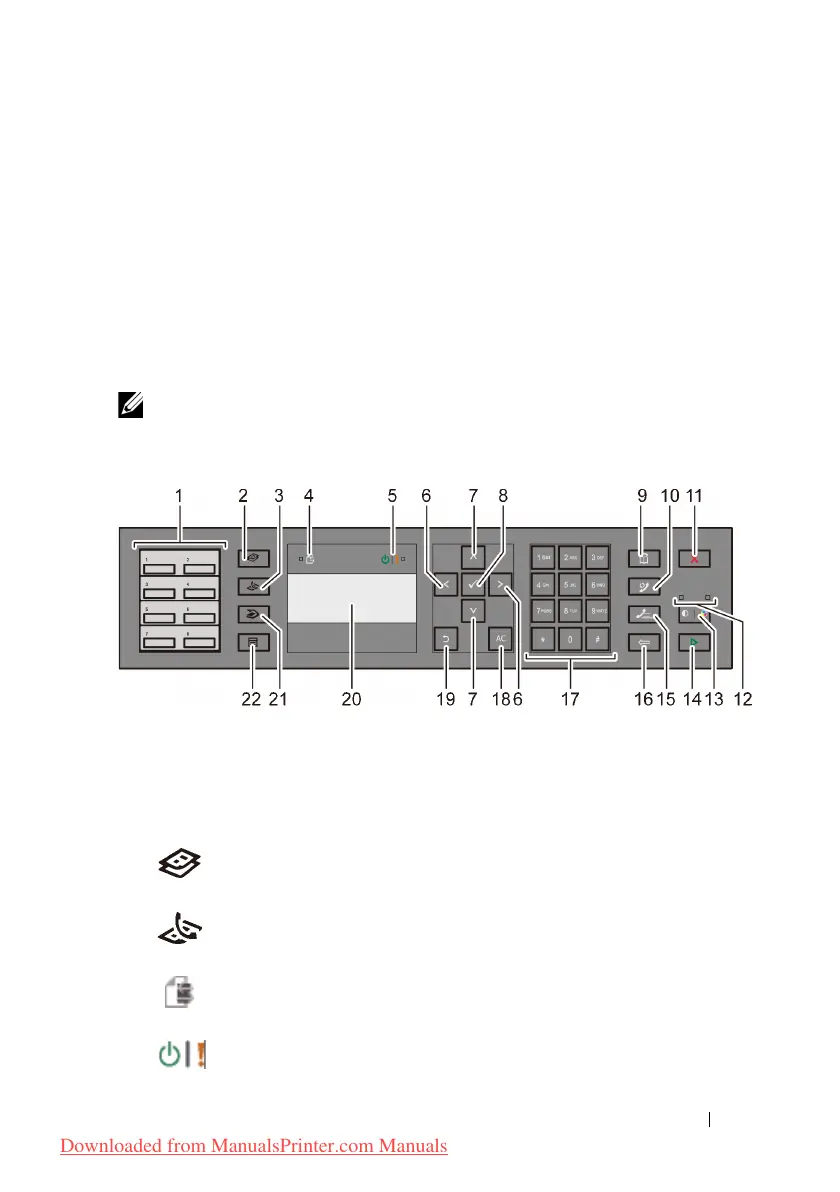
Using the Operator Panel Buttons
The operator panel has a 4-line by 28-character liquid crystal display (LCD),
light-emitting diodes (LED), control buttons, and numeric keypad, which allow
you to control the printer.
NOTE: The images used and procedures described in this manual are those of
Dell™ 2155cdn Multifunction Color Printer.
1
One Touch Dial button
• Calls up the stored Fax number registered in the Phone Book. The first
eight fax numbers in the Phone Book are assigned to the buttons in row
order, starting from the left top corner.
2
(Copy)
button
• Moves to the top level of the
Copy
menu.
3
(Fax)
button
• Moves to the top level of the
Fax
menu.
4
Data LED
• Lights up for incoming, outgoing, or pending Fax jobs.
5
Ready / Error LED
Downloaded from ManualsPrinter.com Manuals











 To Next Page