64 Installing Optional Accessories
2
Select
Available
for the optional 250-sheet feeder setting.
3
Click
Apply
, and then click
OK
.
4
Close the
Printers and Faxes
(,
Printers
, or
Devices and Printers
) dialog
box.
Installing the Optional Wireless Adapter
The wireless adapter allows you to use the printer with wireless network
connection.
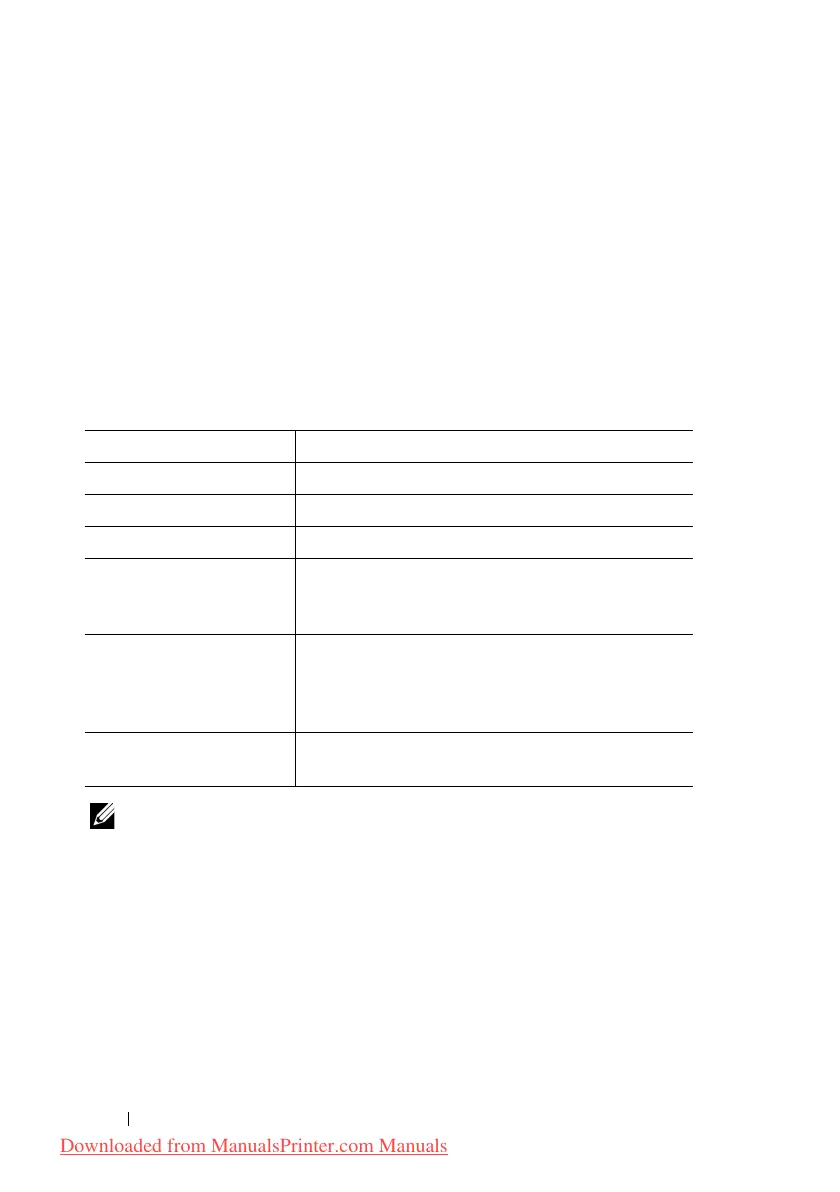
The specifications of the wireless adapter are described below.
NOTE: When the wireless adapter is installed, you cannot use IEEE 802.1x
authentication and/or the Ethernet port for a wired connection.
Item Specification
Connectivity Technology Wireless
Compliant Standards IEEE 802.11b, 802.11g, and 802.11n
Bandwidth 2.4 GHz
Data Transfer Rate IEEE 802.11n: 65 Mbps
IEEE 802.11g: 54, 48, 36, 24, 18, 12, 9, and 6 Mbps
IEEE 802.11b: 11, 5.5, 2, and 1 Mbps
Security 64 (40-bit key)/128 (104-bit key) WEP,
WPA- PSK (TKIP, AES), WPA2-PSK (AES)
(IEEE 802.1x attestation function of WPA 1x non-
corresponds)
Wi-Fi
®
Protected Setup
(WPS)
Push-Button Configuration (PBC),
Personal Identification Number (PIN)
Downloaded from ManualsPrinter.com Manuals











 To Next Page