115
New/Edit Dial String
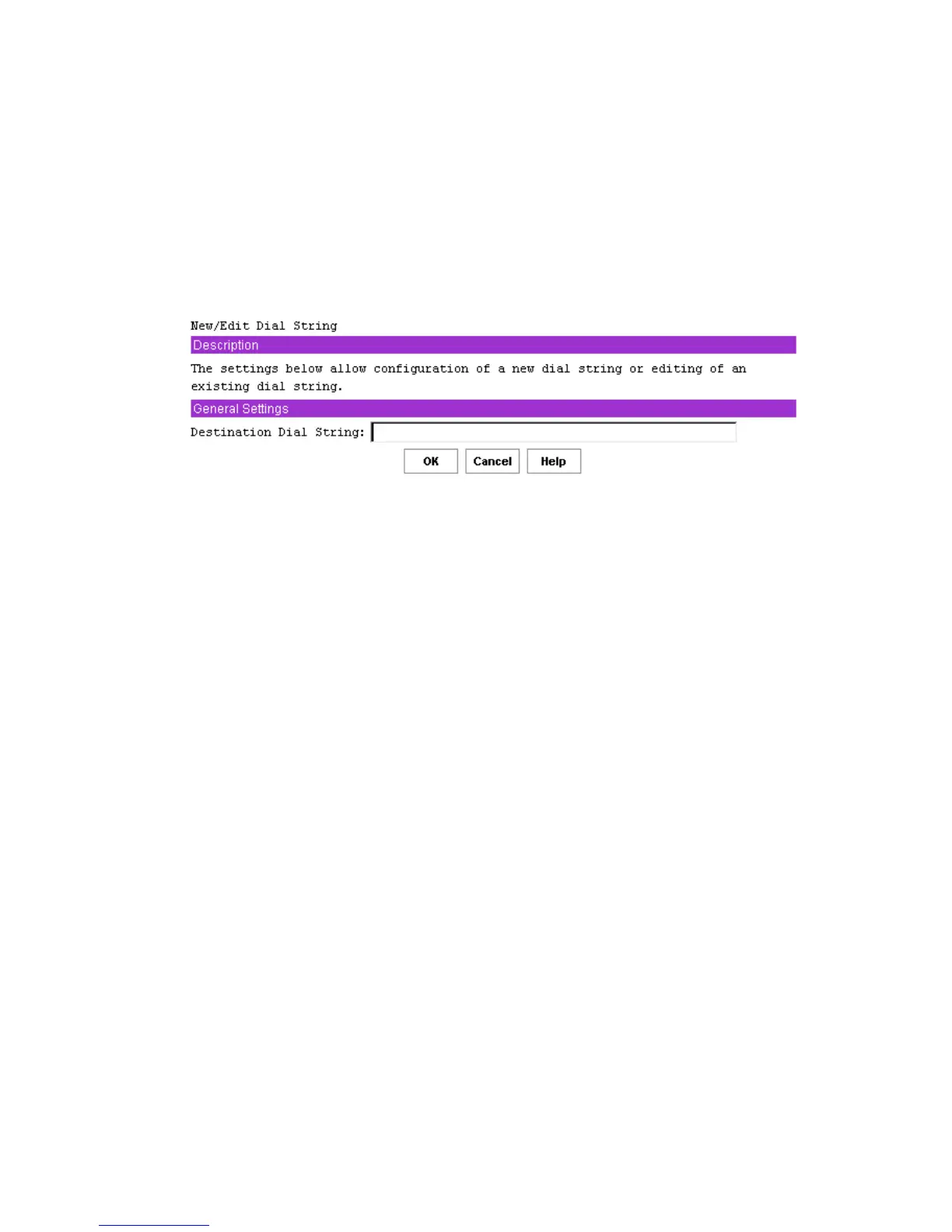
The New/Edit Dial String screen, shown in Figure 40, is displayed when you click either New or
Edit on the Destination Dial Strings screen. The New/Edit Dial String screen allows you to
configure or change the settings related to dial string to which alerts are to be sent. The screen
displayed either to configure a new dial string or to edit an existing dial string is the same, except
that when editing an existing dial string, the current settings for that dial string are displayed.
If a dial string is changed to null (cleared), then when the OK button is clicked, that entry in the
dial string list displays as Not Configured.
Figure 40. New / Edit Dial String
After completing this screen, click OK to return to the Destination Dial Strings screen.
Destination Dial String
When the BMC sends a dial string to a modem, it automatically precedes it with the currently
defined Modem Init String sequence.
Valid dialing digits are 0-9, *, #, A, B, C, D. The BMC can also recognize the following special
characters:
• P – dial using pulse. Dialing digits following the P will be sent using pulse dialing.
• T – dial using tone. Dialing digits after the T will be sent using touch tones.
• R – reverse frequencies. Forces the modem to dial out at the answering frequency.
• S=n – dial a pre-stored phone number n.
• W – wait for dial tone.
• @ - wait for quiet (answer).
• , (comma) – pause 2 seconds.
• ; (Semicolon) – return to command mode after dialing.
• ! (exclamation point) – flash the switch hook.



 To Next Page