193
Removing the DVD-ROM/CD-ROM Drive from the Drive Carrier
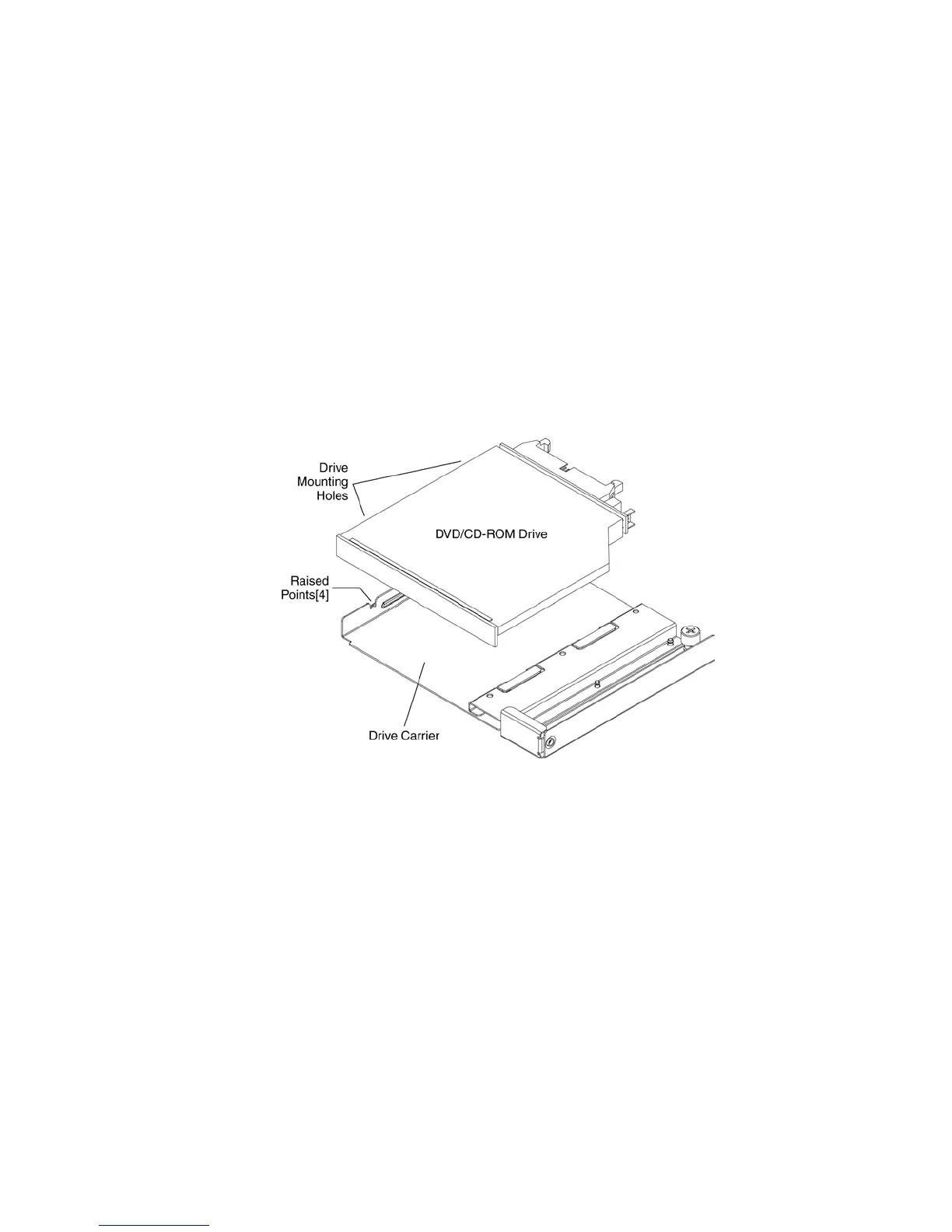
Refer to Figure 72 and use these instructions to remove a DVD-ROM or CD-ROM drive from the
drive carrier:
1. Position the carrier assembly with the label-side up.
2. The DVD-ROM/CD-ROM drive is attached to the carrier with snap fit tabs on the drive carrier.
These fit the corresponding mounting holes in the drive. Carefully disengage the drive from
the carrier and remove the DVD/CD-ROM
3. Place the drive in an antistatic protective bag if the drive will not be reinstalled.
4. Continue with the appropriate task:
• To install a replacement drive, continue with Installing the DVD-ROM/CD-ROM Drive.
• To replace the carrier into the server system without installing a DVD-ROM/CD-ROM drive,
continue with Installing the Peripheral Board.
Figure 72. Removing the DVD/CD-ROM Drive from the Carrier



 To Next Page