86
4. When the server has been successfully rebooted to the service partition software, the supported
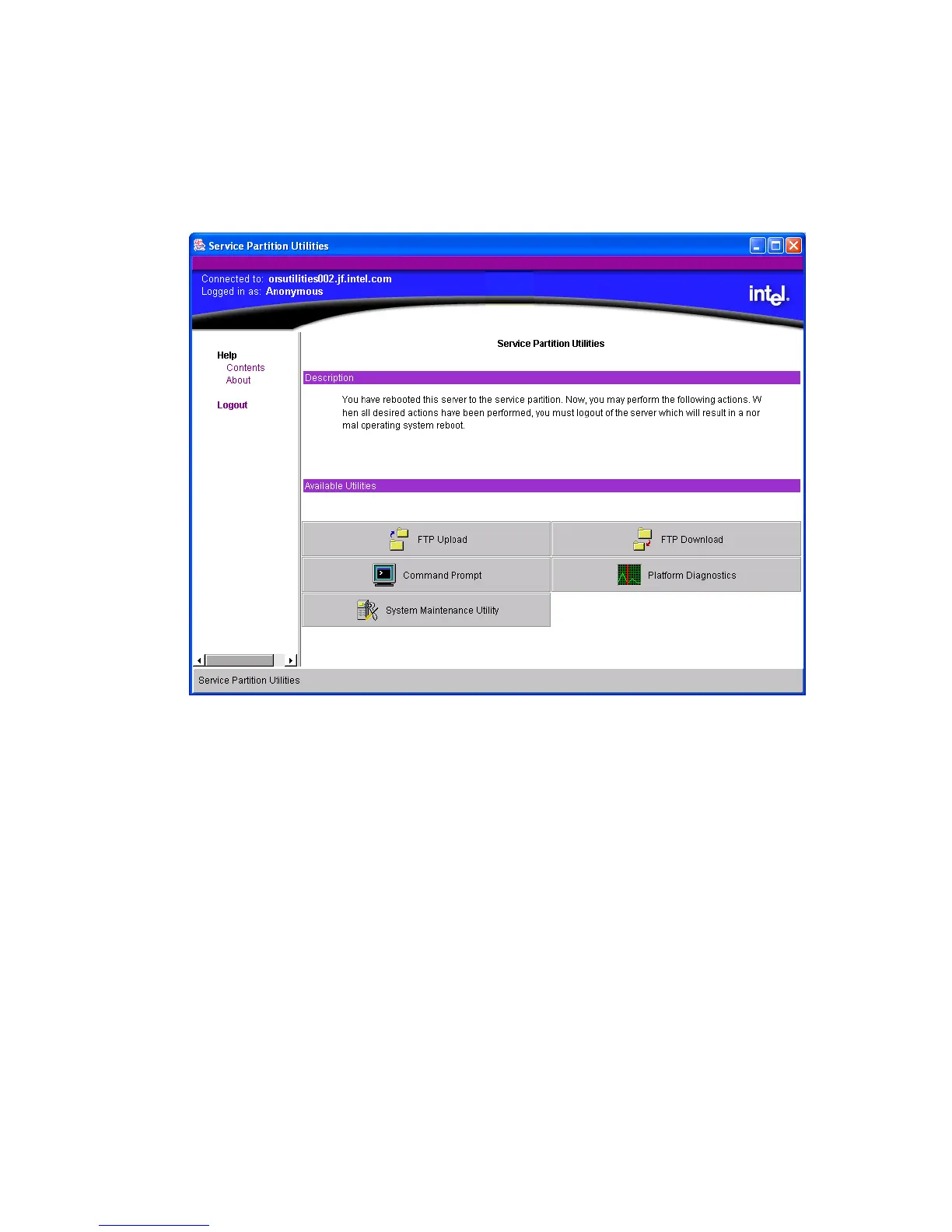
service partition utilities are displayed, as shown in Figure 24. Click on System Maintenance
Utility to launch the SMU application. ISM passes connection information to the SMU so the
SMU can communicate with the target server. Up to this point, all errors are handled by the
ISM software, not the SMU.
Figure 24. Service Partition Utilities
The remote SMU application attempts to establish a socket connection to the server and uses the
Service Partition Utilities services to execute the server-side SMU core components. If a
connection is established, the application sends information to the SMU core components to request
a session. If the connection fails, a dialog box is displayed to indicate an error condition. In the
event of an error, you can attempt to restart the SMU from the ISM console.
After the session with the SMU core components is established, a version check is made to
determine if the remote SMU application is able to communicate with the SMU core components
on the server. If the versions do not match, an error message is displayed, the SMU application is
closed, and control is returned to the Service Partition Utilities application.



 To Next Page