180
Installing a Thermal Blank
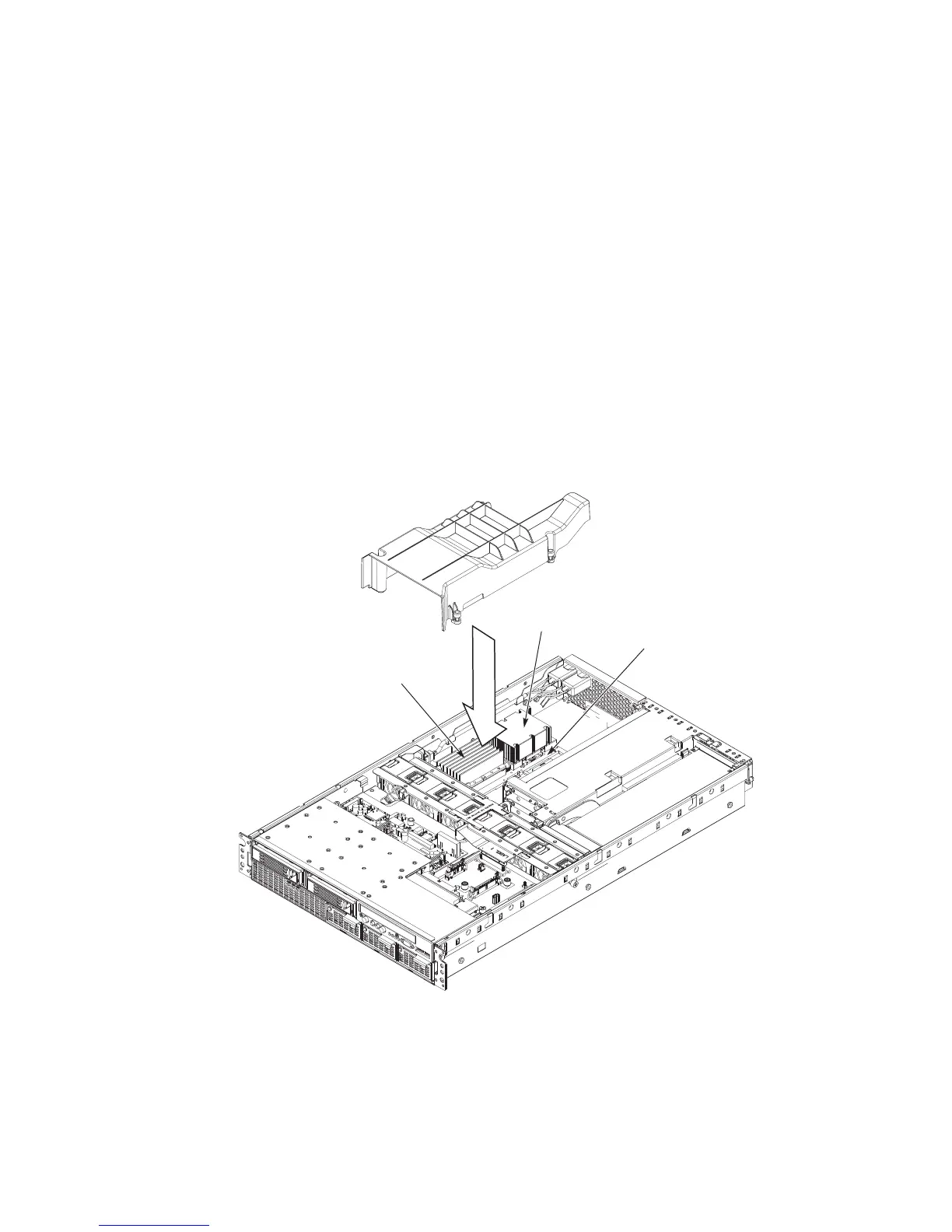
A thermal blank is installed into a server system when only a single processor is to be installed. If a
processor is removed or if only a single processor is initially installed, you must install a thermal
blank into the processor 2 location in order to properly direct the cooling airflow. Refer to Figure
61 and use the following instructions to install a thermal blank:
1. Power down the system by pressing and holding the power button on the front panel for several
seconds.
2. Unplug both AC power cords to remove standby power from the server.
3. See the warnings and cautions under Removing and Installing the Top Cover.
4. Follow the instructions under Removing the Top Cover.
5. Position the thermal blank in the empty processor and power pod position on the main board.
6. Squeeze the sides of the thermal blank together and slip the tabs in the notches under the metal
power pod frame.
7. Follow the instructions under Installing the Top Cover.
Power Pod Frame
Processor
Power Pod
Thermal Blank
Figure 61. Installing a Thermal Blank



 To Next Page