FrameMaker Ver.5.5E(PC) DIS/REASSEMBLY, ADJUSTMENT FOR Di152/Di183
01.09.03
D-18
3-4. PAPER TAKE-UP/TRANSPORT SECTION
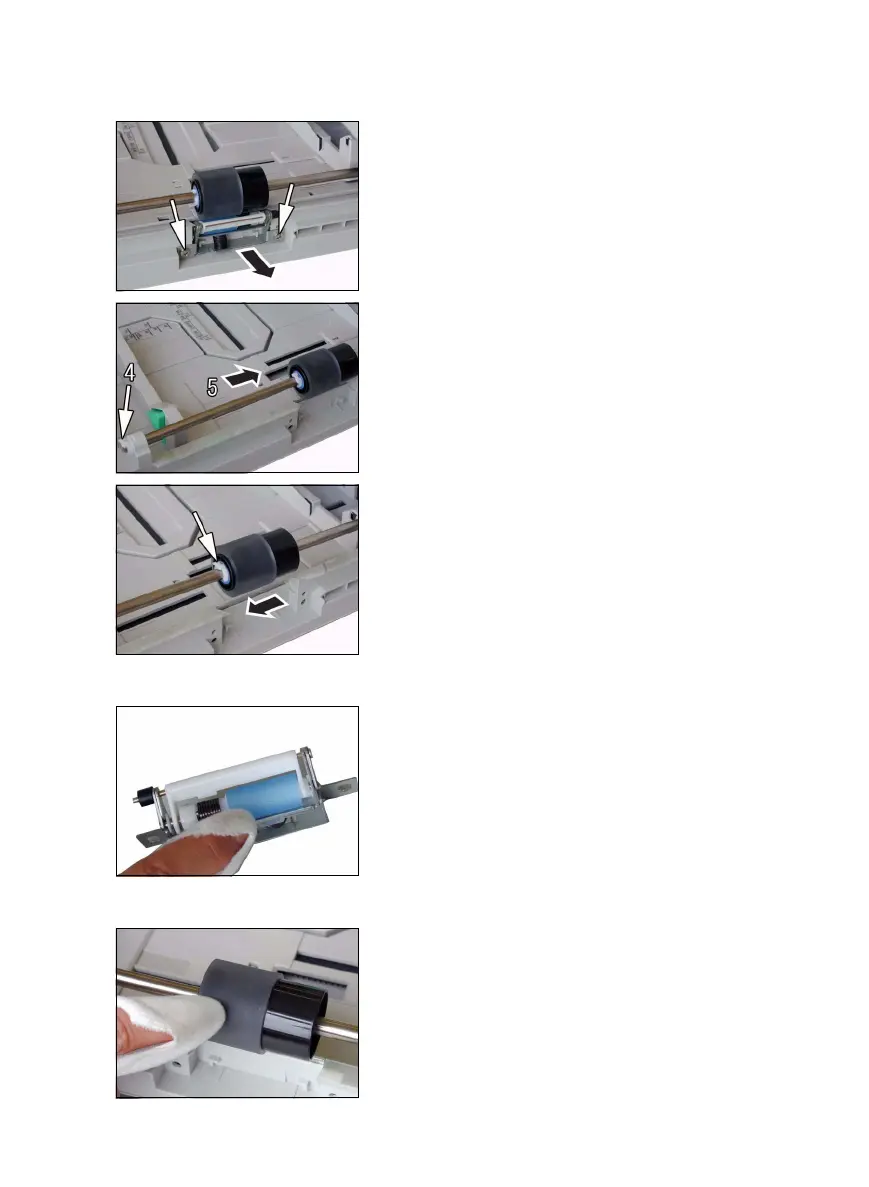
(1) Removal of the Paper Separator Roll Assy and Paper Take-Up Roll
(2) Cleaning of the Paper Separator Roll
(3) Cleaning of the Paper Take-Up Roll
1. Slide out the 1st Tray.
2. Remove two screws and the Paper Separator
Roll Assy.
3. Press down the Paper Lifting Plate.
4. Snap off one C-clip from the Paper Take-Up Roll
Assy.
5. Slide the Paper Take-Up Roll Assy to the rear so
that it can be pulled off the bushing at the front.
6. Snap off one C-clip and remove the Paper Take-
Up Roll.
1. Remove the Paper Separator Roll Assy.
2. Using a soft cloth dampened with alcohol, wipe
the Paper Separator Roll clean of dirt.
1. Slide out the 1st Tray.
2. Remove the Paper Separator Roll Assy.
3. Using a soft cloth dampened with alcohol, wipe
the Paper Take-Up Roll clean of dirt.



 To Next Page