FrameMaker Ver.5.5E(PC) DIS/REASSEMBLY, ADJUSTMENT FOR Di152/Di183
01.09.03
D-29
3-6. PH
(1) Removal of the PH Unit
1. Remove the control panel, Front Cover, Rear Cover, Left Cover, and Upper Cover.
2. Remove the PWB Cover Assy.
(2) Cleaning of the PH Window
1. Remove the Front Cover, Rear Cover, Left Cover, and Upper Cover.
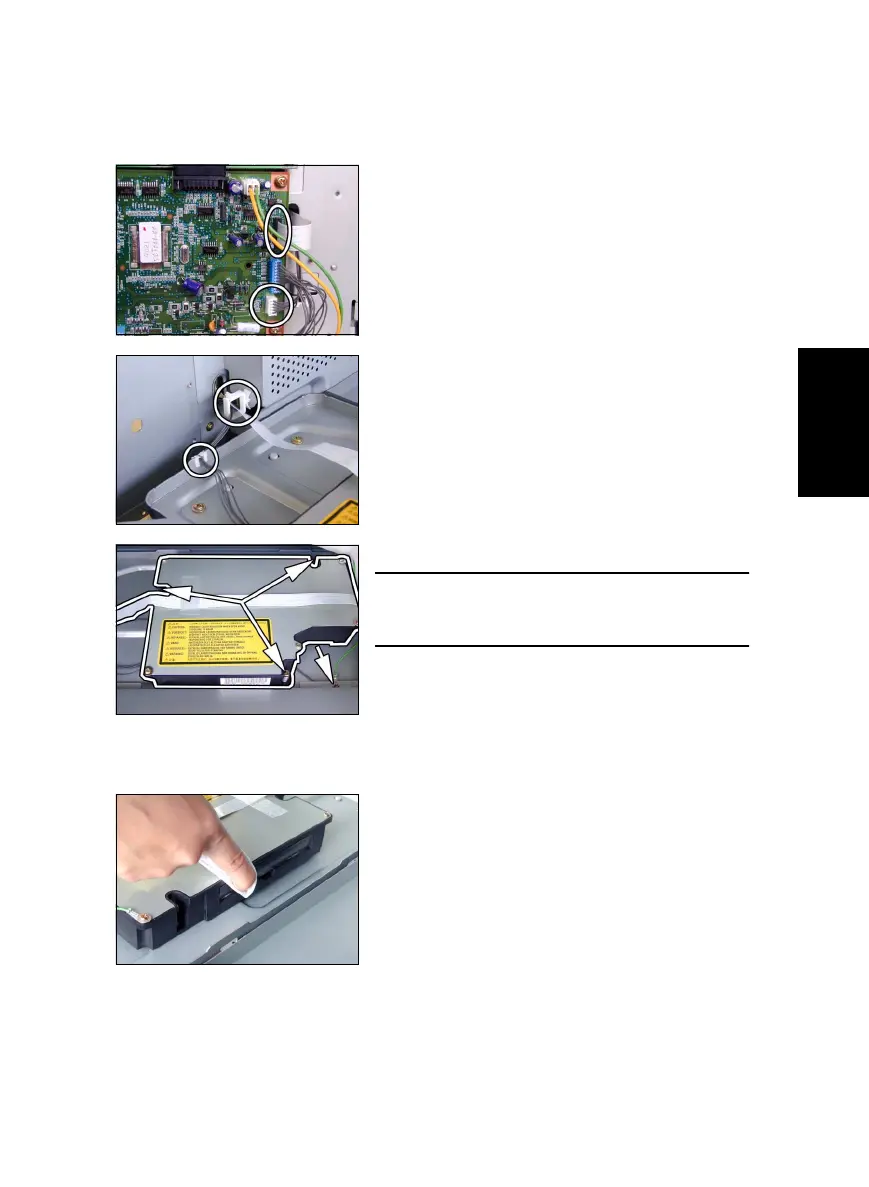
3. Remove one flexible harness and unplug one
connector from the Master Board.
4. Remove the harness from one edge cover and
one wiring saddle.
5. Remove one screw and the ground wire.
NOTE
• To remove the ground wire, remove the screw
installed on the copier side.
6. Remove three screws and the PH Unit.
2. Wipe the PH window clean of dirt using a soft
cloth.



 To Next Page