FrameMaker Ver.5.5E(PC) Di152/Di183 TROUBLESHOOTING
01.09.04
T-52
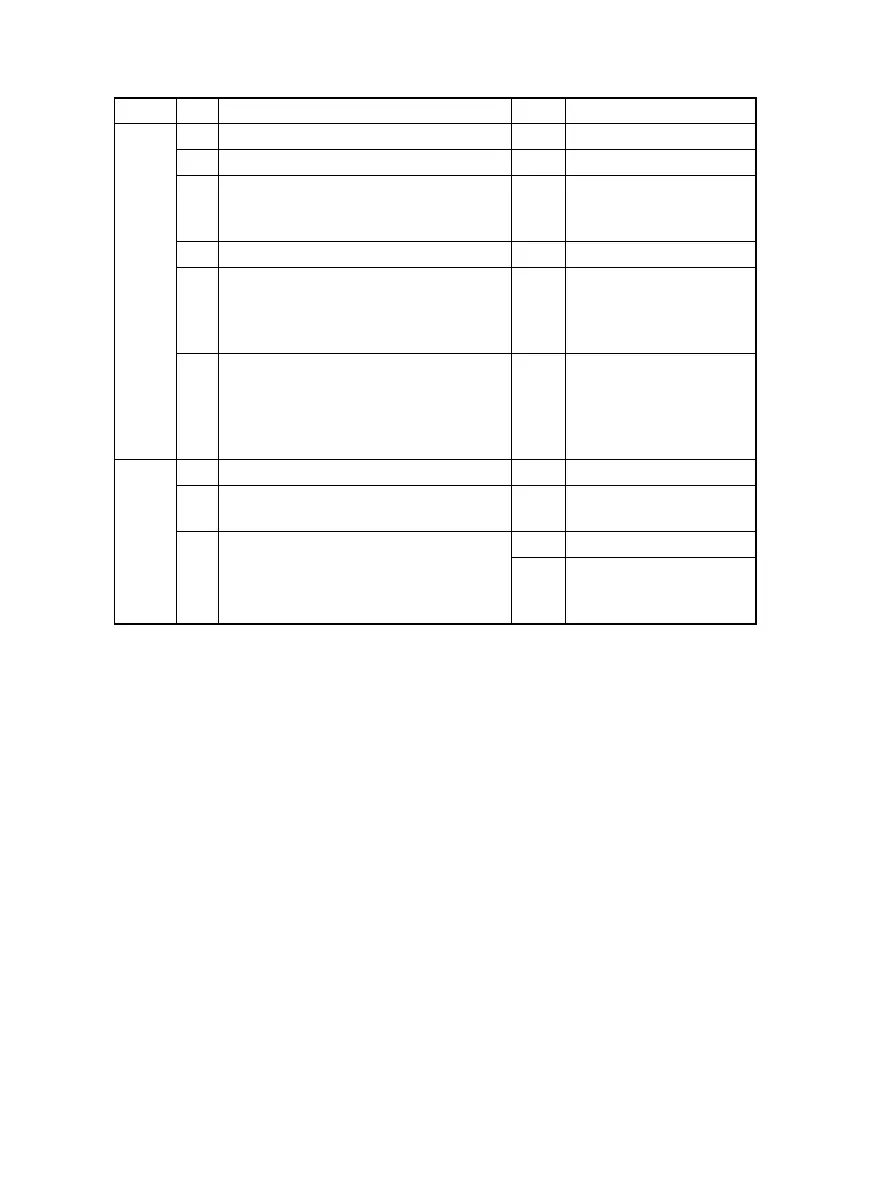
(6) Black spots
Section Step Check Result Action
Output
system
1 Toner is present along the paper path. YES • Clean.
2 PC Drum is dirty or scratchy. YES • Clean or change.
3 Tip of the PC Drum Paper Separator
Finger is dirty, scratchy, deformed, worn,
or damaged.
YES • Clean or change.
4 Left Fusing Roller is dirty or scratchy. YES • Clean or change.
5 Tip of the Fusing Paper Separator Fin-
ger is dirty, scratchy, deformed, worn, or
damaged.
YES • Clean or change Fus-
ing Paper Separator
Fingers and finger
springs.
6 Image condition changes after “VG
Adjustment” has been made.
YES • Readjust.
For details, see
SWITCHES ON PWBs/
TECH. REP. SET-
TINGS.
Input
system
1 Original Glass is dirty or scratchy. YES • Clean.
2 CCD Board (copier: PWB-J) connector
is loose.
YES • Reconnect.
3 Control Board (copier: PWB-C) connec-
tor PJ1A is loose.
YES • Reconnect.
NO • Change CCD Unit.
• Change Control Board
(copier: PWB-C).


 To Next Page