FrameMaker Ver.5.5E(PC) Di152/Di183 TROUBLESHOOTING
01.09.04
T-51
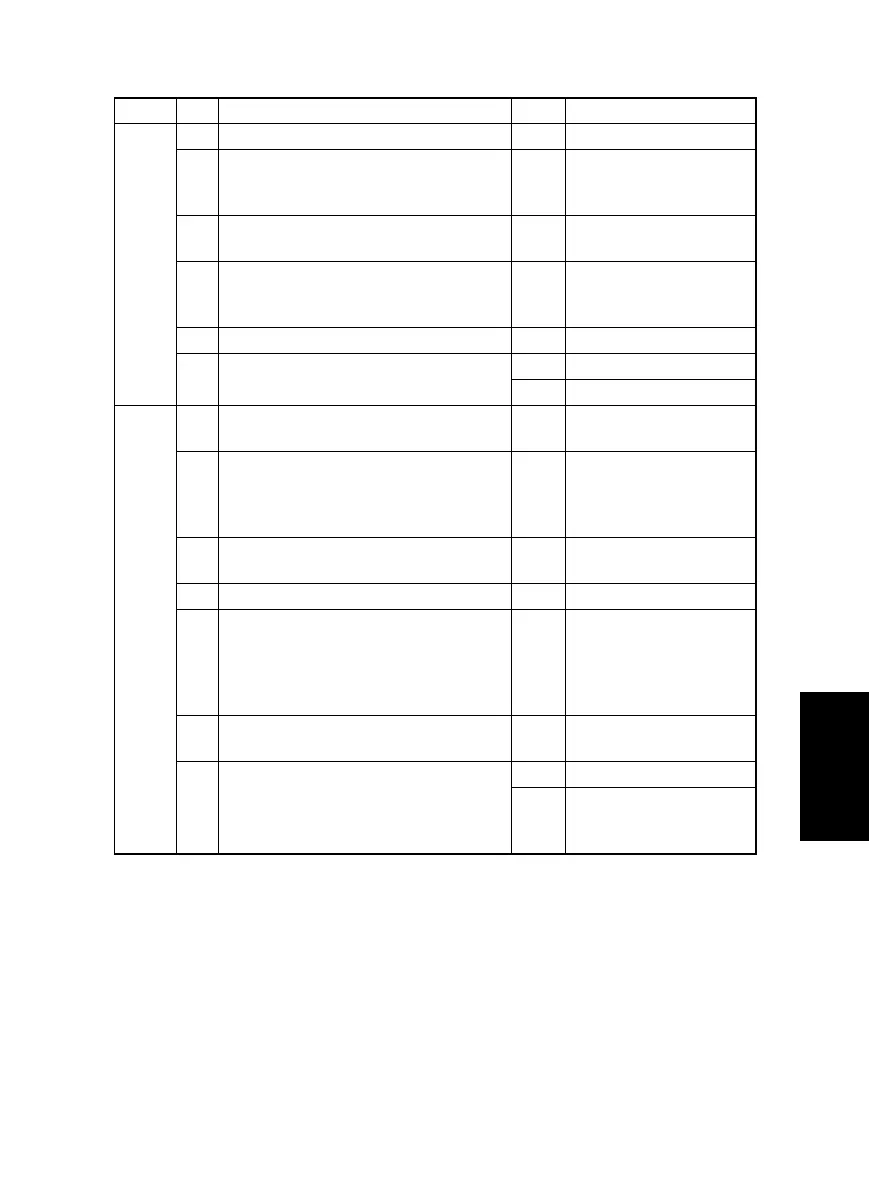
(5) Black streaks or bands
Section Step Check Result Action
Output
system
1 PC Drum is dirty or scratchy. YES • Clean or change.
2 Foreign matter (such as paper dust)
sticks to the Cleaning Blade of IU or the
blade curves upward.
YES • Remove foreign mat-
ter, correct, or change.
3 DB of IU is plugged with foreign matter
(such as paper dust).
YES • Remove foreign matter.
4 PC Drum Charge Corona grid mesh and
Comb Electrode are dirty, scratchy,
deformed, damaged, or out of position.
YES • Clean or change.
5 Left Fusing Roller is dirty or scratchy. YES • Clean or change.
6 PH window of the PH Unit is dirty or
scratchy.
YES • Clean or change.
NO • Change IU.
Input
system
1 Original Glass is dirty, scratchy, worn, or
damaged.
YES • Clean or change.
2 Shading sheet reading portion (the por-
tion on the backside of the Original
Glass to which Original Width Scale is
affixed) is dirty.
YES • Clean.
3 Scanner mirrors are dirty, scratchy, or
damaged.
YES • Clean or change.
4 Exposure Lamp (LA2) is dirty. YES • Clean or change.
5 CCD Unit lens and CCD surface are
dirty or scratchy.
<Check Procedure>
Remove lens cover to check for possible
contamination.
YES • Clean or change.
6 CCD Board (copier: PWB-J) connector
is loose.
YES • Reconnect.
7 Control Board (copier: PWB-C) connec-
tor PJ1A is loose.
YES • Reconnect.
NO • Change CCD Unit.
• Change Control Board
(copier: PWB-C).


 To Next Page