FrameMaker Ver.5.5E(PC) Di152/Di183 TROUBLESHOOTING
01.09.04
T-56
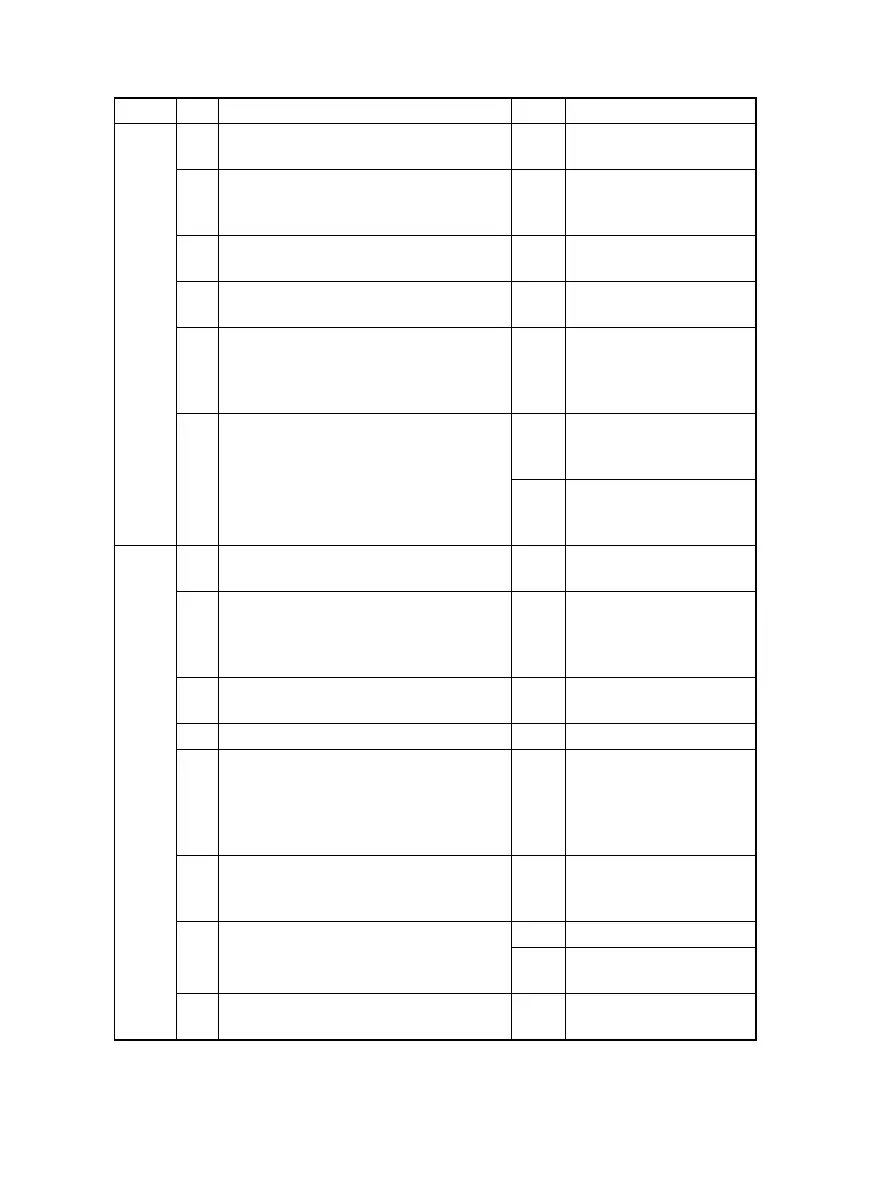
(10) Uneven image density
Section Step Check Result Action
Output
system
1 PC Drum ground plate is dirty, scratchy,
deformed, worn, or damaged.
YES • Clean, correct, or
change.
2 PC Drum Charge Corona grid mesh and
Comb Electrode are dirty, scratchy,
deformed, worn, damaged, or loose.
YES • Clean, correct, or
change.
3 Image Transfer Roller is dirty, scratchy,
deformed, worn, or damaged.
YES • Clean or change.
4 Sleeve/Magnet Roller is dirty, scratchy,
deformed, worn, or damaged.
YES • Clean or change.
5 Toner is even on Sleeve/Magnet Roller. NO • Adjust DB.
For details, see DIS/
REASSEMBLY,
ADJUSTMENT.
6 Developer is not even in the Developer
Mixing Chamber of IU.
YES • Even out developer in
the Developer Mixing
Chamber.
NO • Change IU.
• Change Master Board
(copier: PWB-A).
Input
system
1 Original Glass is dirty, scratchy, worn, or
damaged.
YES • Clean or change.
2 Shading sheet reading portion (the por-
tion on the backside of the Original
Glass to which Original Width Scale is
affixed) is dirty.
YES • Clean.
3 Scanner mirrors are dirty, scratchy, or
damaged.
YES • Clean or change.
4 Exposure Lamp (LA2) is dirty. YES • Clean or change.
5 CCD Unit lens and CCD surface are
dirty or scratchy.
<Check Procedure>
Remove lens cover to check for possible
contamination.
YES • Clean or change.
6 Exposure Lamp is abnormally lit (flickers
or abnormally dark) when the Power
Switch is turned ON.
NO • Go to step 8.
7 Inverter Board (copier: PU2) connector
CN1PU2 is loose.
YES • Reconnect.
NO • Change Exposure
Lamp (LA2).
8 CCD Board (copier: PWB-J) connector
is loose.
YES • Reconnect.


 To Next Page