FrameMaker Ver.5.5E(PC) Di152/Di183 TROUBLESHOOTING
01.09.04
T-14
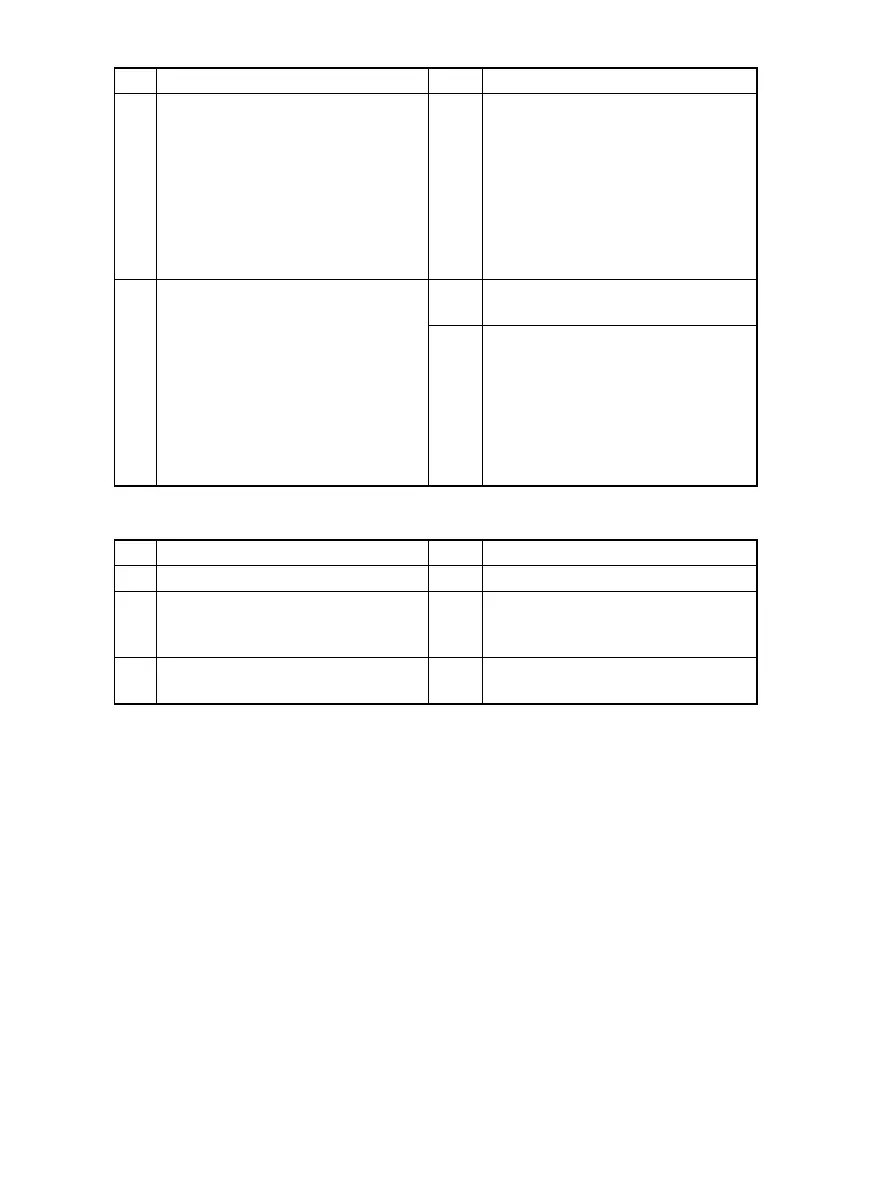
• Paper is at a stop at the PC Drum.
Step Check Result Action
3 Synchronizing Roller Sensor (PC1) is
operational.
<Check Procedure>
Check voltage across a Master Board
(copier: PWB-A) pin and GND when
the sensor is blocked.
• Voltage across PJ6A-3 and GND
When blocked: DC5 V
When unblocked: DC0 V
NO • Change Synchronizing Roller Sen-
sor (PC1).
4 The following voltage is supplied to
the Synchronizing Roller Clutch
(CL1).
<Check Procedure>
Check voltage across a Master Board
(copier: PWB-A) pin and GND when
the Start key is pressed.
• Voltage across PJ5A-4 and GND
In standby: DC24 V
When pressed: DC0 V
YES • Change Synchronizing Roller
Clutch (CL1).
NO • Change Master Board (copier:
PWB-A).
Step Check Result Action
1 Image Transfer Roller is dirty. YES • Clean or change.
2 PC Drum Paper Separator Fingers
are dirty, scratchy, deformed, worn, or
damaged.
YES • Clean or change.
3 Charge Neutralizing Plate is dirty,
scratched, broken, or bent.
YES • Clean, correct, or change.



 To Next Page